Use the following example to list all of the folders that contain a pom.xml file
Refer: https://www.computerhope.com/unix/tree.htm
tree --prune -P "pom\.xml"
Technical notes, and other ideas.
Use the following example to list all of the folders that contain a pom.xml file
Refer: https://www.computerhope.com/unix/tree.htm
tree --prune -P "pom\.xml"Reading package lists... Done
E: Repository 'https://download.docker.com/linux/ubuntu bionic InRelease' changed its 'Label' value from 'Docker EE' to 'Docker CE'
N: This must be accepted explicitly before updates for this repository can be applied. See apt-secure(8) manpage for details.
Refer: https://forums.docker.com/t/apt-repo-label-changed-from-ce-to-ee/82488/5
$ sudo apt-get --allow-releaseinfo-change update
Refer: https://superuser.com/questions/570984/virtualbox-guest-ubuntu-loses-dns-when-host-connects-to-vpn
$ sudo gedit /etc/NetworkManager/NetworkManager.conf
Comment out, the plugins line below (shown before commenting)
[main]
plugins=ifupdown,keyfile,ofono
# dns=dnsmasq
Notes: had a very similar situation with Lubuntu 16.04 (should be identical in other Ubuntus) but this fix did not improve the situation. At least with 16.04, the problem appears to be that NetworkManager uses a local DNS proxy (dnsmasq), and this doesn't play nice with VPN connections, at least in the default configuration.
Commenting/deleting dns=dnsmasq in /etc/NetworkManager/NetworkManager.conf
Note: This fixed was applied too on the Windows host, but it did not seem to make a difference, go ahead and do both.
"C:\Program Files\Oracle\VirtualBox\VBoxManage.exe" modifyvm Ubuntu-1804-Convert --natdnshostresolver1 onRefer: https://github.com/brave/brave-browser/issues/4097
curl -s https://brave-browser-apt-release.s3.brave.com/brave-core.asc | sudo apt-key --keyring /etc/apt/trusted.gpg.d/brave-browser-release.gpg add -
5.0 out of 5 starsBefore you buy.... Simply reset the drum counter
October 24, 2013
Verified Purchase
I love my Brother HL-2170W printer and always get Brother brand toner for it. After using several toner cartridges, I started to get "replace the drum" messages but I ignored them because the print quality was fine. Then finally the 'Replace Drum' light came on and the printer refused to print at all. I ordered this Brother brand drum, and when I got it I saw in the instructions that I needed to reset the drum counter after installing the drum. (Keep the power on and the front door open. Hold down the ON button until all four lights light up, then release the button and close the door.)
Just for kicks, I put the old drum back into the printer and reset the drum counter. Sure enough, the printer is now all set, printing just fine. Someday, when the print quality suffers due to streaking, etc., I'll actually open up the new drum that I have just purchased and install it. In the meantime, I'll keep resetting the drum counter.
I wish I'd tried resetting the drum counter before I ordered this. But it's good to have it on hand, just in case.
Refer: https://www.asbru-cm.net/
Ubuntu 20.04
Refer: https://docs.asbru-cm.net/General/Installation/#ubuntu
sudo apt-add-repository multiverse
sudo apt install curl
curl -s https://packagecloud.io/install/repositories/asbru-cm/asbru-cm/script.deb.sh | sudo bash
sudo apt install asbru-cm
Debian
curl -s https://packagecloud.io/install/repositories/asbru-cm/asbru-cm/script.deb.sh | sudo bash
sudo apt install asbru-cm
Fedora
curl -s https://packagecloud.io/install/repositories/asbru-cm/asbru-cm/script.rpm.sh | sudo bash
sudo dnf install asbru-cm
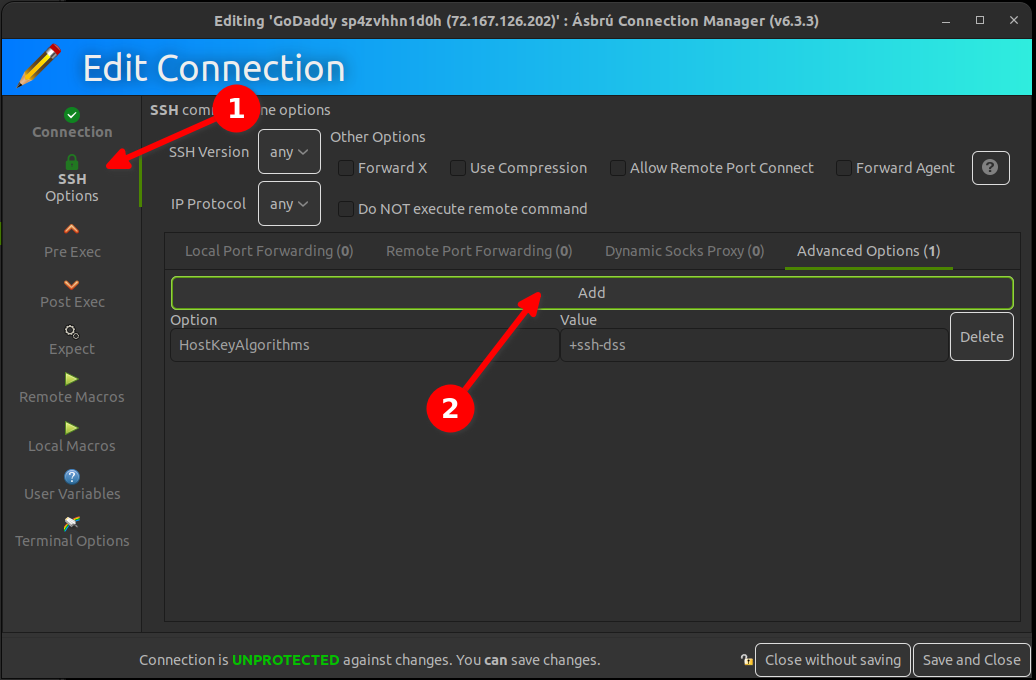
Getting GoDaddy to Work
Refer: https://stackoverflow.com/questions/31270774/visual-studio-code-always-reopens-previous-file-or-folder
Files, Preferences, Settings
Search for "restore", and choose none "Window: Restore Windows, Controls how windows are being reopened after a restart"

Easier solution is to just set the terminal font to monospace
Refer: https://github.com/microsoft/vscode/issues/35901

Refer: https://github.com/microsoft/vscode/issues/35901
The underscore or underline character is missing in Visual Studio Code terminal. I changed the fonts to match Sublime and the font was too small.
{
    "terminal.integrated.fontFamily": "Monospace",
    "terminal.integrated.fontSize": 15,
    "python.pythonPath": "/usr/bin/python",
    "python.linting.pylintEnabled": true,
    "python.linting.enabled": true
}Refer: https://portableapps.com/node/23783
WORKS!
This solution was given by other authors as well - but i want to repeat and emphasis that it REALLY WORKS - and its simple as 1-2-3:
Sample Location:
C:\Users\mruckman\Documents\PortableApps\PortableApps\FirefoxPortable\FirefoxPortable.ini
Refer: https://www.makeuseof.com/tag/how-to-analyze-your-disk-usage-pattern-in-linux/
Ncurses Disk Usage (ncdu)
$ sudo apt install ncdu