Trick: The modal might not be expanded enough for you to see the override checkbox.
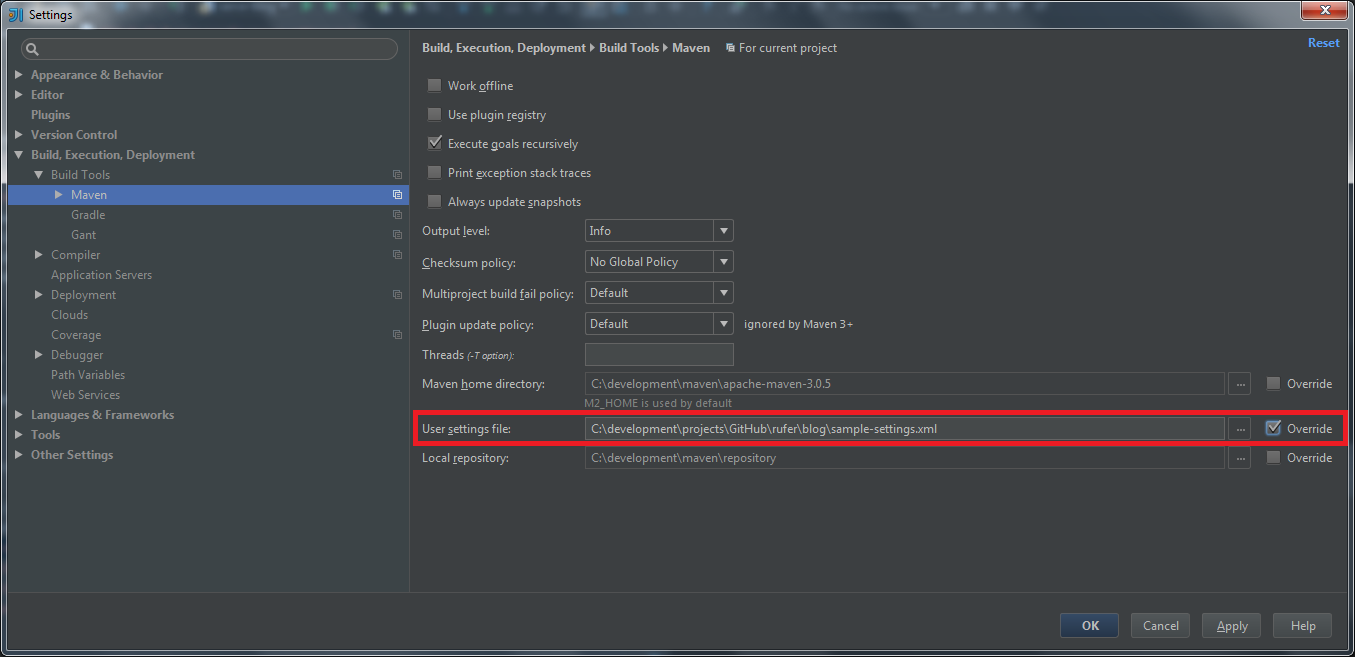
Download a sample settings.xml to get things started. IntelliJ does not work without it.

Technical notes, and other ideas.
Trick: The modal might not be expanded enough for you to see the override checkbox.
Download a sample settings.xml to get things started. IntelliJ does not work without it.
Download JAR files with all dependencies
From here: https://jar-download.com/
cp ./maven-deploy-plugin-2.7.jar /home/mruckman/.m2/repository/org/apache/maven/plugins/maven-deploy-plugin/2.7/
Maven workaround to ignore all certs:
$ mvn install -Dmaven.wagon.http.ssl.insecure=true -Dmaven.wagon.http.ssl.allowall=true -Dmaven.wagon.http.ssl.ignore.validity.dates=true
Fairly straight forward process
Text Version of this post: Installing Netbeans on Ubuntu 12.04 in VirtualBox.txt
Downloaded the complete version of Netbeans for Linux
http://netbeans.org/downloads/7.1.1/
Ended up downloading this "netbeans-7.1.1-ml-linux.sh"
Tried to install but it complained that Java was not installed. It prompted with URL to use, followed URL to here:
http://www.oracle.com/technetwork/java/javase/downloads/index.html
Downloaded the "jdk-7u5-linux-i586.tar.gz" version as opposed to the RPM version.
Found a Ubuntu help site with instructions on how to install:
http://askubuntu.com/questions/55848/how-do-i-install-oracle-java-jdk-7
Uncompress it
tar -xvf jdk-7u2-linux-i586.tar.gz
had to make a jvm directory (deviation from instructions)
sudo mkdir /usr/lib/jvm
JDK 7 package is extracted into ./jdk1.7.0_02 directory. - Now move the JDK 7 directory to /usr/lib
sudo mv ./jdk1.7.0_02 /usr/lib/jvm/jdk1.7.0
Ran the following three commands:
sudo update-alternatives --install "/usr/bin/java" "java" "/usr/lib/jvm/jdk1.7.0/bin/java" 1
sudo update-alternatives --install "/usr/bin/javac" "javac" "/usr/lib/jvm/jdk1.7.0/bin/javac" 1
sudo update-alternatives --install "/usr/bin/javaws" "javaws" "/usr/lib/jvm/jdk1.7.0/bin/javaws" 1
The article continued but that seemed enough to get this working, it seems like there would be issues if another JVM is installed. Refer to the article to change things.
Net beans was installed here by default and it launches by double-clicking the "netbeans" icon.
/home/mruckman/netbeans-7.1.1/bin
It has necessary to update the configuration file of NetBeans in order to see the menu selections, they did not play well with Ubunutu's layout:
gedit /home/mruckman/netbeans-7.1.1/etc/netbeans.conf
Add the following line, at the end of the line starting with netbeans_default_options=" and within the closing double-quote:
-J-Dswing.aatext=true -J-Dawt.useSystemAAFontSettings=lcd --laf Metal
Refer: 20120512 Using Third-party jars with Maven
To use third party jars in a maven project, the steps are as follows:
1) Upload the jar into a repository (either your local repository if it's just for you, or into the shared Nexus repository if you want other people to access the jar as well)
2) Add a section in your pom.xml to tell maven that your application depends on this jar.
Here are the commands to implement those steps:
To upload a jar in your local repository (your local repository is on your vm in ~/.m2/repository):
mvn install:install-file
-Dfile= -DgroupId=com.hal.thirdparty
-DartifactId=
-Dversion=
-Dpackaging= -DgeneratePom=true
Where: the path to the file to load
the group that the file should be registered under
the artifact name for the file
the version of the file
the packaging of the file e.g. jar
To upload a jar into the shared Nexus Repository:
Option A: Command line
mvn deploy:deploy-file -Durl=file://C:m2-repo
-DrepositoryId=some.id
-Dfile=your-artifact-1.0.jar
[-DpomFile=your-pom.xml]
[-DgroupId=org.some.group]
[-DartifactId=your-artifact]
[-Dversion=1.0]
[-Dpackaging=jar]
[-Dclassifier=test]
[-DgeneratePom=true]
[-DgeneratePom.description="My Project Description"]
[-DrepositoryLayout=legacy]
[-DuniqueVersion=false]
See here for the detail of the options: http://maven.apache.org/plugins/maven-deploy-plugin/usage.html
Option B: Using the web interface from Nexus at http://halsvn01:8081/nexus/index.html#view-repositories;thirdparty~uploadPanel
See the attached screenshot.
In both options, you will need Nexus admin credentials to upload artifacts (jars in maven terms) into the shared repository.
2) In your pom.xml, inside the section, add:
com.hal.thirdparty
your-artifact
your-artifact-version
-------------------------------------
Guillaume Radde
Senior Consultant, Red Hat Consulting
guillaume.radde@redhat.com
http://www.redhat.com
-------------------------------------

-----Original Message-----
From: Guillaume Radde [mailto:guillaume.radde@redhat.com]
Sent: Thursday, March 15, 2012 10:40 AM
To: Ruckman, Maurice (HAL)
Cc: Fillman, Eric (HAL); Phatak, Sheetal (HAL); Thompson, Sonya (HAL); Bojja, Sridhar (HAL Contractor)
Subject: Re: FYI JBOSS - Almost as good as an exploded WAR
Exploded deployment and faster modify/test cycle will come as a side effect of the maven migration, currently in progress in the "goodbye-ant" feature branch. Anybody can try it by doing:
$ svn co http://halsvn01/svn/hal/branches/features/goodbye-ant hal $ cd hal $ mvn install
Guillaume