Docker with VPN

Did NOT work with Ubuntu 20.04 installation

There's a setting with Cisco AnyConnect to "Allow local (LAN) access when using VPN (if configured)

Refer: https://www.lullabot.com/articles/fixing-docker-and-vpn-ip-address-conflicts (pdf)

By default Cisco AnyConnect was interfering with Docker running on localhost.  The fix was to have Docker use a different range of IP addresses.

$ sudo nano /etc/docker/daemon.json

daemon.json

And the restart your computer.

VirtualBox Company VPN Issues with DNS

Refer: https://superuser.com/questions/570984/virtualbox-guest-ubuntu-loses-dns-when-host-connects-to-vpn

$ sudo gedit /etc/NetworkManager/NetworkManager.conf

Comment out, the plugins line below (shown before commenting)

[main]
plugins=ifupdown,keyfile,ofono
# dns=dnsmasq

Notes: had a very similar situation with Lubuntu 16.04 (should be identical in other Ubuntus) but this fix did not improve the situation. At least with 16.04, the problem appears to be that NetworkManager uses a local DNS proxy (dnsmasq), and this doesn't play nice with VPN connections, at least in the default configuration.

Commenting/deleting dns=dnsmasq in /etc/NetworkManager/NetworkManager.conf

Note: This fixed was applied too on the Windows host, but it did not seem to make a difference, go ahead and do both.

"C:\Program Files\Oracle\VirtualBox\VBoxManage.exe" modifyvm Ubuntu-1804-Convert --natdnshostresolver1 on

Install VPN in Ubuntu

Ubuntu 14.04

$ sudo apt-get install network-manager-openconnect openconnect

Ubuntu 15.10

$ sudo apt-get install network-manager-openconnect-gnome

Ubuntu 16.04

Refer: https://support.onevpn.com/knowledgebase/linux-ubuntu-anyconnect/

The magic sauce was from rebooting after

$ sudo apt-get update
$ sudo apt-get install lib32z1 lib32ncurses5
$ sudo apt-get install network-manager-openconnect

Reboot and install vpnsetup.sh (zipped file)

$ sudo sh ./vpnsetup.sh

---

Ubuntu 16.04

Install this rpm (it's zipped): networkmanager-openconnect_1.1.93-1_amd64.deb

Refer: http://tomtomtom.org/networkmanager-openconnect/

Only need to changes this, and also used this for the connection name, and then save, get to these settings upper right-corner up/down arrow icons
Gateway: gateway.hollandamerica.com

---

Install with Chrome, Firefox seems to have issues accepting the plug-in and SSL certificate

https://gateway.hollandamerica.com/
https://faq.oit.gatech.edu/content/how-do-i-install-cisco-anyconnect-client-linux

If you have to uninstall a previous version first:
$ sudo /opt/cisco/vpn/bin/vpn_uninstall.sh

$ chmod 755 vpnsetup.sh
$ sudo ./vpnsetup.sh

Dash / Start menu
Cisco Anyconnect VPN

If you get this error message while trying to connect " AnyConnect cannot confirm it is connected to your secure gateway. The local network may not be trustworthy. Please try another network."

Try this:
$ sudo cp /etc/ssl/certs/* /opt/.cisco/certificates/ca

Work VPN Proxy for Google Hangouts

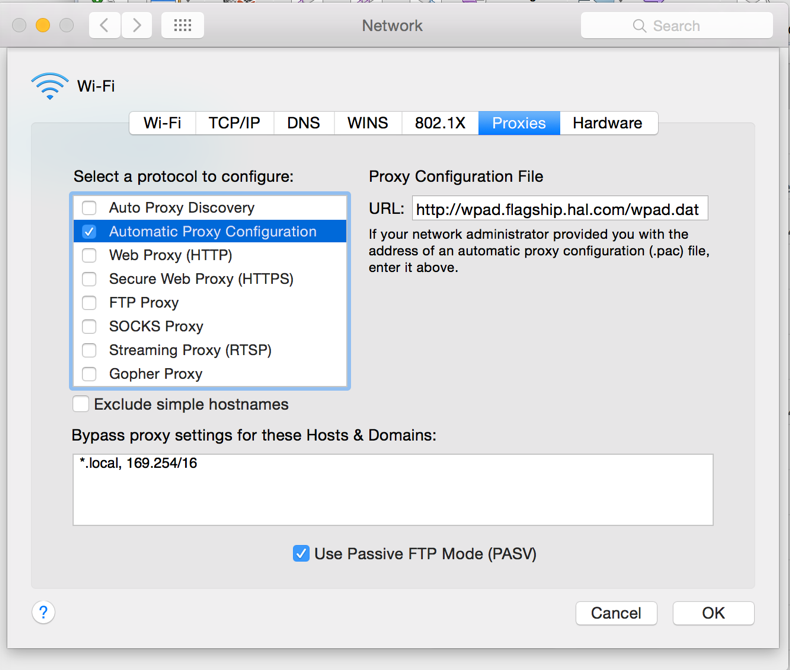
In Network Preferences, do the following. After Apply, I quit Chrome, then logged out of VPN then logged back in. When I started Chrome, it asked me to log in to halproxy01, like Firefox does, and everything worked.

A0942570-3D1B-4E56-8FC8-6705318619A7

Proxy Configuration File
http://wpad.flagship.hal.com/wpad.dat

Bypass proxy settings:
*.local, 169.254/16

no vpn secrets ubuntu 14.04

I just rm'd all files in /etc/NetworkManager/system-connections/ and restarted Ubuntu 14.04. Problem solved. I know it was the last software update because I updated and shutdown. The next time I started up Ubuntu, the network kept dropping connection.

This almost worked to start from the command line but might need to run as sudo, might try if there are future problems.

Probably need this, needs read/write access to /var/run/vpnc, or change it's permissions:
$ sudo openconnect --no-cert-check gateway.hollandamerica.com

Original attempt that failed:
$ openconnect --no-cert-check gateway.hollandamerica.com

Another Idea is to try this for the, no luck with this:
[vpn]
password-flags=0

https://faq.i3wm.org/question/3796/nmcli-connection-activation-failed-no-valid-vpn-secrets/

Start VPN from Command Line in Ubuntu

Show Connections

$ nmcli con

Start a Connection

$ nmcli con up id gateway.hollandamerica.com
$ nmcli con up id ConnectName

Stop a Connection

$ nmcli con down id gateway.hollandamerica.com
$ nmcli con down id ConnectionName

Refer: http://askubuntu.com/questions/57339/connect-disconnect-from-vpn-from-the-command-line