Kiro MCP Servers
https://kiro.dev/docs/mcp/servers/
Purchase eSim for Travel
https://cellulardata.ubigi.com/rates-and-coverage/japan-data-plans/japan-10gb-30-days/
How to Install and use
https://www.youtube.com/watch?v=JLOwhaw4cnc
How to Activate / Deactivate
https://www.youtube.com/watch?v=icGEEPm-_6A
Overview
Purchase the plan and get a QR code.
On your iPhone:
Settings → Cellular → Add eSIM
Scan the QR code
Label it (e.g., “Japan eSIM”)
When you land in Japan, enable the eSIM and toggle Data Roaming.
Lenovo T580 Keyboard Replacement and Battery
Lenovo Product Information
https://pcsupport.lenovo.com/us/en/products/laptops-and-netbooks/thinkpad-t-series-laptops/thinkpad-t580-type-20l9-20la/20l9/20l9cto1ww/documentation/doc_accessories
Product number: 20L9CTO1WW
Replace the Keyboard Instructions
https://youtu.be/v60498O9Q0s?si=JQPrmUAQucUq8jSi
Battery Replacement Part
https://pay.ebay.com/rxo?action=view&sessionid=2575078954019
Add files to a new Git Repository
Navigate to the location of the files to add:
git init
Add the remote repository:
git remote add origin <your-git-repo-url>
Note: If your Git repository already has files (like a README), you might need to pull first:
git pull origin master --allow-unrelated-histories
Then you can add and push your changes.
Add all existing files:
git add .
Create your first commit:
git commit -m "Initial commit"
Push to the remote repository:
git push -u origin master
Cursor ARM Installation on Ubuntu
Use the following for installation of Cursor on ARM
curl -fsSL https://downloads.cursor.com/keys/anysphere.asc | gpg --dearmor | sudo tee /etc/apt/keyrings/cursor.gpg > /dev/null
echo "deb [arch=amd64,arm64 signed-by=/etc/apt/keyrings/cursor.gpg] https://downloads.cursor.com/aptrepo stable main" | sudo tee /etc/apt/sources.list.d/cursor.list > /dev/null
sudo apt update
sudo apt install cursor
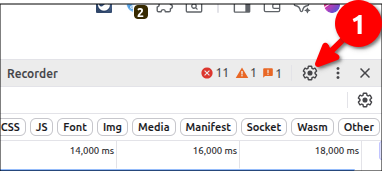
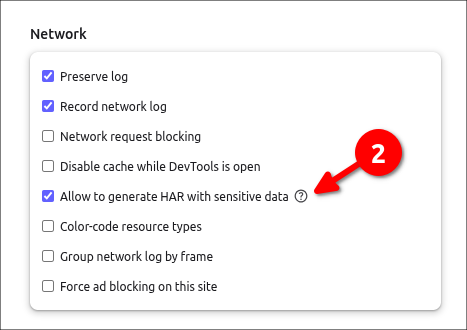
Download a HAR file with Brave
Using Cursor from Terminal CLI
Installation
Install the Cursor CLI by running:
curl https://cursor.com/install -fsS | bash
Usage Modes
1. Interactive Mode
Start an interactive session with the Cursor Agent:
cursor-agent
This opens a conversational interface where you can describe your coding tasks, review proposed changes, and approve commands.
2. Non-Interactive Mode
For scripting or automation purposes, use the non-interactive mode:
cursor-agent -p "Your prompt here"
Replace "Your prompt here" with your specific instruction. This mode is suitable for integrating Cursor into scripts, CI pipelines, or other automated workflows.
3. Shell Mode
Cursor CLI includes a Shell Mode that allows you to execute shell commands directly:
cursor-agent shell
In this mode, you can run quick, non-interactive commands without leaving your conversation. Note that commands timeout after 30 seconds, and long-running processes or interactive prompts are not supported.
Managing Sessions
Resume a Previous Conversation
cursor-agent resume
List All Previous Chats
cursor-agent ls
These commands help maintain context across multiple interactions.
Security
Before executing terminal commands, the CLI will prompt you for approval. Ensure you review and approve commands to maintain security.
Resources
Macbook Search for NOTES not working
Go to /Macintosh HD/User/xxx/Library/Metadata/CoreSpotlight
Delete everything within `CoreSpotlight` folder
Empty trash (optional)
Restart computer
Wait a few minutes after logon
Cursor Auto Mode Not Available
Refer: https://forum.cursor.com/t/auto-mode-is-not-available/119549/9
I was able to fix, by renaming my current Cursor config folder and then launching the application again.
mv /home/mruckman/.config/Cursor /home/mruckman/.config/Cursor_BAK