AngularJS Sample Build Project

Refer: https://github.com/jhades/angularjs-gulp-example/blob/master/gulpfile.js
Note: list folder has wrong relative file paths

Refer: http://blog.angular-university.io/what-every-angular-project-likely-needs-and-a-gulp-build-to-provide-it/

WebStorm Debugger

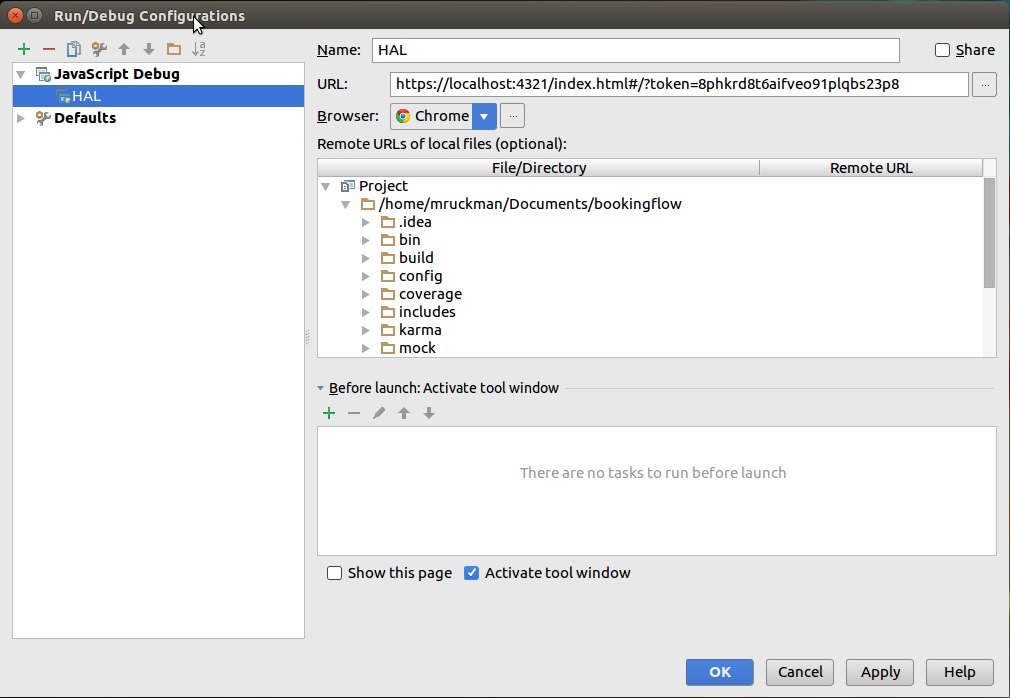
In order to Debug in WebStorm, you will need a couple of things.  The Chrome plug-in for WebStorm is the first.

Once that is done, you should setup a debugger configuration to launch from within WebStorm, using JavaScript Debug.  You'll need launch this target in Debug.  You can also setup Chrome as your default browser.

2016-06-21_07-51-32

Quicktime and Soundflower Recording

Using Soundflower on your Macbook Pro, to record sounds from your computer

0. Install Soundflower and reboot your laptop

You will not be able to monitor your session on your laptop, if you wish to follow the audio, you will need another device

1. Open sound, and change the output to Soundflower (ch2)
2. On the Quicktime choose from the dropdown Soundflower (ch2)
3. Start your recording
4. When done, save the recording
5. Switch your sound output back to the device of your choice
6. Enjoy your video

No matching cipher found

When doing ssh or scp you get the following error:

no matching cipher found: client aes256-cbc,aes192-cbc,blowfish-cbc,cast128-cbc,aes128-cbc,3des-cbc server chacha20-poly1305@openssh.com,aes128-ctr,aes192-ctr,aes256-ctr

You can fix with, but you've removed security
$ scp -c none other-stuff-here
$ ssh -c none username@hostname

Refer: http://steronius.blogspot.com/2014/10/ssh-no-matching-cipher-found.html

[jboss1@haldevjbs13 /tmp/mongo-backup/export-testcms-20160709]$ less /home/jboss1/.ssh/known_hosts.old

[jboss1@haldevjbs13 /tmp/mongo-backup/export-testcms-20160709]$ less /home/jboss1/.ssh/known_hosts

JWT Examples with Perl Decryption

Overview with Different Languages
http://www.url-encode-decode.com/base64-encode-decode/

JWT Decode Online
http://jwt.calebb.net

Online Decoder:
http://kjur.github.io/jsjws/tool_b64udec.html

Perl

#!/usr/bin/perl
use MIME::Base64;

print "Sample JWT Payload\n";
my $myPayload = "eyJqdGkiOiI3YmNiMTQ5ZS1lZTFlLTQ2YWQtODlkNy04ZWVkMTFmODc1ZTEiLCJpYXQiOjE0NjUzMjI3NzgsInN1YiI6IkVyaWMiLCJpc3MiOiJBUElNb2R1bGUiLCJyb2xlcyI6WyJ1c2VyIiwiYWRtaW4iXSwiZXhwIjoxNDY1MzIyODI4fQ";
print decode_base64($myPayload)."\n";

print "\n--- Encrypt and Decrypt Base64 Example ---\n\n";
$myPayload = '{"jti":"7bcb149e-ee1e-46ad-89d7-8eed11f875e1","iat":1465322778,"sub":"Eric","iss":"APIModule","roles":["user","admin"],"exp":1465322828}';
$myPayload_enc = encode_base64($myPayload);
print $myPayload_enc."\n";
print decode_base64($myPayload_enc)."\n";