
Curl Example for Mariner Lookup Rest Call

Use the following to make the rest call from the command line:


curl -H "Accept: application/xml" -H "Content-Type: application/xml" -d @myfile.xml "http://halprdpolartu01.hq.halw.com:8080/hal-polar/rest/contact/v1.0.0"
curl -H "Accept: application/json" -H "Content-Type: application/xml" -d @myfile.xml "http://halprdpolartu01.hq.halw.com:8080/hal-polar/rest/contact/v1.0.0"

Restful Servies, Git and Other Materials

From: DCosta, John (HAL) Sent: Wednesday, December 17, 2014 4:55 PM

http://git-scm.com/book/en/v2

http://www.javaworld.com/article/2113465/developer-tools-ide/git-smart-20-essential-tips-for-git-and-github-users.html

http://fideloper.com/hexagonal-architecture

http://alistair.cockburn.us/Hexagonal+architecture

http://codeplanet.io/principles-good-restful-api-design/

http://blog.mwaysolutions.com/2014/06/05/10-best-practices-for-better-restful-api/

http://www.slideshare.net/mario_cardinal/best-practices-for-designing-pragmatic-restful-api

http://blog.2partsmagic.com/restful-uri-design/

http://martinfowler.com/articles/microservices.html

http://www.codingpedia.org/ama/tutorial-rest-api-design-and-implementation-in-java-with-jersey-and-spring/

Supporting multiple monitors with Macbook Pro

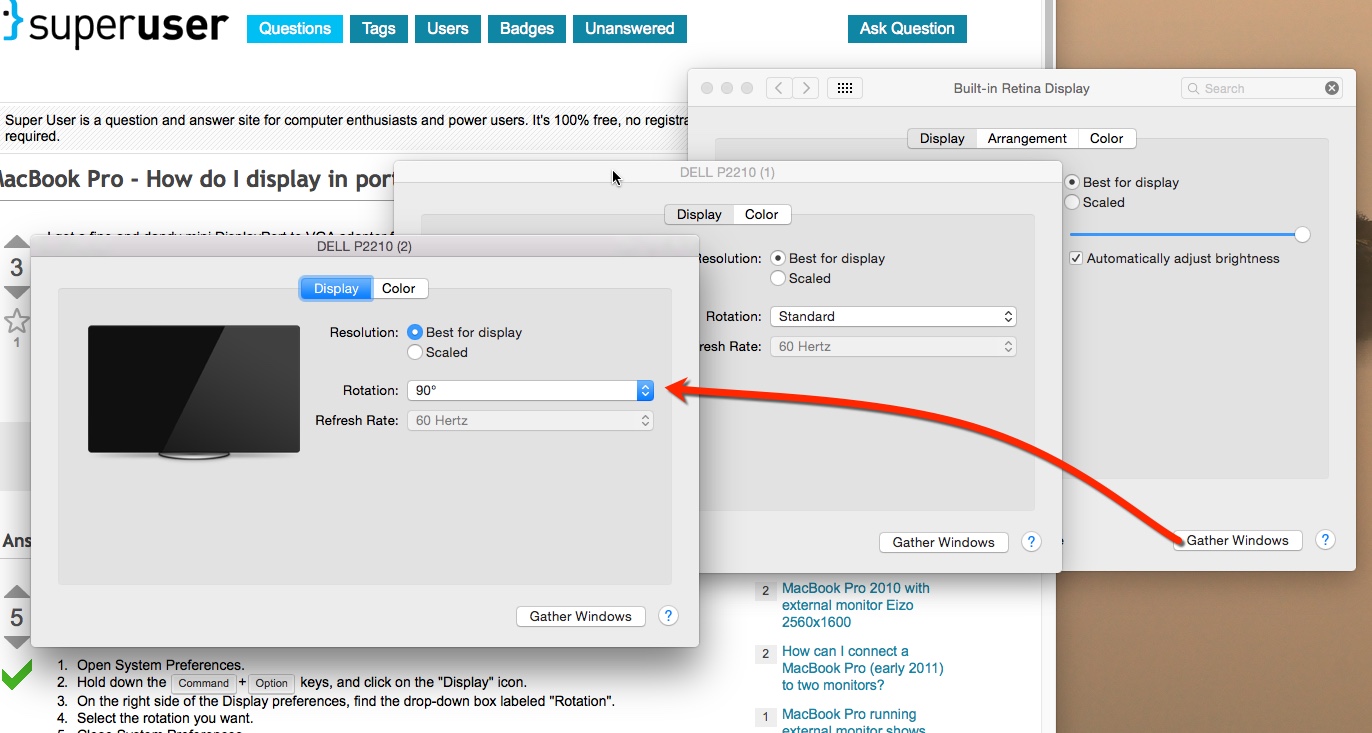
Used thunderbolt adapters to drive two external monitors.  One of them was rotated so there was another tweak necessary to get this to pickup.

Settings, Monitors

Choose: Gather Windows

Multiple windows appear, choose the window/panel with the monitor to rotate, and it should have a rotation option.

Please see attached example.

Rotate external monitor

Offers4U Malware on Mac

Looks like John D, got hit by this item, fairly good article for removal.

http://virusremovalguideline.blogspot.jp/2014/05/offers4u-popup-how-do-i-stop-ads-by.html

Looking for MacBook Changes

John was looking around his MacBook pro to see if any Malware was installed.  These are notes from terminal history of where to look.

465 ls -ltr
466 cd /Library
467 ls -ltr
468 cd LaunchAgents/
469 ls -ltr
470 cd ..
471 cd LaunchDaemons/
472 ls -ltr

How to close save dialog with keyboard

Mac seems a bit backwards where you cannot close a dialog by default with the keyboard.  You need to go into settings, keyboard, shortcuts.

In the "Full keyboard access" section, choose the radio "All Controls"

After this, you can close without saving by using the space bar, use escape to cancel or enter to save with a prompt.