Eye of Gnome is eog
Refer: https://net2.com/how-to-display-images-in-the-command-line-in-linux-ubuntu/
Usage
eog image.png
eog *.png
Installation
sudo apt-get install eog
Technical notes, and other ideas.
Eye of Gnome is eog
Refer: https://net2.com/how-to-display-images-in-the-command-line-in-linux-ubuntu/
Usage
eog image.png
eog *.pngInstallation
sudo apt-get install eogUpdate the following CSS
Appearance, Customize, "Additional CSS"
.wrap {
    margin-left: auto;
    margin-right: auto;
    max-width: 1920px;
    padding-left: 2em;
    padding-right: 2em;
}Fix the ORA-00904: ORA_ROWSCN: invalid identifier error in SQLDeveloper with a few easy steps
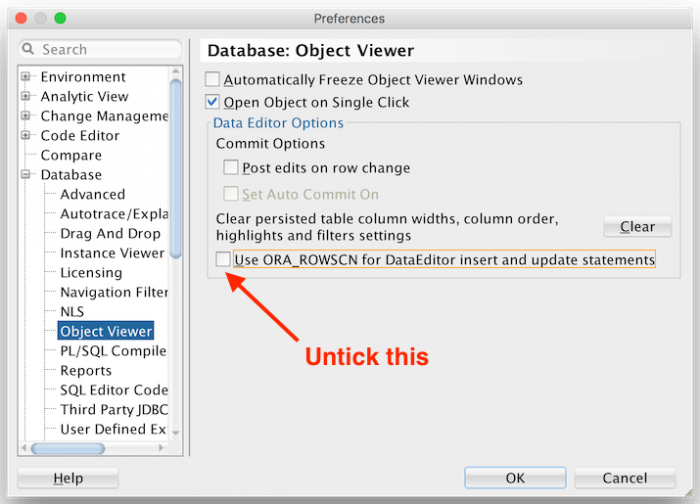
Turns out fixing this problem is easy. Open up the SQL Developer Preferences, then navigate to Database > Object Viewer. Untick the box that says Use ORA_ROWSCN for DataEditor insert and update statements.
Refer: https://ubuntuhandbook.org/index.php/2021/06/open-heic-convert-jpg-png-ubuntu-20-04/
Install Application for Conversion
sudo apt-get update
sudo apt-get install libheif-examples
Convert a File, you can keep default 92 by not specifying quality
heif-convert input.HEIC output.JPG
heif-convert -q 85 input.HEIC output.JPG
Or you can batch an entire folder
for file in *.HEIC; do heif-convert $file ${file/%.HEIC/.jpg}; doneRefer: https://kb.vmware.com/s/article/74650
Create the file /etc/systemd/system/mnt-hgfs.mount with this content:
sudo touch /etc/systemd/system/mnt-hgfs.mount
sudo gedit /etc/systemd/system/mnt-hgfs.mount
[Unit]
Description=VMware mount for hgfs
DefaultDependencies=no
Before=umount.target
ConditionVirtualization=vmware
After=sys-fs-fuse-connections.mount
[Mount]
What=vmhgfs-fuse
Where=/mnt/hgfs
Type=fuse
Options=default_permissions,allow_other
[Install]
WantedBy=multi-user.targetCreate the file /etc/modules-load.d/open-vm-tools.conf with this content:
sudo touch /etc/modules-load.d/open-vm-tools.conf
sudo gedit /etc/modules-load.d/open-vm-tools.conf
If the file already exists, add that line to the file.
fuseEnable the system service with the command:
sudo systemctl enable mnt-hgfs.mountThis will make sure the hgfs fdirectory will be mounted after a reboot.
Make sure the 'fuse' module is loaded:
sudo modprobe -v fuseIn Workstation or Fusion, enable "Shared Folders" in "Virtual Machine Settings" > "Options", and set the folders to be shared.
The shared folders should appear in the directory /mnt/hgfs. If that is not the case, start the service with:
sudo systemctl start mnt-hgfs.mountor
rebootRefer: https://zoomadmin.com/HowToInstall/UbuntuPackage/screenruler
sudo apt-get update -y
sudo apt-get install -y screenrulerInstall the following package, and Ubuntu's default Image Viewer will start working.
sudo apt install heif-gdk-pixbufInstall this to allow Nautlius to create thumbnails
Refer: http://manpages.ubuntu.com/manpages/impish/man1/heif-thumbnailer.1.html
sudo apt install heif-thumbnailerUse ASUS File Manager to tranfer files over WiFi with browser
Currently Using: File Manager_2.3.1.87M_190627_apkcombo.com.apk
Originall Used: File Manager_2.0.0.397_180123_apkcombo.com.apk