sudo apt-get install sshpass
Syntax of usage:
sshpass -p '' <ssh/scp command>

Technical notes, and other ideas.
sudo apt-get install sshpass
Syntax of usage:
sshpass -p '' <ssh/scp command>
Ubuntu
Open Files, and under Network "Connect to Server"
smb://isilonpool01.hq.halw.com
You'll then be prompted to enter your domain and credentials, after that you should be connected.
Mac OS X
With ForkLift, Go, Connect
Your will need the following information:
Protocol:SMB
Server: isilonpool01.hq.halw.com
Username:
Password:
Quick search looking for files not modified a particular day:
$ ls -clRt | grep -i "jboss1" | grep -v 'Feb 13' | more
The magic sauce is really this command
$ ls -clRt
Use this for a full listing with long dates, and not shortened
$ ls -clhRt --time-style long-iso
If you need to setup an htpasswd file and need the file path
Refer: file-path.php
Create the password file with PGP
Refer: create-password.php
Site reference: http://www.htaccesstools.com/articles/create-password-for-htpasswd-file-using-php/
Installing Brother HL-2170W LaserJet on Ubuntu 14.02 and 18.04
Refer: https://support.brother.com/g/b/downloadtop.aspx?c=us&lang=en&prod=hl2170w_all
Mac Setup, Get Binary from Site
IP address for installation is: 192.168.000.012
Web Interface is: http://192.168.0.12/printer/main.html
Brother has web portal at http://192.168.0.12 (admin / access)
The Brother site does has some installation instructions but it's for 32-bit software had to mess around with it, but the drivers seem to work, maybe? Still used the Printer wizard.
Here's the installation instructions and *.gz file:
linux-brprinter-installer-2.2.zip
Using the wizard from the command line is the best way to install. Choose option to install with IP address, when finishing and testing the installation.
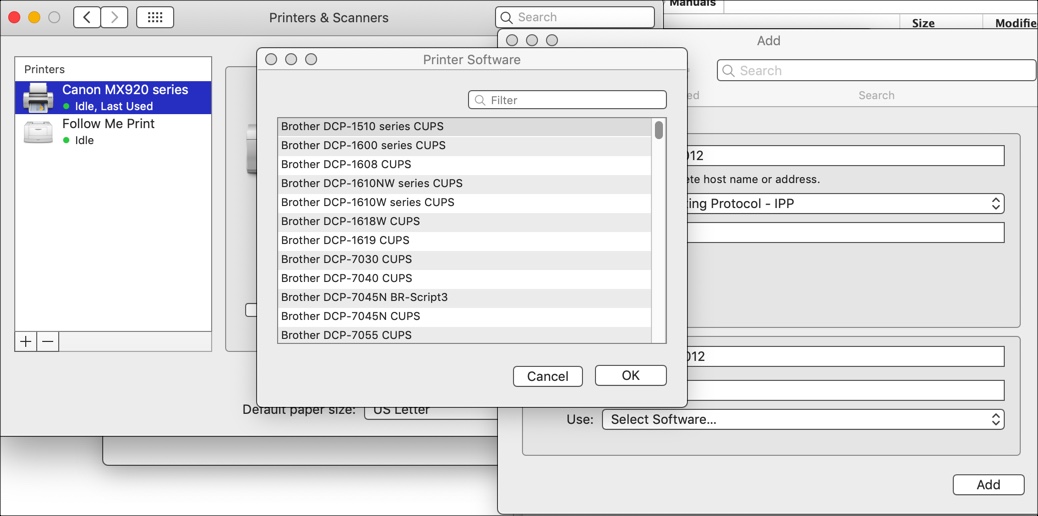
Make sure you run the installation as sudo and also choose at the end "Will you specify the Device URI? [Y/n] ->y" with option 12 to specify the IP address of the printer as 192.168.0.12
AppSocket/HP JetDirect
Host: 192.168.86.35 (T-Mobile)
Host: 192.168.0.12 (XFinity)
Click Forward
Click Apply
Older Notes
Use PPD to install: brother-hl-2170w-PPD
Delete old crash reports to see if it fixes the problem.
$ sudo rm /var/crash/*
Refer: http://askubuntu.com/questions/365358/im-getting-a-lot-of-system-program-problem-detected-error-dialogs-is-there-a
Try this first from the terminal:
cat /proc/sys/vm/laptop_mode
Use the following to make the rest call from the command line:
curl -H "Accept: application/xml" -H "Content-Type: application/xml" -d @myfile.xml "http://halprdpolartu01.hq.halw.com:8080/hal-polar/rest/contact/v1.0.0"
curl -H "Accept: application/json" -H "Content-Type: application/xml" -d @myfile.xml "http://halprdpolartu01.hq.halw.com:8080/hal-polar/rest/contact/v1.0.0"
You can also configure it to user meld as an external editor.
http://www.syntevo.com/smartgit/download
I just rm'd all files in /etc/NetworkManager/system-connections/ and restarted Ubuntu 14.04. Problem solved. I know it was the last software update because I updated and shutdown. The next time I started up Ubuntu, the network kept dropping connection.
This almost worked to start from the command line but might need to run as sudo, might try if there are future problems.
Probably need this, needs read/write access to /var/run/vpnc, or change it's permissions:
$ sudo openconnect --no-cert-check gateway.hollandamerica.com
Original attempt that failed:
$ openconnect --no-cert-check gateway.hollandamerica.com
Another Idea is to try this for the, no luck with this:
[vpn]
password-flags=0
https://faq.i3wm.org/question/3796/nmcli-connection-activation-failed-no-valid-vpn-secrets/