Panasonic Cordless Phone Wrong Time Zone

Refer: https://eng-au.faq.panasonic.com/app/answers/detail/a_id/43080/~/troubleshooting---i-set-my-time-on-my-cordless-phone-and-when-someone-calls-me

TROUBLESHOOTING - I set my time on my cordless phone and when someone calls me the time changes to the wrong time. How do I stop this?

What is happening is by default your phone uses what is known as the Caller ID information to obtain the time. So when someone calls you your phone, it is being given the time that is being used by the phone exchange of the phone provider.

If you wish to avoid this from happening you need to change the time settings in your phone from "Caller ID" to "manual".

Go to Menu->Time Settings->Time Adjust. Change from Caller ID to Manual.
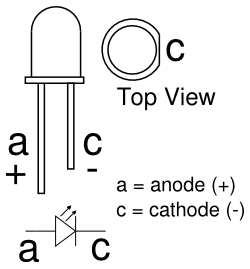
LED How to Determine Positive and Negative

On the physical LED, the longer lead (or leg) of the LED is the anode. The cathode is marked on the rim of the LED body with a flat area shown in the diagram. Another way to tell which lead is the anode and which is the cathode is to look at the two plates at the end of the leads inside the body of the LED.

Using All-in-One WP Migration Plug-in

You MUST use these two settings for things to work.

  • You can use this plug-in to export your site; however, test it first with Docker and YOU CANNOT export the plug-ins. It wil break the site!
  • Also, YOU MUST go into your settings and make your permalinks

All-in-One WP Settings

You should install the plug-in to upload large files too, on your target WordPress - all-in-one-wp-migration-file-extension.zip

You can also use "Traktor-1.1.exe" to extract the files, but it might be easier to just import using Docker and WordPress itself.

Using Dolphin Browser

The Dolphin browser has a nice integration with the terminal, but you need to install the addtional plug-in.

sudo apt-get install dolphin
sudo apt-get install dolphin konsole
sudo apt-get install ark