Use the following to search a site for a particular key string
site:www.hollandamerica.com/blog power search youtu.be

Technical notes, and other ideas.
Use the following to search a site for a particular key string
site:www.hollandamerica.com/blog power search youtu.be
For me the fix was to disable my anti virus software. In my case it was Avast Mail Shield that was causing the issue. Turned it off and now I can my Gmail account again, at last!
Go into drop-down menu top-right corner, and click "Settings", "Show Advanced"
And uncheck "Use hardware acceleration when available."
ORA-00904: "ORA_ROWSCN": invalid identifier
Refer: https://community.oracle.com/thread/1019844?tstart=0
Fix is to uncheck "Use ORA_ROWSCN for DataEditor insert and update statements"

Editor not working, enter key / backspace / delete button not working – quick fix
To resolve the problem you have to go to:
Tools -> Preferences -> Accelerators -> Load Preset -> Default -> OK
Do you experience a long wait when opening attachments from within Outlook? And the same file opens in a snap when you save the attachment first on your hard disk, launch the program and then open the file from within the program?
If you answered yes to all questions above, you probable have a DDE issue. DDE (short for Dynamic Data Exchange) allows applications to communicate with one another. For example, when you double-click a document in Windows Explorer, and the associated application is already running, Explorer sends a DDE message to the application, with instructions to open the document on its own, rather than launching another copy of the application. Sounds neat, no?
Well, on my machine, DDE has the tendency to get corrupted… or at least confused. I’m not sure why, but when that happens, it does cause significant delays in opening documents. Not only when launching it from Outlook, also when double-clicking a file in Windows Explorer.
The solution? Disable DDE for those file types that you have trouble with. Like Word, Excel and PowerPoint documents. This is the process:
1. Explorer, Folder Options, File Types
2. In the File Types tab, select the file extension you want to change (e.g. .doc for Word documents)
3. Click the Advanced button
4. Select the Open action, click Edit. You will get a dialog box like this:
5. Uncheck Use DDE
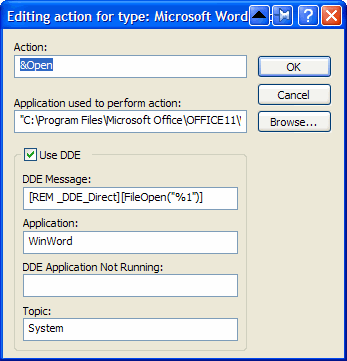
6. In the field Application used to perform action, you will see something similar to
"C:\Program Files\Microsoft Office\OFFICE11\WINWORD.EXE" /n /dde
Remove everything after the application (in this case /n /dde) and add "%1". (Ensure you put %1 between double quotes ("), otherwise this might not work if the folder and/or filename of the document contains spaces).
The field should now contain
"C:\Program Files\Microsoft Office\OFFICE11\WINWORD.EXE" "%1?
7. Click OK, OK, Close
That’s it. One final note: the DDE functionality gets restored when you re-install the application. But that will probably also fix the DDE issue itself, and if not, simply follow the instructions above again.
Use the following to access basic router information:
http://192.168.100.1/
You can use the following link to find older versions of applications:
http://www.oldapps.com/itunes.php
Here's what I found a a help site that worked:
"Unplug it pop out the battery and hold the power down for a minute, put the battery and ac adapter back in and start it; the motherboard was probably still holding power when the battery died causing a "hiccup"in the system, this should resolve or at least help a little."