
Turn on Num Lock with Ubuntu 22.04
Install the Package
sudo apt update && sudo apt install numlockxTurn on Num Lock
numlockx onWindows 11 License / Serial Number – How to transfer
Moving Your Windows 11 License to Another Computer
1. Verify Your License Type
- Retail keys can be transferred.
- OEM keys are tied to the original hardware—not transferable.
- Digital entitlement licenses link to your Microsoft account and may auto-reactivate on new hardware.
2. Extract Your Product Key
Open an Administrator Command Prompt and run:
wmic path softwarelicensingservice get OA3xOriginalProductKeyIf that returns blank, try in PowerShell (Admin):
(Get-WmiObject -Query 'select * from SoftwareLicensingService').OA3xOriginalProductKeyIf still blank, you likely have a digital-only license—no key is needed; just sign in on the new PC with your Microsoft account.
3. De-register on the Old PC
In an elevated Command Prompt, run:
slmgr.vbs /upkThis uninstalls the key from the old machine, freeing up the license.
4. Install & Activate on the New PC
Option A: Command Line
Open Admin Command Prompt and run:
slmgr.vbs /ipk YOUR-25-CHAR-KEY-HERE
slmgr.vbs /ato
Option B: Settings UI
Go to Settings > System > Activation > Change product key, paste your key, and follow the prompts.
If activation fails, confirm you have a Retail license (Settings > System > Activation) or contact Microsoft support for a manual transfer.
PDF OCR
This website does a great job of converting a PDF to an OCR PDF so you can search for text.
Docker Ask Gordon
From the command line, sample
docker ai can I containerize this application?Docker has an Docker MCP Toolkit
https://www.docker.com/blog/announcing-docker-mcp-catalog-and-toolkit-beta/
Cursor Generate Cursor Rules
Automated and improved rules
You can now generate rules directly from a conversation using the /Generate Cursor Rules command. This is useful when you want to capture the existing context of a conversation to reuse later.
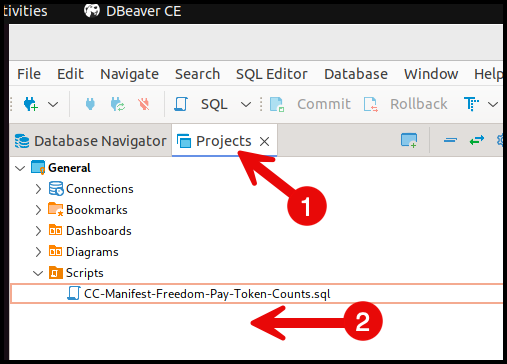
dBeaver Script Cleanup
Click on Projects and Choose "Scripts" folder and delete all of the old scripts.
dBeaver-CE Exports
Remember when you export dBeaver settings some of the files are hidden, which means they start with a period.
New AI Tools
AI Search Enging
https://www.perplexity.ai/search
AI IDE Editor built on Visual Studio Code
https://www.cursor.com/
Macbook Closing Windows with Mission Control
You can cmd+tab, and then while still holding command press Q over any app you want to quit, and then tab onto the next