
The Whole Point of a College Degree
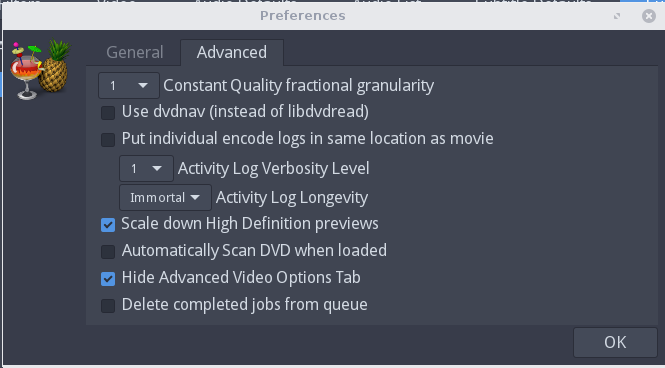
Handbrake Issues – Only Converts a few Seconds
Go to File, Preferences, Advanced, and toggle the "Use dvdnav (instead of libdvdread). By default on Ubuntu this is checked, try unchecking it, when done put it back again.
Linux Screen Records for Screencast
Refer: https://itsfoss.com/best-linux-screen-recorders/
$ sudo apt install kazam
Works fairly well when capturing full screen. Has issues trying to capture a window area.
Turning off Auto Play in Firefox
Open about:config
Search for media*play
Set media.block-autoplay-until-in-foreground;false
Set media.autoplay.enabled;false
AviDemux Simple Video Editor
Makes it really simple to trim down an MP4 video. It's also multi-platform.
http://fixounet.free.fr/avidemux/download.html
Stabilize Shaky Videos with Youtube Editor
Fixing/stabilize your cell phone/camera shaky videos using new feature of YouTube video editor.
Making videos while holding camera or cell phone in our hand always gives us some shaky results no matter how still our hands were. This is what we call shaky camera syndrome and this effect can easily be observed while watching that video.
In Plain English… You can make your shaky videos stable by using this feature with only a few clicks.
Here are the steps:
Go to YouTube video editor.
- Drag your video to the bottom row where you can edit it later.
- After dragging the video to bottom row, hover the mouse onto the video thumbnail and click on the “Effects” button of the three buttons shown on the thumbnail.
- It will lead you to another window where you will see “Stabilize this video” option (View screenshot below)
- Just tick on the option and let the YouTube do the stabilization for you.
Handbrake Command Line (HandBrakeCLI.exe)
It's easiest to prepare video for the IPod Nano just by using the Handbrake software in command line mode. The GUI interface requires Net 2.0 and it seems a bit buggy in a virtual pc.
The following seems to have smaller video size:
HandBrakeCLI.exe -i DVD\MYVIDEO\VIDEO_TS -o myvideo.mp4 --preset="iPhone & iPod Touch"
Other option:
HandBrakeCLI.exe -i DVD\MYVIDEO\VIDEO_TS -o myvideo.mp4 --preset="iPod"
Encrypted DVD's Finding Title
The following command will show all of the menus, find the right title, and then use that with the -t switch to set it, default is always 1.
handbrake -i /dev/dvd -t 0