Use --save-dev for dependencies necessary to build application for development but not needed to distribute as dependencies for actual project.
Refer: npm-save-dev.pdf

Technical notes, and other ideas.
Use --save-dev for dependencies necessary to build application for development but not needed to distribute as dependencies for actual project.
Refer: npm-save-dev.pdf
Free BootStrap 3 UI Editor
Form Elements in BS3
Overview with Different Languages
http://www.url-encode-decode.com/base64-encode-decode/
JWT Decode Online
http://jwt.calebb.net
Online Decoder:
http://kjur.github.io/jsjws/tool_b64udec.html
Perl
#!/usr/bin/perl

use MIME::Base64;
print "Sample JWT Payload\n";
my $myPayload = "eyJqdGkiOiI3YmNiMTQ5ZS1lZTFlLTQ2YWQtODlkNy04ZWVkMTFmODc1ZTEiLCJpYXQiOjE0NjUzMjI3NzgsInN1YiI6IkVyaWMiLCJpc3MiOiJBUElNb2R1bGUiLCJyb2xlcyI6WyJ1c2VyIiwiYWRtaW4iXSwiZXhwIjoxNDY1MzIyODI4fQ";
print decode_base64($myPayload)."\n";
print "\n--- Encrypt and Decrypt Base64 Example ---\n\n";
$myPayload = '{"jti":"7bcb149e-ee1e-46ad-89d7-8eed11f875e1","iat":1465322778,"sub":"Eric","iss":"APIModule","roles":["user","admin"],"exp":1465322828}';
$myPayload_enc = encode_base64($myPayload);
print $myPayload_enc."\n";
print decode_base64($myPayload_enc)."\n";
Command Executed:
Preeti-Fnus-MacBook-Pro:security root# openssl s_client -connect halinquirytest.halw.com:443 -showcerts
CONNECTED(00000003)
depth=0 /OU=Domain Control Validated/CN=halinquirytest.halw.com
verify error:num=20:unable to get local issuer certificate
verify return:1
depth=0 /OU=Domain Control Validated/CN=halinquirytest.halw.com
verify error:num=27:certificate not trusted
verify return:1
depth=0 /OU=Domain Control Validated/CN=halinquirytest.halw.com
verify error:num=21:unable to verify the first certificate
verify return:1
---

Certificate chain

0 s:/OU=Domain Control Validated/CN=halinquirytest.halw.com

i:/C=US/ST=Arizona/L=Scottsdale/O=GoDaddy.com, Inc./OU=http://certs.godaddy.com/repository//CN=Go Daddy Secure Certificate Authority - G2

-----BEGIN CERTIFICATE-----

MIIFRzCCBC+gAwIBAgIJAOuSdfQd4EJsMA0GCSqGSIb3DQEBCwUAMIG0MQswCQYD

VQQGEwJVUzEQMA4GA1UECBMHQXJpem9uYTETMBEGA1UEBxMKU2NvdHRzZGFsZTEa

MBgGA1UEChMRR29EYWRkeS5jb20sIEluYy4xLTArBgNVBAsTJGh0dHA6Ly9jZXJ0

cy5nb2RhZGR5LmNvbS9yZXBvc2l0b3J5LzEzMDEGA1UEAxMqR28gRGFkZHkgU2Vj

dXJlIENlcnRpZmljYXRlIEF1dGhvcml0eSAtIEcyMB4XDTE1MDgyNTIxNTUzOFoX

DTE2MDgyNTIxNTUzOFowRTEhMB8GA1UECxMYRG9tYWluIENvbnRyb2wgVmFsaWRh

dGVkMSAwHgYDVQQDExdoYWxpbnF1aXJ5dGVzdC5oYWx3LmNvbTCCASIwDQYJKoZI

hvcNAQEBBQADggEPADCCAQoCggEBALi26qE3lUt3aEKs23PnGlsi55ZYs0lItmoE

sRBbm4WTnuGV3wnogNOOij0SvVcIqUvWsFmnWlOb3Yp1leW0htAsUgz0COF2Jy7N

9PejmgRUQ9Kl9MamifH0nRQaFD9V41JxHawGIbtoxC6Ub6STagNAt7HJZqqz6SBM

wJVuoBLL4jkV4CVFUvo+xICB+9TVE+r5I5ZtnKwt9YpLb7fSQjRAgy+9BfGZt6iX

sD/SY7E+FlWYsK9ENamUnt+BVY6uXtN1DpIPVc0Quy5bJ4r0mV4URchouzb38iG5

ypD7h96OHNCrIgS6h7xVBaZeYnfrc+dRRSRgU+dGeS5PYuLiE7MCAwEAAaOCAcgw

ggHEMAwGA1UdEwEB/wQCMAAwHQYDVR0lBBYwFAYIKwYBBQUHAwEGCCsGAQUFBwMC

MA4GA1UdDwEB/wQEAwIFoDA3BgNVHR8EMDAuMCygKqAohiZodHRwOi8vY3JsLmdv

ZGFkZHkuY29tL2dkaWcyczEtMTEzLmNybDBTBgNVHSAETDBKMEgGC2CGSAGG/W0B

BxcBMDkwNwYIKwYBBQUHAgEWK2h0dHA6Ly9jZXJ0aWZpY2F0ZXMuZ29kYWRkeS5j

b20vcmVwb3NpdG9yeS8wdgYIKwYBBQUHAQEEajBoMCQGCCsGAQUFBzABhhhodHRw

Oi8vb2NzcC5nb2RhZGR5LmNvbS8wQAYIKwYBBQUHMAKGNGh0dHA6Ly9jZXJ0aWZp

Y2F0ZXMuZ29kYWRkeS5jb20vcmVwb3NpdG9yeS9nZGlnMi5jcnQwHwYDVR0jBBgw

FoAUQMK9J47MNIMwojPX+2yz8LQsgM4wPwYDVR0RBDgwNoIXaGFsaW5xdWlyeXRl

c3QuaGFsdy5jb22CG3d3dy5oYWxpbnF1aXJ5dGVzdC5oYWx3LmNvbTAdBgNVHQ4E

FgQUp9Cg4a7eWhkr09m9lV/DMKCvDbswDQYJKoZIhvcNAQELBQADggEBACuAbo68

SOrL7Ak4CRPde9m2Dqwx1ViHK4fe+lz3lAXOlfuRXwnIA6KNMzEScIsW8YCyIr7K

VGN3++FaRrlDlIHlajn7uEr2UsCN+vpFW/0XPVDoESO0FDoGILgvh/IbIUwiW9TA

p+rcfJjeM2uGRTQY3YWo0bWNc0RC4YpUo2nmdvV35I/ga3U50ER60mYmThMWvXb3

LMU9Sw36XKkvSBPGLr1rJWu/rzQKtuwWMWXw8CuhxTCgKxROMzhnw4jUbtAI+oyd

a0+6rmOb9HAmraqRZW2/qjOqseo+Ld5np7c8rxPXb2JtLwN7hYQnlI0/YefQ4kBX

YRcEyQvMJ+d1j5s=

-----END CERTIFICATE-----
---
Server certificate
subject=/OU=Domain Control Validated/CN=halinquirytest.halw.com
issuer=/C=US/ST=Arizona/L=Scottsdale/O=GoDaddy.com, Inc./OU=http://certs.godaddy.com/repository//CN=Go Daddy Secure Certificate Authority - G2
---
No client certificate CA names sent
---
SSL handshake has read 1498 bytes and written 440 bytes
---
New, TLSv1/SSLv3, Cipher is RC4-MD5
Server public key is 2048 bit
Secure Renegotiation IS supported
Compression: NONE
Expansion: NONE
SSL-Session:
Protocol : TLSv1
Cipher : RC4-MD5
Session-ID: 982500008C3CC53F4FDF7678FCD3A2EF83F01834E69EF11B3746A0F63CC9265B
Session-ID-ctx:
Master-Key: C6EE7071AE8731E7554122713C6D81FB3415EB75BE83E6D9CFB039F2030739D77D9A98196993F82A8AA69129967B5EC9
Key-Arg : None
Start Time: 1463000757
Timeout : 300 (sec)
Verify return code: 21 (unable to verify the first certificate)
---
Booking flow needs older version of node until we can upgrade and OLCI needs the current version otherwise the DELETE calls fail, here's how we can use multiple versions:
Refer: https://davidwalsh.name/upgrade-nodejs
Refer: https://github.com/tj/n
# node -v which is v0.10.37 for booking flow, EAS is using 4 and booking flow works
$ sudo npm cache clean -f
$ sudo npm install -g n
$ sudo n 0.10.37
$ sudo n stable
# Now you switch between versions but running, selecting and hitting enter
$ sudo n
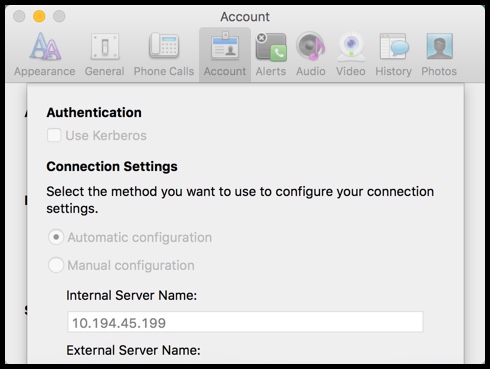
Click the "Advanced" button on the sign-in window
Select "Manual Configuration" radio button and paste "10.194.45.199" for the Internal Server Name
Select Ok
Then sign-in with your AD credentials
Reboot laptop and then change it to automatic
# Example to quickly look for a deleted file
$ git log --diff-filter=D --summary | grep -i delete | grep -i barclay
Use this to find actual commit for file and you can search it like a less command
$ git log --diff-filter=D --summary
Refer: http://stackoverflow.com/questions/7203515/how-to-locate-a-deleted-file-in-the-commit-history
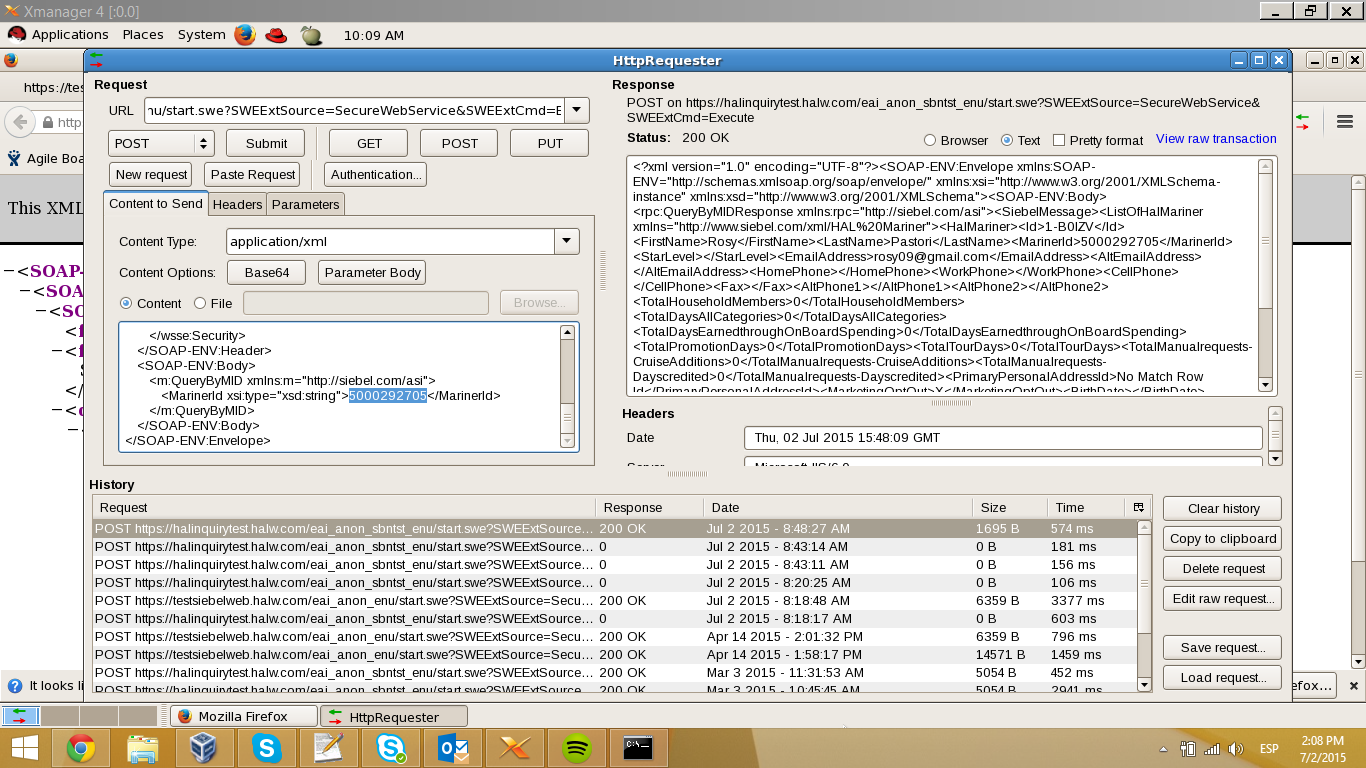
CJ, just check Siebel for SBN and is not returning the middle name…. if the middle was null it should return the tags empty, but in this case that tag is not commig. <CellPhone />
Here is a print screen from my VM that is inside HAL’s network. Haldevjbs22.
Instructions: Daily Verification HAL Booking only.pdf
Resources: daily-automation.zip
Maurice, here are the files you need to run the Daily Verification test for HAL to get your daily booking. If the OLCI or Secondary fails, don’t worry about it. You only need the booking number, right? I will fix anything else that goes wrong when I get back.
If you run into trouble, you can consult with Manuel, as he has trained a little bit on this. I have attached the document he put together for himself for running Parts 1 and 2.
You will need to install Firefox add-ons Selenium IDE, File Logging (Selenium IDE) and ScreenShot on Error (Selenium IDE). They can all be found by clicking on Add-ons in the Firefox hamburger menu. You may have to search for them.
From the console:
angular.version.full