Read PDF: How_To_Debug_Websites_On_iPhone.pdf
Refer: https://www.lambdatest.com/blog/how-to-debug-websites-on-iphone/

Technical notes, and other ideas.
Symptom
sign_and_send_pubkey: signing failed for RSASolution, make sure your ~/.ssh/id_rsa has the proper permissions, it should be read/write for the owner and none for anyone else.
Create a bash file, something like "chrome-fresh.sh" with the following, it will randomize a file for a new user profile in your temp folder
#!/bin/bash
tfile=$(mktemp /tmp/chrome.XXXXXXXXX)
/Applications/Google\ Chrome.app/Contents/MacOS/Google\ Chrome --user-data-dir=/tmp/$tfile
Or Launch a Single browser, delete the temp folder when you want a fresh one.
cd /tmp
rm -rf james_bonds_browser
/Applications/Google\ Chrome.app/Contents/MacOS/Google\ Chrome --user-data-dir="/tmp/james_bonds_browser"If you launch a chrome fresh grab yourself some plug-ins if you need them.
Akamai Headers
Install Akamai Headers Extension
Script Blocker Ultimate
Install Script Blocker Extension
Add these to Request Blocker in Script Blocker Ultimate
Adobe DTM Scripts
*://assets.adobedtm.com/*
*://carnivalbrands.tt.omtrdc.net/*
Tracking Scripts
*://col.eum-appdynamics.com/*
*://ad.doubleclick.net/*
*://r.turn.com/*
*://insight.adsrvr.org/*
*://5955407.fls.doubleclick.net/*
*://p11.techlab-cdn.com/*
*://173e2529.akstat.io/*
*://cdn.mouseflow.com/*
*://n2.mouseflow.com/*
If you just want to use the built-in script blocker for chrome without a plug-in
assets.adobedtm.com
carnivalbrands.tt.omtrdc.net
col.eum-appdynamics.com
ad.doubleclick.net
r.turn.com
insight.adsrvr.org
5955407.fls.doubleclick.net
p11.techlab-cdn.com
173e2529.akstat.ioDelete credentials here: C:\Users\XXX\AppData\Local\Atlassian\SourceTree\passwd
Refer: https://www.youtube.com/watch?v=epDPEphSYSI
Visual Studio Plug-ins to Install
Oracle Problems
Unable to get managed connection for jdbc/springdb)
grep -i "Unable to get managed connection for jdbc/springdb" /var/lib/jbossas/server/halprdjbs03/log/server.log
ORA-01017: invalid username/password; logon denied
grep -i "ORA-01017" /var/lib/jbossas/server/halprdjbs03/log/server.log
Server Started
/wbi/haldata/webprd_cluster1/cms/web/spa/spaImageMap.xml (No such file or directory)
CreditCardProcess :
Error was happening on this
http://book.hollandamerica.com/checkout/purchaseItems.action
This is the confirmation page
/checkout/checkoutConfirmationDetermineJsp.action
Refer: https://www.asbru-cm.net/
Ubuntu 20.04
Refer: https://docs.asbru-cm.net/General/Installation/#ubuntu
sudo apt-add-repository multiverse
sudo apt install curl
curl -s https://packagecloud.io/install/repositories/asbru-cm/asbru-cm/script.deb.sh | sudo bash
sudo apt install asbru-cm
Debian
curl -s https://packagecloud.io/install/repositories/asbru-cm/asbru-cm/script.deb.sh | sudo bash
sudo apt install asbru-cm
Fedora
curl -s https://packagecloud.io/install/repositories/asbru-cm/asbru-cm/script.rpm.sh | sudo bash
sudo dnf install asbru-cm
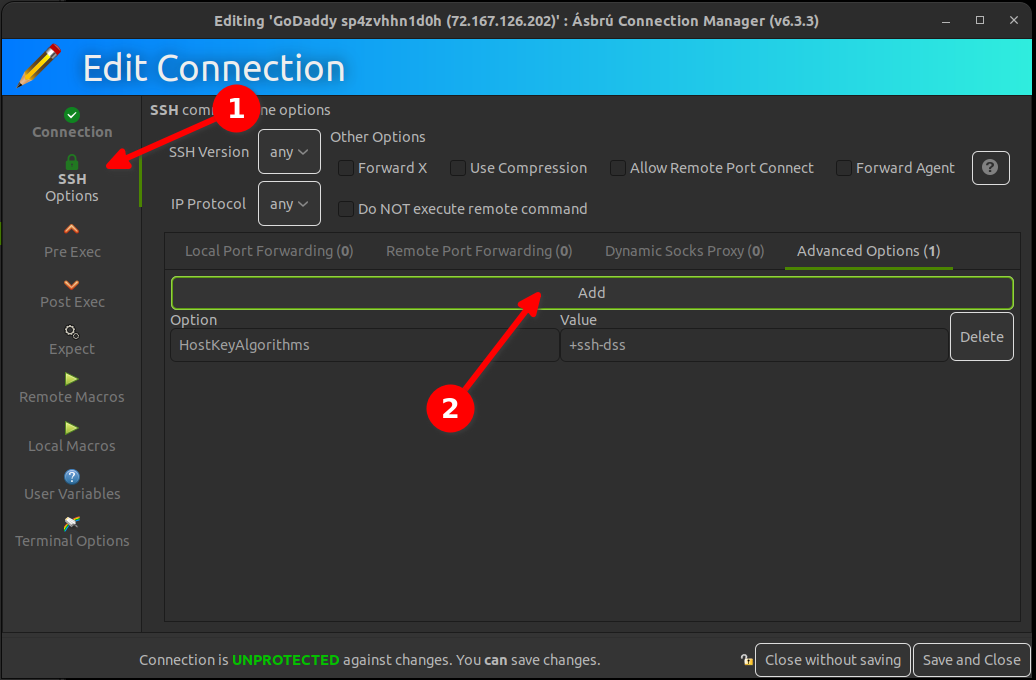
Getting GoDaddy to Work
Google HAR Analysis
Refer: https://toolbox.googleapps.com/apps/har_analyzer/
Simple tool to verify you can send various requests
Refer: https://httpbin.org
Simple Debug Post Tools
Mocking Tools
You can run it locally:
$ docker run -p 80:80 kennethreitz/httpbin
Announcing Httpbin.org
June 12, 2011
The development of Requests, the Python HTTP Module for Humans, led to some annoying testing practices. Relying on random websites and services in order to test different capabilities of the HTTP client became annoying quickly. PostBin.org was perfect for testing POST request behavior, but is usless for other situations. I was hoping to extend its functionality to other request types, but it turns out that PostBin runs on the Google App Engine platform. No.
Thus, httpbin.org was born.
Example Endpoints
To get a feel for what HttpBin does, here are a few endpoint examples:
$ curl http://httpbin.org/ip :
{"origin": "::ffff:24.127.96.129"}
$ curl http://httpbin.org/user-agent :
{"user-agent": "curl/7.19.7 (universal-apple-darwin10.0) libcurl/7.19.7 OpenSSL/0.9.8l zlib/1.2.3"}
Refer: https://github.com/oracle/node-oracledb/blob/master/doc/api.md#connpoolcache
12.4.3 Connection Pool Cache
When pools are created, they can be given a named alias. The alias can later be used to retrieve the related pool object for use. This facilitates sharing pools across modules and simplifies getting connections.
Pools are added to the cache by using a poolAlias property in the poolAttrs object::
oracledb.createPool (
  {
    user: 'hr',
    password: mypw,  // mypw contains the hr schema password
    connectString: 'localhost/XEPDB1',
    poolAlias: 'hrpool'
  },
  function(err) {  // callback 'pool' parameter can be omitted
    . . . // get the pool from the cache and use it
  }
);