Hudson continually tries to compile the code:
http://halci01/hudson/?
Helpful hint: Never use spaces in the name of Hudson jobs, it crashes the deployment scripts.

Technical notes, and other ideas.
Hudson continually tries to compile the code:
http://halci01/hudson/?
Helpful hint: Never use spaces in the name of Hudson jobs, it crashes the deployment scripts.
My Very Easy Method Just Shows Us Nine Planets
From: Mounagurusamy, Jayakumar (HAL)
Sent: Thursday, February 02, 2012 1:08 PM
To: Fernan, Diana (HAL Contractor) expires 30 days until HR approval; Ruckman, Maurice (HAL)
Cc: Harrington, Scott (HAL Contrator); c-dfernan@hollandamerica.com; Bueing, Teresa (HAL)
Subject: RE: eZair - Hyperlink in POLAR Admin Access
Maurice,
Here is the log file location, can you please take a look?
\itnasweb_nonprod$tst01_logststezair
After storage moved:
\nasitweb_nonprod$tst01_logststezair
Refer: Guidelines for automation on demand
From: Radhakrishnan, Ragu (HAL Contractor)
Sent: Thursday, January 19, 2012 12:04 PM
To: Harris, Tyrone (HAL); Smith, Marcus (HAL Contractor); Beckley, James (HAL Contractor); Mounagurusamy, Jayakumar (HAL); Thompson, Sonya (HAL); Fillman, Eric (HAL); Doan, Thomas (HAL Contractor); McKelvey, Linda (HAL Contractor)
Cc: Hofsetz, Therron (HAL)
Subject: Automation on demand
Hi,
I have finished coding the web based automation on demand for the Seabourn booking flow. I have tested the flow a few times. You can download the package from the shared location mentioned in the attachment. The attachment has basic instructions for installation, running tests and for troubleshooting. You could try this out and please give me the feedback (including any suggestions).
Thanks,
Ragu
Players
Chris McConnell - Installed EAR on WebSphere, and configured user account
David Risley - Installed schema, inserted data and created accounted
Jayakumar - was original SME (Subject Matter Expert)
Kristen Tonks - Organizer
Diana Fernan - Main tester, questions
Scott Harrington - Project Manager
Teresa - being pulled in part-time to help
Richard Anderson (PCL) - Project Manager, originally Jay's counterpart
Overview
Using real SABRE inventory for testing. All code changes need applied by PCL.
Chris from HAL systems did setup and Tara was contact from PCL Apps.
 .
.
Jay has setup three environments {development, test and production}
Each environment should have 4 folders, following this naming convention \chipdev.dinghy.hal.testDcmscommunicationcopy
Server locations:
Overview:
Files are dropped into the copy folder, and eventually loaded into Web Methods memory. A filter is put in place to only load *.xml files, the service that starts the process in Web Methods is cacheALCData.
Here's the test interface:
http://haltadobelc01.dinghy.hal.test:5555/BuildALCEmail/emailCommValidation.dsp
Use "Views" COMMUNICATION_DATA and filter by CODE_CO and LANGUAGE_CODE to get some test data. The ID_COMMUNICATION_DATA is a unique id for a single guest communication.
All of the tables that make up the above view start with STORE_*
From: Ruckman, Maurice (HAL)
Sent: Sunday, January 01, 2012 7:24 PM
To: HAL Service Request Center (HAL); Doan, Thomas (HAL Contractor)
Cc: De Vera, Marlon (HAL); Harris, Tyrone (HAL); Hofsetz, Therron (HAL); Augustine, Anila (HAL)
Subject: SBN PrelimFinal FTP process broken, Need UNIX help to resolve
Importance: High
SRC,
Please call out to the Unix, it will be necessary to have them delete some files to allow a schedule task to start again on the half hour. Please see attached email for previous example that happened on 12/16/2011 where Marlon opened a ticket to resolve. Please copy all recipients of this email with the work order.
Unix Team,
Please do the following, NOT on the half-hour, because a crontab is setup to run the scripts on the half-hour, such as 7:30pm, 8:30pm etc., just don’t want you in the middle of cleanup when the next job starts, and feel free to call me if there are any questions 206.650.7576:
Step #1:
Check if any bash jobs are running in HALPRDWAS02, named : 'LoadPrelimFinalDocs.sh' or 'LPFD*'. If so end task(s).
Step #2:
Delete all of the files in the following folder on halprdwas02
/prod/sbndocs/transfer/final/*
There are currently 68 files with a date/time stamp 12/31/2011 9:30am to 12/31/2011 9:32am
Step #3:
Delete the following lock file on halprdwas02
/prod/scripts/LoadPrelimFinalDocs.lock
Thomas,
Would you complete the necessary “emergency” documentation on Tuesday?
All,
The FTP Job failed on 12/31/2011 @ 10:30AM and its lock file was left in place, subsequently there are PDF files date stamped 12/31/2011 @ 9:30AM+ which were not processed. Have verified that all files in RRD archive folder are both on the production PDF server and exists in the Oracle database. Symptom emails “untitled” has been sent on the hour since that time with the message body of “LoadPrelimFinalDocs.sh IS STILL RUNNING! EXITING NOW!” when two of those happen back-to-back, it normally means there’s a problem.
Thanks,
Maurice Ruckman
Voice: (206) 626-7497 x67497
Cellular: (206) 650-7576
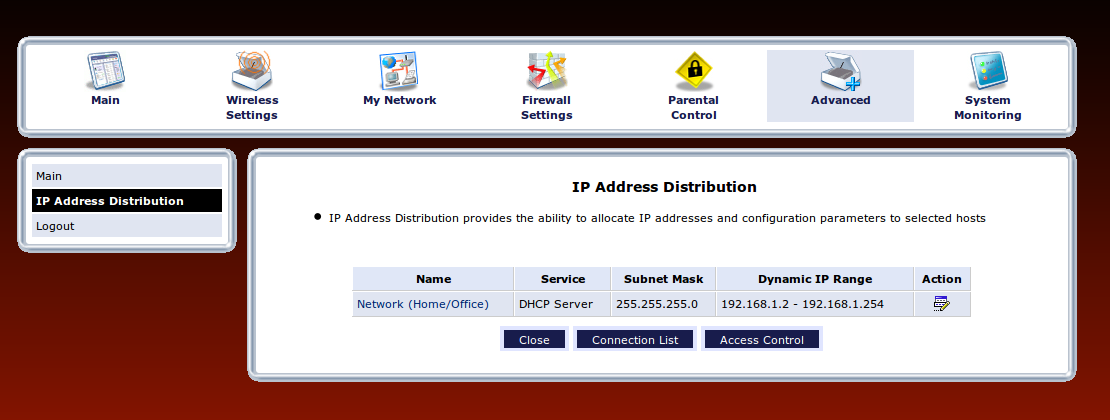
Advanced, IP Address Distribution, Connection List
To disable the Global Menu, use the following Terminal command. Once done, log out or restart your system for changes to take effect.
sudo apt-get autoremove appmenu-gtk appmenu-gtk3 appmenu-qt
This process is completely revertible and the changes can be undone by re-installing the package from the below given command. Once the package is installed, restart your computer.
sudo apt-get install appmenu-gtk3 appmenu-gtk appmenu-qt