
SSH For SCP Fix

From: Turner, Andrew (HAL)
Sent: Tuesday, January 03, 2012 11:36 AM
To: Lee, Scott (HAL); Hoggard, Chad (HAL); Hofsetz, Therron (HAL); Siwek, John (HAL)
Cc: Mounagurusamy, Jayakumar (HAL); Harris, Tyrone (HAL); Augustine, Anila (HAL); Ruckman, Maurice (HAL)
Subject: RE: FAILURE FAILURE FAILURE Environment - prod : Error -- CC Applied Onboard Failed SCP For File WEBC20111229CC.txt

Here are my notes to fix the issue:

Open Dos Window

ntrights +r SeAssignPrimaryTokenPrivilege -u cyg_server ntrights +r SeCreateTokenPrivilege -u cyg_server

--restart CYGWIN sshd service using the following net stop sshd net start sshd

From: Turner, Andrew (HAL)
Sent: Thursday, February 02, 2012 10:06 AM
To: Siwek, John (HAL); Hoggard, Chad (HAL); Lee, Scott (HAL); Ruckman, Maurice (HAL); Harris, Tyrone (HAL)
Cc: Mounagurusamy, Jayakumar (HAL); Augustine, Anila (HAL); Hofsetz, Therron (HAL)
Subject: RE: FAILURE FAILURE FAILURE Environment - prod : Error -- CC Applied Onboard Failed SCP For File EDBC20120124CC.txt

Hi John

The user name is cyg_server

This is a local user on the HALRES01 box that runs the SSHD service.
Dummy Credit Cards

Attachment:

Dummy test credit cards

From: Mounagurusamy, Jayakumar (HAL)
Sent: Wednesday, December 14, 2011 12:47 PM
To: HAL DistList: IT Website Team
Subject: Emailing: Dummy test credit cards

The attached document has the dummy credit card and expected results that can used in webdev and  webtst environments. This document is also available at below SharePoint location.

Link to Sharepoint

Your message is ready to be sent with the following file or link attachments:

Dummy test credit cards

Note: To protect against computer viruses, e-mail programs may prevent sending or receiving certain types of file attachments.  Check your e-mail security settings to determine how attachments are handled.

Web Application Architecture Diagrams

Attachments:

From: Hofsetz, Therron (HAL)
Sent: Tuesday, December 13, 2011 1:21 PM
To: Thompson, Sonya (HAL); Augustine, Anila (HAL); Fillman, Eric (HAL); Ruckman, Maurice (HAL); Phatak, Sheetal (HAL); Sankar, Kousalya (HAL); Bojja, Sridhar (HAL Contractor); Mirza, Masood (HAL Contractor); Mounagurusamy, Jayakumar (HAL); Smith, Robert (HAL Contractor); Gong, Raymond (HAL Contractor)
Subject: Web Application Architecture Diagrams

Here are a set of Architecture diagrams that were put together for the Web.  I found out recently that we not everyone has seen these or has access to them.

Jay – also please send the link to these files on the IT SharePoint site where they are located.

Therron

From: Mounagurusamy, Jayakumar (HAL)

Sent: Tuesday, December 13, 2011 1:25 PM
To: Hofsetz, Therron (HAL); Thompson, Sonya (HAL); Augustine, Anila (HAL); Fillman, Eric (HAL); Ruckman, Maurice (HAL); Phatak, Sheetal (HAL); Sankar, Kousalya (HAL); Bojja, Sridhar (HAL Contractor); Mirza, Masood (HAL Contractor); Smith, Robert (HAL Contractor); Gong, Raymond (HAL Contractor)
Subject: RE: Web Application Architecture Diagrams

Hello,

Below is the SharePoint link. I just dropped the Combined Architecture diagram file there too: Architecture Diagrams

Jay

Disable a Run/Share across network

You have done a \\machine_name\C$ and now you want to break the connection without reboot the current host machine.

Show the link by using the following:
cmd>net use

Delete the link by using the following:
cmd>net use \\machine_name\C$ /del

Getting Ubuntu SSH Server running, allows nomachine to work too

No SSH - No No Machine

I've been using No Machine to remote into machines for quite a while now and all I can say is that I'll never go back to VNC.

I recently completely reinstalled my fileserver with Ubuntu 8.10 and installed the no machine server in the recommended way. I fired up the client and got a "connection refused on port 22".

It had been so long since I did a fresh installation of Ubuntu that I'd forgotten that Ubuntu ships with a SSH client but not the server. I found some useful info here.

To get your system up to speed all you need to do is:
sudo apt-get install openssh-server openssh-client

You can test it with:
ssh your_user@localhost

Now your system can frolic in its No Machine goodness!

Accuvant Holland America Evaluation Agmt 12 6 2011

From: Ruckman, Maurice (HAL)
Sent: Wednesday, December 14, 2011 10:24 AM
To: Mounagurusamy, Jayakumar (HAL)
Cc: Augustine, Anila (HAL)
Subject: RE: Accuvant Holland America Evaluation Agmt 12 6 2011
Importance: High

Encryption Algorithm used is DESede:

Triple DES Encryption (also known as DES-EDE, 3DES, or Triple-DES). Data is encrypted using the DES algorithm three separate times. It is first encrypted using the first subkey, then decrypted with the second subkey, and encrypted with the third subkey.

Technical Notes for Reference:

C:changeMancomhalwsecurityDESedeEncrypter.java
public static String ENCRYPTION_ALGORITHM = "DESede";
Cipher cipher = Cipher.getInstance( ENCRYPTION_ALGORITHM );

Refer: Accuvant Holland America Evaluation Agmt 12 6 2011 [pdf]

Understanding Style Precedence in CSS

Refer: link [pdf]

Specificity is calculated by counting various components of your css and expressing them in a form (a,b,c,d). This will be clearer with an example, but first the components.

  • Element, Pseudo Element: d = 1 – (0,0,0,1)
  • Class, Pseudo class, Attribute: c = 1 – (0,0,1,0)
  • Id: b = 1 – (0,1,0,0)
  • Inline Style: a = 1 – (1,0,0,0)

An id is more specific than a class is more specific than an element.

Fixing slow loading of attachments from Outlook

Do you experience a long wait when opening attachments from within Outlook? And the same file opens in a snap when you save the attachment first on your hard disk, launch the program and then open the file from within the program?

If you answered yes to all questions above, you probable have a DDE issue. DDE (short for Dynamic Data Exchange) allows applications to communicate with one another. For example, when you double-click a document in Windows Explorer, and the associated application is already running, Explorer sends a DDE message to the application, with instructions to open the document on its own, rather than launching another copy of the application. Sounds neat, no?

Well, on my machine, DDE has the tendency to get corrupted… or at least confused. I’m not sure why, but when that happens, it does cause significant delays in opening documents. Not only when launching it from Outlook, also when double-clicking a file in Windows Explorer.

The solution? Disable DDE for those file types that you have trouble with. Like Word, Excel and PowerPoint documents. This is the process:

1. Explorer, Folder Options, File Types
2. In the File Types tab, select the file extension you want to change (e.g. .doc for Word documents)
3. Click the Advanced button
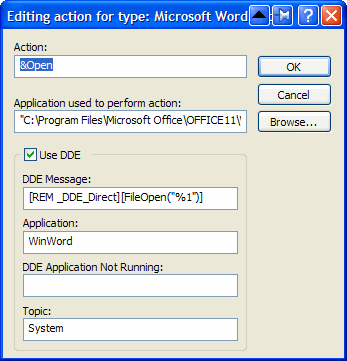
4. Select the Open action, click Edit. You will get a dialog box like this:
5. Uncheck Use DDE


6. In the field Application used to perform action, you will see something similar to
"C:\Program Files\Microsoft Office\OFFICE11\WINWORD.EXE" /n /dde
Remove everything after the application (in this case /n /dde) and add "%1". (Ensure you put %1 between double quotes ("), otherwise this might not work if the folder and/or filename of the document contains spaces).
The field should now contain

"C:\Program Files\Microsoft Office\OFFICE11\WINWORD.EXE" "%1?

7. Click OK, OK, Close

That’s it. One final note: the DDE functionality gets restored when you re-install the application. But that will probably also fix the DDE issue itself, and if not, simply follow the instructions above again.