
Bluetooth Adapter Ubuntu
VMWare ended up taking away the USB port for the blue-tooth adapter. Eventually, fixed by using USB 4-port to get a different adapter to get recognized. Ran the following, anyway and left it. Don't know if it did anything or not.
Refer: https://www.linuxliteos.com/manual/hardware.html#bluetooth
$ sudo leafpad /etc/bluetooth/audio.conf
Add the following to the file:
[General]
Enable = Source,Sink,Headset,Gateway,Control,Media
Disable = Socket
HFP=false
[A2DP]
SBCSources=1
MPEG12Sources=0
sudo add-apt-repository ppa:cschramm/blueman
sudo apt-get update && sudo apt-get install blueman pavucontrol pulseaudio-module-bluetooth -yUse this to see kernel version
uname -rUB500 Released September 2022
I've read in a few places that the TP-Link UB500 driver was added to the linux kernel starting with kernel version 5.16, meaning older kernel versions will require you to manually install the driver (https://github.com/tedboudros/tplink-ub500-linux-patch-guide)
Since Ubuntu 20.04 and 22.04 only have kernel version 5.15, I bought the previous version of this device (TP-Link UB400) and I can confirm it works out of the box on Ubuntu. I just plugged it in and it worked.
I'm currently using UB400, and UB500 DID NOT WORK yet.
You could build a newer kernel, instructions here:
Refer: https://github.com/tedboudros/tplink-ub500-linux-patch-guide
How to Change Your Kernel
Refer: https://blog.mruckman.com/2021/09/change-linux-kernel-being-used/
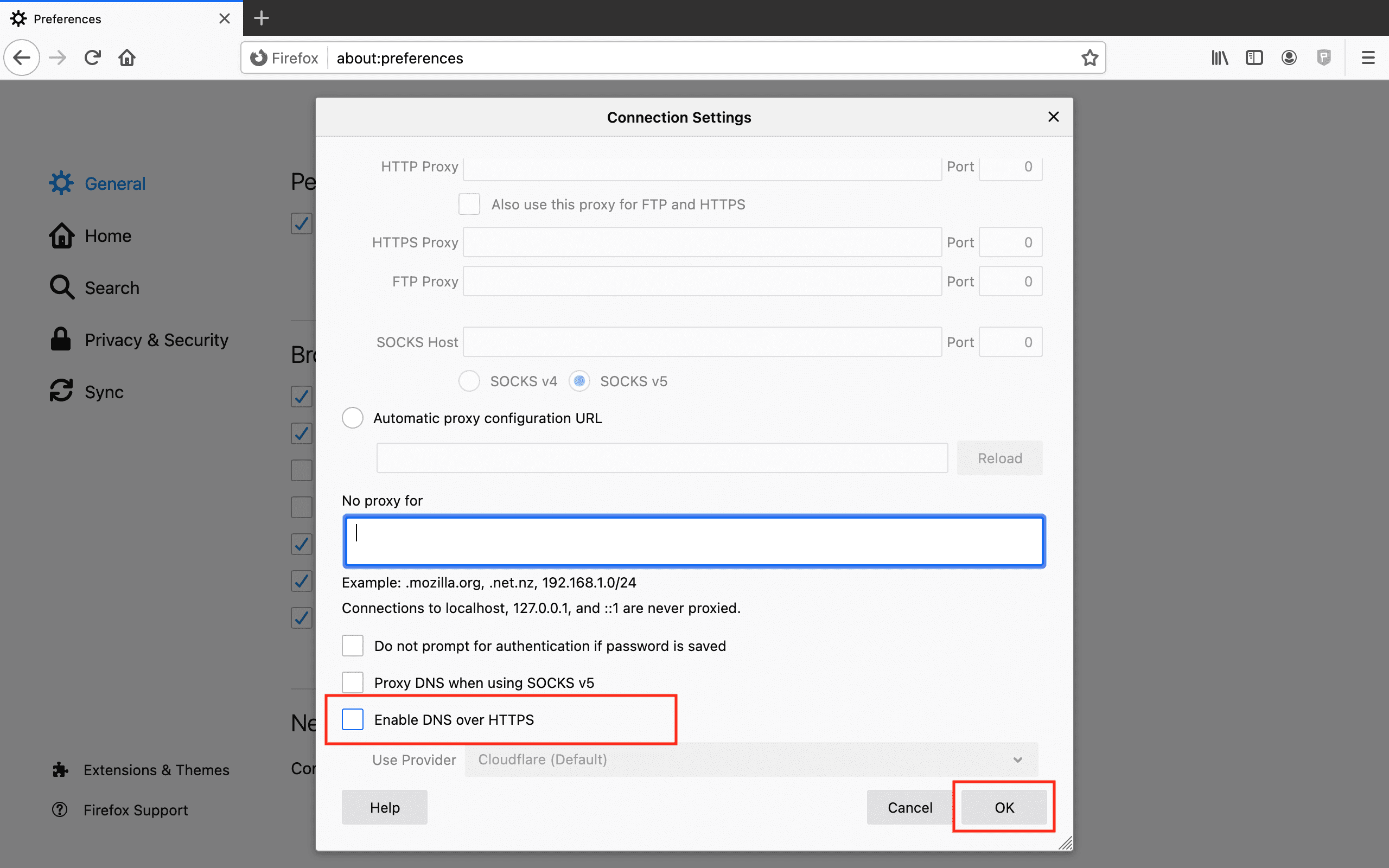
Disable DNS over HTTPS for Firefox
Refer: https://www.keepsolid.com/smartdns/manuals/how-to-disable-dns-over-https
Just go into settings and search for DNS
Mug Pancake
Refer: https://www.youtube.com/watch?v=DnuH1Yggnjw
1 Minute Fluffy Pancake recipe ( Mug Pancake):
- 13 g (1 tbsp) Butter
- 10 g (3/4 tbsp) Sugar
- 30 g (2 tbsp) Milk
- 25 g (3 tbsp) All purpose flour
- ¼ tsp Baking powder
- Maple Syrup
If you are using grams, please be precise and use the exact amounts in the recipe.
Every microwave is different. Mug cakes can take anywhere between 1 minute - 1 minute and 15 seconds. Be careful to not over cook your cake.
Panasonic Cordless Phone Wrong Time Zone
TROUBLESHOOTING - I set my time on my cordless phone and when someone calls me the time changes to the wrong time. How do I stop this?
What is happening is by default your phone uses what is known as the Caller ID information to obtain the time. So when someone calls you your phone, it is being given the time that is being used by the phone exchange of the phone provider.
If you wish to avoid this from happening you need to change the time settings in your phone from "Caller ID" to "manual".
Go to Menu->Time Settings->Time Adjust. Change from Caller ID to Manual.
Firefox Resources Hack
Refer: https://www.techrepublic.com/article/prevent-firefox-consuming-resources/
about:configSearch for
layers.acceleration.force-enabledSet to true and restart Firefox
Change Timezone on Ubuntu
From a Terminal
export TZ=America/Los_Angeles
timedatectl
Example Output
$ timedatectl
                      Local time: Sun 2022-09-18 18:28:01 UTC
                  Universal time: Sun 2022-09-18 18:28:01 UTC
                        RTC time: Sun 2022-09-18 18:28:03
                       Time zone: Etc/UTC (UTC, +0000)
       System clock synchronized: no
systemd-timesyncd.service active: yes
                 RTC in local TZ: no
Another way
sudo timedatectl set-timezone America/Los_AngelesInside a Docker Container
ln -fs /usr/share/zoneinfo/America/Los_Angeles /etc/localtime
dpkg-reconfigure --frontend noninteractive tzdata
Interactive Way
dpkg-reconfigure tzdataUbuntu Text to Speech from Command Line
Free Online WebSite
https://www.naturalreaders.com/online/
Paid Software with Lifetime Subscription
https://micmonster.com/pricing/
Alexa Has a Skill that can be accessed from a browser
Refer: https://www.lifewire.com/make-alexa-say-what-you-want-5204622
Install Alexa "Text to Voice" skill
One,
Two,
Three
Refer: https://askubuntu.com/questions/501910/how-to-text-to-speech-output-using-command-line
Say converts text to audible speech using the GNUstep speech engine.
sudo apt-get install gnustep-gui-runtime
say "hello"
Refer: https://www.geeksforgeeks.org/how-to-use-aplay-and-spd-say-command-in-linux/
spd-say Seems to be built-in
spd-say "Hello World"
spd-say -t female2 -r -30 "Hello World"Outlook OST File
If you need to delete your Outlook OST file because it is out of date, it's here:
C:\Users\mruckman\AppData\Local\Microsoft\OutlookHow to Remove Personal Information from Images and Photos
Refer: https://winaero.com/remove-personal-information-photos-linux/
To remove EXIF Information from photos in Linux, do the following:
- For your convenience, place all image you want to process to the single folder.
- Navigate to that folder.
- Open a new terminal and run the following command:
mogrify -strip IMG_2640.jpg