Set Cost of Filament
Settings, "Configure Setting Visibility..."
Change the currency code

Set the Cost


Technical notes, and other ideas.
Set Cost of Filament
Settings, "Configure Setting Visibility..."
Change the currency code
Set the Cost
Refer: https://www.thewindowsclub.com/ethernet-keeps-disconnecting-in-windows-10
Trying to disable power saver features on the network card by unchecking "Allow the computer to turn off this device to save power."

Create a .markdownlint.json file and place it in the root folder of your project.
{
    "default": true,
    "MD034": false
}When GoDaddy upgraded and change my server package, we move my domains from one plan to another; however, the sites never went live on the new servers. This was because GoDaddy's automated process did not update my DNS settings properly. Do this manually.
Get the IP address of the new server, and you need to go through each domain that you own and update the A records for the DNS.


So you have a file that starts with a dash/hyphen/- and need to delete it. But when you try to do so, the "rm" command complains that you have passed an "invalid option –". This post looks at the simple solution to deleting a file that starts with a dash/hyphen.
As an example, doing a directory listing gives you something like this:
$ ls -l
total 678586
-rw-r--r-- 1 root root        54 Apr 29 15:39 -.log
-rw-r--r-- 1 root root     26819 Apr 30 13:17 210.5.53.35.log
-rw-r--r-- 1 root root     18114 Apr 30 01:37 210.5.53.36.log
-rw-r--r-- 1 root root     18410 Apr 30 01:37 210.5.53.37.log
You try to delete the -.log file like this:
rm -.logand rm complains like this:
rm: invalid option -- .
Try rm ./-.log' to remove the file -.log'.
Try `rm --help' for more information.
The answer is actually supplied in the error message, which is fairly unusual for a Linux/Unix command. Instead of doing rm -.log you simply add ./ to the start and run this instead:
rm ./-.logThis will also work for other command line utilities you need to run against a file starting with a hypen/dash.
Eye of Gnome is eog
Refer: https://net2.com/how-to-display-images-in-the-command-line-in-linux-ubuntu/
Usage
eog image.png
eog *.png
Installation
sudo apt-get install eogUpdate the following CSS
Appearance, Customize, "Additional CSS"
.wrap {
    margin-left: auto;
    margin-right: auto;
    max-width: 1920px;
    padding-left: 2em;
    padding-right: 2em;
}Fix the ORA-00904: ORA_ROWSCN: invalid identifier error in SQLDeveloper with a few easy steps
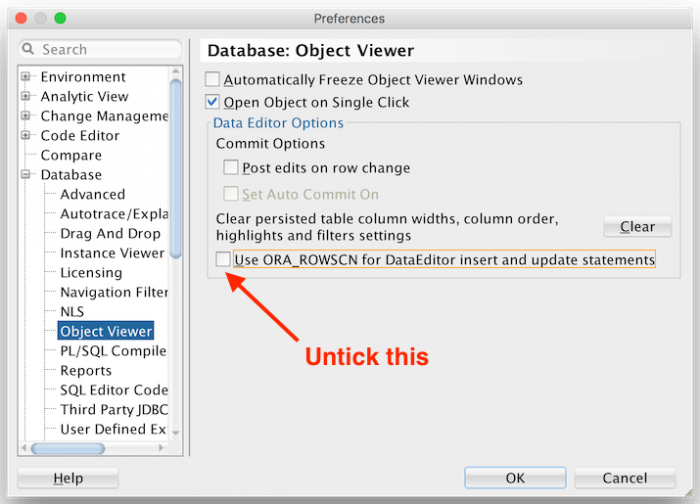
Turns out fixing this problem is easy. Open up the SQL Developer Preferences, then navigate to Database > Object Viewer. Untick the box that says Use ORA_ROWSCN for DataEditor insert and update statements.
Refer: https://ubuntuhandbook.org/index.php/2021/06/open-heic-convert-jpg-png-ubuntu-20-04/
Install Application for Conversion
sudo apt-get update
sudo apt-get install libheif-examples
Convert a File, you can keep default 92 by not specifying quality
heif-convert input.HEIC output.JPG
heif-convert -q 85 input.HEIC output.JPG
Or you can batch an entire folder
for file in *.HEIC; do heif-convert $file ${file/%.HEIC/.jpg}; done