Search for
Wi-Fi Hotspot To GoRefer:
Raw:
https://sno-isle.bibliocommons.com/v2/search?query=Wi-Fi%20Hotspot%20To%20Go&searchType=smart

Technical notes, and other ideas.
Search for
Wi-Fi Hotspot To GoRefer:
Raw:
https://sno-isle.bibliocommons.com/v2/search?query=Wi-Fi%20Hotspot%20To%20Go&searchType=smart
GUI Text Search Tool
sudo apt install searchmonkeyIf the application icon is missing, try the following:
sudo nano /usr/share/applications/searchmonkey.desktopUse the following image, verify it exists.
/usr/share/icons/hicolor/48x48/apps/searchmonkey.pngRefer: https://support.logi.com/hc/en-ca/articles/17177604450711-FAQ-Wave-Keys-MK670-Combo
Refer: https://www.amazon.com/gp/product/B0BTNXW6W2/ref=ppx_yo_dt_b_search_asin_title?ie=UTF8&psc=1
My NumPad/KeyPad is not working with Wave Keys keyboard, what should I do?
Make sure that the NumLock key is enabled. If pressing the key once doesn’t enable NumLock, press and hold the key for five seconds.

Tailscale for example had issues updating on VPN. To remove the unwanted PPAs, such as Tailscale, follow these steps:
Get a list of installed PPAs
ls /etc/apt/sources.list.d/It returns something like this
asbru-cm-release.list proposed.list sublime-text.list tailscale.list unit193-ubuntu-encryption-jammy.list vscode.lisTo remove tailscale, use this command
sudo rm /etc/apt/sources.list.d/tailscale.listPurge associated packages
sudo apt-get purge tailscaleUpdate the package list
sudo apt updateConvert PDF into PNG files
sudo apt update
sudo apt install poppler-utils
Usage
pdftoppm -png input.pdf output_name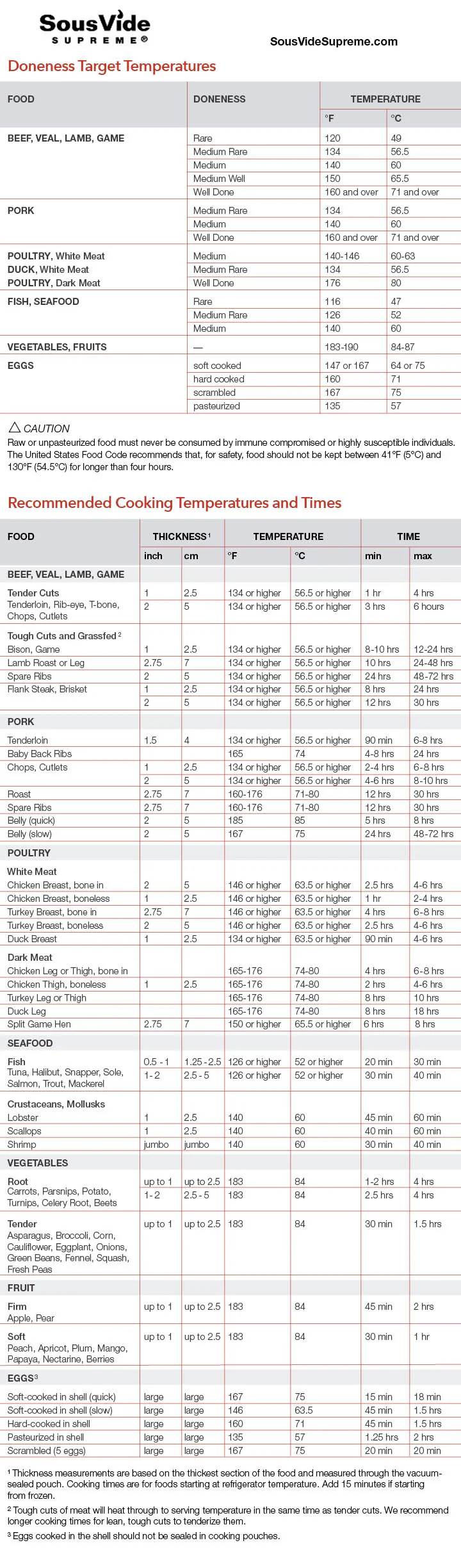
First install utility
sudo apt install webpNow convert image, heres and example, strangely it goes output file first and then input file
dwebp -o "times_and_temps.png" "times_and_temps.webp"Make sure to use iPhone backup for authenticator app, use your hotmail account legit, to get it working.
If you hold the Option Key and double-click a corner it will make the current window go full size.
Refer: https://www.howtogeek.com/how-to-remote-access-your-network-using-tailscale-vpn/
NOTE: Headscale is the open source implementation of Tailscale to avoid using the Tailscale's server.
This guide will walk you through installing Tailscale on Ubuntu 22.04, preventing it from running automatically, and starting/stopping it manually as needed.
It would be better to refer to their website:
https://tailscale.com/kb/1031/install-linux
First, update your system and install Tailscale using the following commands:
curl -fsSL https://pkgs.tailscale.com/stable/ubuntu/jammy.noarmor.gpg | sudo tee /usr/share/keyrings/tailscale-archive-keyring.gpg >/dev/null
curl -fsSL https://pkgs.tailscale.com/stable/ubuntu/jammy.tailscale-keyring.list | sudo tee /etc/apt/sources.list.d/tailscale.list
sudo apt-get update
sudo apt-get install tailscaleOnce installed, you'll need to authenticate your device with Tailscale. Run:
sudo tailscale upA URL will be provided; open it in your browser to log in and authenticate your device with your Tailscale account.
You're connected! You can find your Tailscale IPv4 address by running:
tailscale ip -4By default, Tailscale runs automatically on boot. If you prefer to control when it runs, disable the automatic startup by executing:
sudo systemctl disable tailscaledThis will stop Tailscale from starting every time your system boots.
You can now manually control when Tailscale starts and stops. Use the following commands:
Start Tailscale:
sudo systemctl start tailscaled
sudo tailscale up
Stop Tailscale:
sudo tailscale down
sudo systemctl stop tailscaledIf you want to check whether Tailscale is running, use the command below:
sudo systemctl status tailscaledThis will show you the current status of the Tailscale service, including whether it is active, inactive, or stopped.
Now you can manually control Tailscale on your Ubuntu 22.04 system.
Uninstall Tailscale
Stop the Tailscale Service
sudo systemctl stop tailscaledRemove application
sudo apt remove tailscaleRemove any configuration files
sudo apt purge tailscaleOptional Removal of Dependencies
sudo apt autoremoveVerify removal
which tailscale