
Windows 10 Shutdown Restart Issue with Parallels

Symptoms
The virtual machine processor was reset by the operating system. error message is shown when working with a Windows virtual machine:

Resolution
While Parallels Engineering Team is working on the permanent fix for this issue by disabling hybrid hibernation it's possible to temporary resolve the issue:

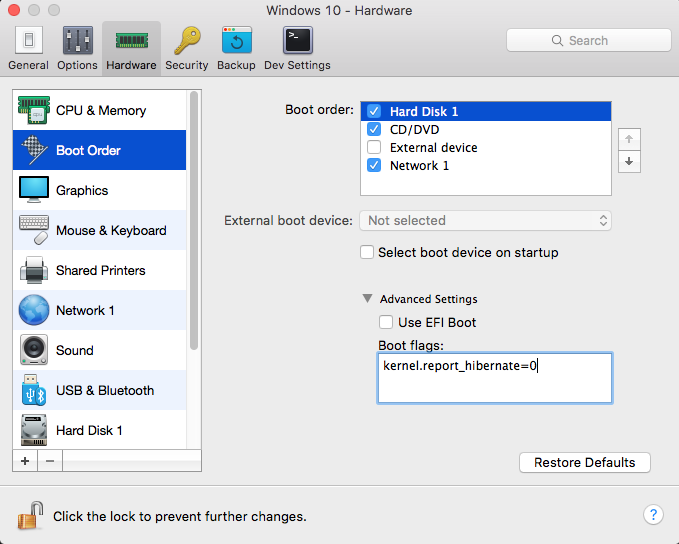
  • Shut down the Windows virtual machine and open its configuration.
  • Switch to the Hardware tab and choose Boot Order from the list.
  • Expand Advanced Settings dropdown menu and insert the following boot flag in the Boot flags section:
    kernel.report_hibernate=0

Refer: https://kb.parallels.com/en/123831
Other possible solutions, did not work but when using the above switch, the options completely disappeared as an option.  The trick was to delete the fast boot option.

Refer: https://winaero.com/blog/how-to-disable-or-enable-fast-startup-in-windows-10/
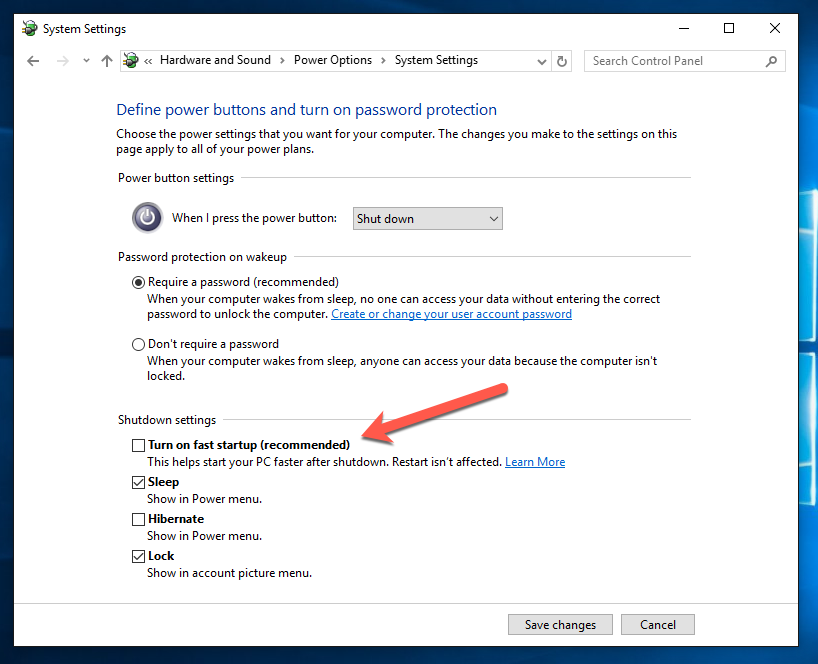
To disable Fast Startup in Windows 10, follow these simple instructions:

  • Right click the Start button or you can press Win + X shortcut keys together to open the Power Users menu / Win + X menu.
  • In the Win+X menu, click the Control Panel item. Windows 10 win+x menu control panel
  • Go to the following applet:
  • Control Panel\System and Security\Power Options
    Windows 10 Control panel Power options
  • Click the link "Change what the power button does" on the left.
  • The following window will appear on the screen: Windows 10 change what power button does
  • Click on the 'Change settings that are currently unavailable' link to make the Shutdown options available.
  • Untick the Turn on fast startup (recommended) option: Windows 10 disable fast startup

That's it. Now the Fast Startup feature is disabled.

Slow Shutdown Ubuntu 16.04

After doing some cleanup, it looks like shutdown was starting to take a long time.  Did the following figuration change.

Refer: https://blog.imposeren.org/2016/11/how-to-fix-ubuntu-1604-hangs-or-very.html

$ sudo edit /etc/systemd/system.conf

Uncomment the following line and change it from 10 seconds to 5 seconds

[Manager]
DefaultTimeoutStopSec=5s

Logitech Mouse and Keyboard Software

You need to install this software on your Mac to get it working properly.

Refer: https://support.logitech.com/en_us/product/wireless-mouse-m510/downloads

Logitech Options

Logitech Control Center

Logitech Unifying Software

Custom Linux Live CD

Refer: https://www.ostechnix.com/create-custom-ubuntu-live-cd-image/

Install Cubic
Cubic developer has made a PPA to ease the installation process. To install Cubic on your Ubuntu system, run the following commands one by one in your Terminal:

$ sudo apt-add-repository ppa:cubic- wizard/ release
$ sudo apt-key adv --keyserver keyserver. ubuntu. com --recv-keys 6494C6D6997C215E
$ sudo apt update
$ sudo apt install cubic

How to fix – Apple Calendar can’t save event to Exchange

Refer: https://michaelkummer.com/technology/fix-calendar-cant-save-event-x-exchange/

The Calendar app often gives you three options: Revert to Server, Try Again and Ignore. In some cases, neither option resolves the issue, and the error message keeps coming back, every time Calendar tries to synchronize with the Exchange Server.

The solution involves deleting some cache files and restarting all Calendar processes. In a nutshell, you have to:

The following 3 files were deleted and fixed the problem:

  • Go to ~/Library/Calendars
  • Calendar Cache-wal
  • Calendar Cache-shm
  • Calendar Cache
  • Quit Calendar application (Command + Q)
  • Quit Apple Mail
  • Open Activity Monitor (through Spotlight or Launchpad)
  • Search for “Calendar” and quit all the relevant processes
  • Open Finder and navigate to ~/Library/Calendars
  • Double-check Activity Monitor to make sure no Calendar-related processes are running
  • Delete cache files
  • Relaunch Calendar

Ubuntu Wifi on Macbook Pro

Refer: https://askubuntu.com/questions/470153/no-wireless-when-install-14-04-on-macbook-pro

NOT TRIED

Please do:

sudo apt-get update
sudo apt-get install firmware-b43-installer
Reboot if it does not connect post a new file from the script.

No internet:

Download the b43updated.zip file to a usb flash drive then drag and drop the file to your ubuntu desktop. Right-click it and select Extract Here.

Open a terminal and do:

sudo mkdir /lib/firmware/b43
sudo cp Desktop/b43/* /lib/firmware/b43
sudo modprobe -rv b43
sudo modprobe -v b43
if it does not come on reboot.