Search direct and sub-directories, looking for invalid XML
Refer: https://www.commandlinefu.com/commands/view/7723/validate-all-xml-files-in-the-current-directory-and-below
$ find -type f -name "*.xml" -exec xmllint --noout {} \;

Technical notes, and other ideas.
Search direct and sub-directories, looking for invalid XML
Refer: https://www.commandlinefu.com/commands/view/7723/validate-all-xml-files-in-the-current-directory-and-below
$ find -type f -name "*.xml" -exec xmllint --noout {} \;
/usr/share/applications
For an Audiobook, it was necessary to play it as music, and rename the Album for each disk with a prefix, like 01, 02 .. 0N, it could not keep the tracks from mixing otherwise.
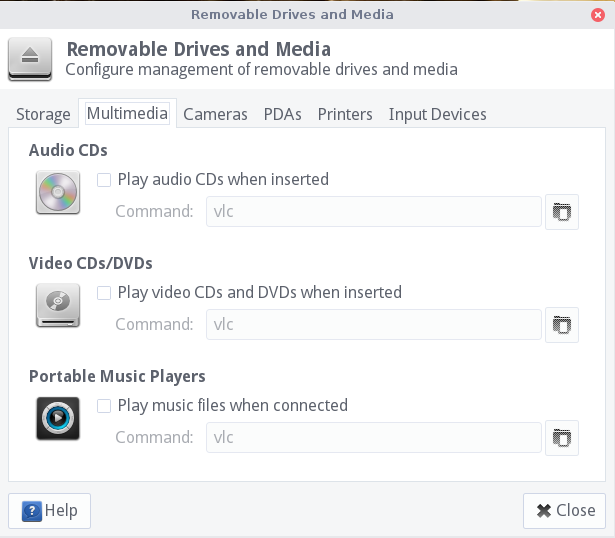
To turn this off, go to Menu, "Removable Drives and Media", Multimedia
And uncheck all of the "vlc" options.
When using Nautilus, use Ctrl+L to switch to text paths.
Refer: https://unix.stackexchange.com/questions/154106/show-address-bar-w-full-path-in-nautilus-instead-of-breadcrumbs-bar
Droid font has been deprecated in Ubuntu 16.04, and this causes the underline character to NOT render in the visual source code terminal. Change the font settings:
"editor.fontFamily": "Liberation Mono",
Okay but not as good:
"editor.fontFamily": "'Noto Mono', 'Droid Sans Mono', 'Courier New', monospace, 'Droid Sans Fallback'",
Problem: Ubuntu Lite keeps asking to unlock keyring
Solution: Unlock the keyring and/or change its password to match logon
$ sudo apt-get install seahorse
Refer: https://askubuntu.com/questions/867/how-can-i-stop-being-prompted-to-unlock-the-default-keyring-on-boot
Refer: https://support.mozilla.org/en-US/questions/1126509
You can look at this extension:
You can copy files like these to the current Firefox profile folder to restore specific data.
You can use this button to go to the current Firefox profile folder:
See also:
Refer: https://aws.amazon.com/premiumsupport/knowledge-center/connect-to-ubuntu-1604-windows/