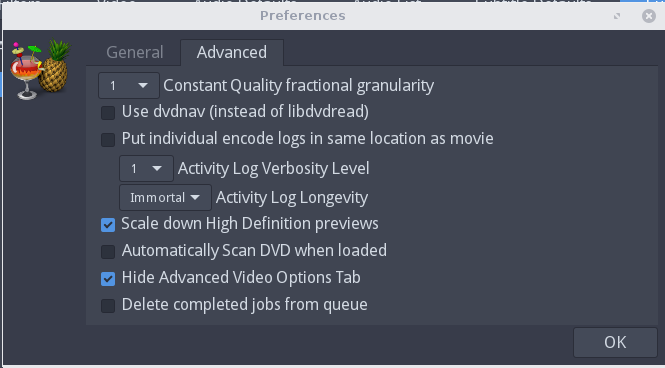
Go to File, Preferences, Advanced, and toggle the "Use dvdnav (instead of libdvdread). By default on Ubuntu this is checked, try unchecking it, when done put it back again.

Technical notes, and other ideas.
Go to File, Preferences, Advanced, and toggle the "Use dvdnav (instead of libdvdread). By default on Ubuntu this is checked, try unchecking it, when done put it back again.
Refer: https://itsfoss.com/best-linux-screen-recorders/
$ sudo apt install kazam
Works fairly well when capturing full screen. Has issues trying to capture a window area.
Refer: https://launchpad.net/~stebbins/+archive/ubuntu/handbrake-releases
From a terminal do the following three steps, Had to do step one to purge, logout and finish the other two steps
Remove any old versions:
$ sudo apt-get purge handbrake # remove any old versions
$ sudo add-apt-repository ppa:stebbins/handbrake-releases
$ sudo apt-get update
$ sudo apt-get install handbrake-gtk
The command line interface:
$ sudo apt-get install handbrake-cli
/media/Cavalry2T/DVD's/Joseph
Install the following package:
$ sudo add-apt-repository ppa:nathan-renniewaldock/qdirstat
$ sudo apt-get update
$ sudo apt install qdirstat
Refer: https://www.makeuseof.com/tag/how-to-analyze-your-disk-usage-pattern-in-linux/
Refer: https://askubuntu.com/questions/703746/how-to-completely-remove-virtualbox
$ sudo apt-get remove --purge virtualbox
Run these commands to delete all virtual machines and settings and Virtual Hard Drives:
$ sudo rm ~/"VirtualBox VMs" -Rf
$ sudo rm ~/.config/VirtualBox/ -Rf
If you want to install it again. Run this command:
$ sudo apt-get install virtualbox
Watch for IP Used to Contact Sublime
$ sudo netstat -nputwc | grep subl
Example Output:
tcp 0 0 10.211.55.6:46296 45.55.255.55:80 ESTABLISHED 337/sublime_text
tcp 0 0 10.211.55.6:46296 45.55.255.55:80 ESTABLISHED 337/sublime_text
Block with iptables
$ sudo iptables -A OUTPUT -j DROP -d 45.55.255.55
List your iptables
$ sudo iptables -S
Older Methods No Longer Work
Refer: https://stackoverflow.com/questions/35269327/how-to-disable-new-version-notifications/35269421
go to Preferences -> Settings-User and add there: "update_check": false
EDIT :
If it's not working then add this line 127.0.0.1 www.sublimetext.com in your host file
File Location
Windows : c:/windows/system32/drivers/etc/hosts
Linux : /etc/hosts
Refer: http://ubuntuhandbook.org/index.php/2014/10/install-vmware-player-ubuntu-14-10/
sudo apt-get install build-essential linux-headers-$(uname -r)
1. Open file browser and navigate to Downloads folder.
2. Right-click on the VMware Player package and select Properties.
3. Under Permissions tab, check the box that says “allow executing file as program”
cd /home/mruckman/Downloads/
sudo ./VMware-Player-14.0.0-6661328.x86_64.bundle
Refer: https://appuals.com/install-virtualbox-ubuntu-16-04/
Get Latest Version of VirtualBox
Refer: https://www.virtualbox.org/wiki/Linux_Downloads
sudo apt-get install libqt5x11extras5 libsdl1.2debian libsdl-ttf2.0-0
sudo dpkg -i virtualbox-5.2_5.2.2-119230~Ubuntu~xenial_amd64.deb
sudo apt-get install -f
Refer: http://www.linux-hardware-guide.com/2013-12-24-brother-p-touch-pt-2430pc-label-maker-usb
$ sudo apt-get install libgd-gd2-perl libgtk2-gladexml-perl
Download this software:
blabel_0.07-1_all-deb.zip
Refer: http://apz.fi/blabel/
$ sudo dpkg -i blabel_0.07-1_all.deb
$ sudo apt-get install -f
Switch the printer to 'extended' mode (flip the switch at the back to 'E'), connect it to your box and turn the printer on. Add it as a ASCII-printer (the printer driver should say "Generic text-only printer"), this happens in Ubuntu.
Switch it back to EL for Windows
$ blabel
Monospace 20, put 9 spaces in front of text and 1 space at end
Center, Middle, PT-2430PC, Inverse
Refer: https://webapps.stackexchange.com/questions/45616/trello-how-do-i-find-all-the-cards-archived-when-on-a-particular-list
Finding Archived Items:
is:archived
Finding Archived Items and in a list:
is:archived list:Done