Refer: https://discussions.apple.com/thread/7030473?tstart=0
System Preferences
Flash Player
Storage, Delete All
Advanced, Delete All

Technical notes, and other ideas.
Refer: https://discussions.apple.com/thread/7030473?tstart=0
System Preferences
Flash Player
Storage, Delete All
Advanced, Delete All
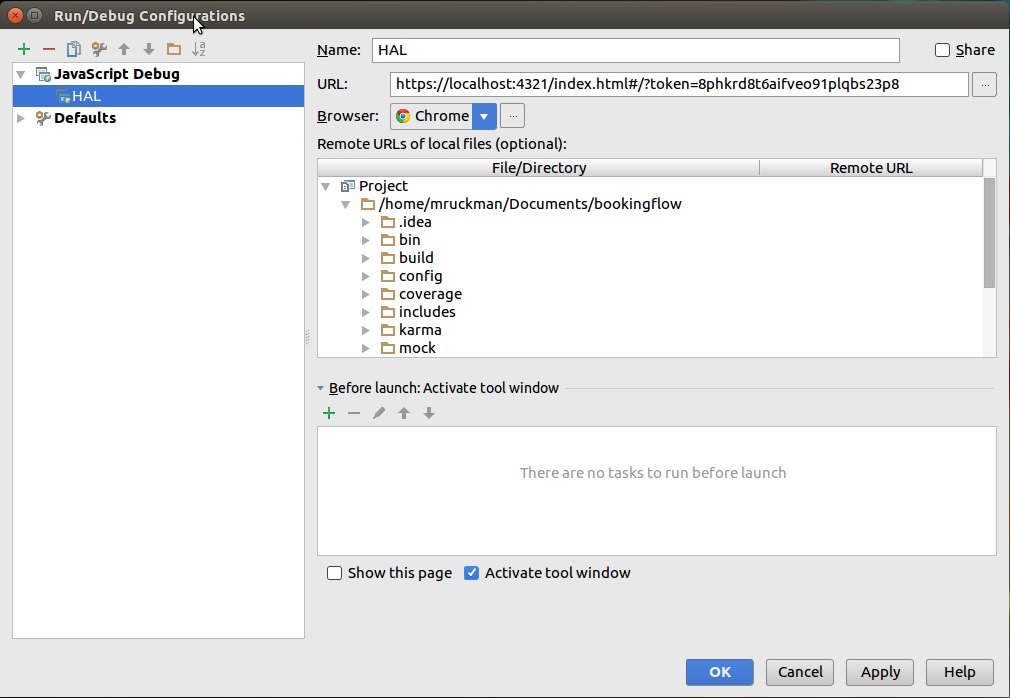
In order to Debug in WebStorm, you will need a couple of things. The Chrome plug-in for WebStorm is the first.
Once that is done, you should setup a debugger configuration to launch from within WebStorm, using JavaScript Debug. You'll need launch this target in Debug. You can also setup Chrome as your default browser.
Using Soundflower on your Macbook Pro, to record sounds from your computer
0. Install Soundflower and reboot your laptop
You will not be able to monitor your session on your laptop, if you wish to follow the audio, you will need another device
1. Open sound, and change the output to Soundflower (ch2)
2. On the Quicktime choose from the dropdown Soundflower (ch2)
3. Start your recording
4. When done, save the recording
5. Switch your sound output back to the device of your choice
6. Enjoy your video
When doing ssh or scp you get the following error:
no matching cipher found: client aes256-cbc,aes192-cbc,blowfish-cbc,cast128-cbc,aes128-cbc,3des-cbc server chacha20-poly1305@openssh.com,aes128-ctr,aes192-ctr,aes256-ctr
You can fix with, but you've removed security
$ scp -c none other-stuff-here
$ ssh -c none username@hostname
Refer: http://steronius.blogspot.com/2014/10/ssh-no-matching-cipher-found.html
[jboss1@haldevjbs13 /tmp/mongo-backup/export-testcms-20160709]$ less /home/jboss1/.ssh/known_hosts.old
[jboss1@haldevjbs13 /tmp/mongo-backup/export-testcms-20160709]$ less /home/jboss1/.ssh/known_hosts
Overview with Different Languages
http://www.url-encode-decode.com/base64-encode-decode/
JWT Decode Online
http://jwt.calebb.net
Online Decoder:
http://kjur.github.io/jsjws/tool_b64udec.html
Perl
#!/usr/bin/perl

use MIME::Base64;
print "Sample JWT Payload\n";
my $myPayload = "eyJqdGkiOiI3YmNiMTQ5ZS1lZTFlLTQ2YWQtODlkNy04ZWVkMTFmODc1ZTEiLCJpYXQiOjE0NjUzMjI3NzgsInN1YiI6IkVyaWMiLCJpc3MiOiJBUElNb2R1bGUiLCJyb2xlcyI6WyJ1c2VyIiwiYWRtaW4iXSwiZXhwIjoxNDY1MzIyODI4fQ";
print decode_base64($myPayload)."\n";
print "\n--- Encrypt and Decrypt Base64 Example ---\n\n";
$myPayload = '{"jti":"7bcb149e-ee1e-46ad-89d7-8eed11f875e1","iat":1465322778,"sub":"Eric","iss":"APIModule","roles":["user","admin"],"exp":1465322828}';
$myPayload_enc = encode_base64($myPayload);
print $myPayload_enc."\n";
print decode_base64($myPayload_enc)."\n";
Command Executed:
Preeti-Fnus-MacBook-Pro:security root# openssl s_client -connect halinquirytest.halw.com:443 -showcerts
CONNECTED(00000003)
depth=0 /OU=Domain Control Validated/CN=halinquirytest.halw.com
verify error:num=20:unable to get local issuer certificate
verify return:1
depth=0 /OU=Domain Control Validated/CN=halinquirytest.halw.com
verify error:num=27:certificate not trusted
verify return:1
depth=0 /OU=Domain Control Validated/CN=halinquirytest.halw.com
verify error:num=21:unable to verify the first certificate
verify return:1
---

Certificate chain

0 s:/OU=Domain Control Validated/CN=halinquirytest.halw.com

i:/C=US/ST=Arizona/L=Scottsdale/O=GoDaddy.com, Inc./OU=http://certs.godaddy.com/repository//CN=Go Daddy Secure Certificate Authority - G2

-----BEGIN CERTIFICATE-----

MIIFRzCCBC+gAwIBAgIJAOuSdfQd4EJsMA0GCSqGSIb3DQEBCwUAMIG0MQswCQYD

VQQGEwJVUzEQMA4GA1UECBMHQXJpem9uYTETMBEGA1UEBxMKU2NvdHRzZGFsZTEa

MBgGA1UEChMRR29EYWRkeS5jb20sIEluYy4xLTArBgNVBAsTJGh0dHA6Ly9jZXJ0

cy5nb2RhZGR5LmNvbS9yZXBvc2l0b3J5LzEzMDEGA1UEAxMqR28gRGFkZHkgU2Vj

dXJlIENlcnRpZmljYXRlIEF1dGhvcml0eSAtIEcyMB4XDTE1MDgyNTIxNTUzOFoX

DTE2MDgyNTIxNTUzOFowRTEhMB8GA1UECxMYRG9tYWluIENvbnRyb2wgVmFsaWRh

dGVkMSAwHgYDVQQDExdoYWxpbnF1aXJ5dGVzdC5oYWx3LmNvbTCCASIwDQYJKoZI

hvcNAQEBBQADggEPADCCAQoCggEBALi26qE3lUt3aEKs23PnGlsi55ZYs0lItmoE

sRBbm4WTnuGV3wnogNOOij0SvVcIqUvWsFmnWlOb3Yp1leW0htAsUgz0COF2Jy7N

9PejmgRUQ9Kl9MamifH0nRQaFD9V41JxHawGIbtoxC6Ub6STagNAt7HJZqqz6SBM

wJVuoBLL4jkV4CVFUvo+xICB+9TVE+r5I5ZtnKwt9YpLb7fSQjRAgy+9BfGZt6iX

sD/SY7E+FlWYsK9ENamUnt+BVY6uXtN1DpIPVc0Quy5bJ4r0mV4URchouzb38iG5

ypD7h96OHNCrIgS6h7xVBaZeYnfrc+dRRSRgU+dGeS5PYuLiE7MCAwEAAaOCAcgw

ggHEMAwGA1UdEwEB/wQCMAAwHQYDVR0lBBYwFAYIKwYBBQUHAwEGCCsGAQUFBwMC

MA4GA1UdDwEB/wQEAwIFoDA3BgNVHR8EMDAuMCygKqAohiZodHRwOi8vY3JsLmdv

ZGFkZHkuY29tL2dkaWcyczEtMTEzLmNybDBTBgNVHSAETDBKMEgGC2CGSAGG/W0B

BxcBMDkwNwYIKwYBBQUHAgEWK2h0dHA6Ly9jZXJ0aWZpY2F0ZXMuZ29kYWRkeS5j

b20vcmVwb3NpdG9yeS8wdgYIKwYBBQUHAQEEajBoMCQGCCsGAQUFBzABhhhodHRw

Oi8vb2NzcC5nb2RhZGR5LmNvbS8wQAYIKwYBBQUHMAKGNGh0dHA6Ly9jZXJ0aWZp

Y2F0ZXMuZ29kYWRkeS5jb20vcmVwb3NpdG9yeS9nZGlnMi5jcnQwHwYDVR0jBBgw

FoAUQMK9J47MNIMwojPX+2yz8LQsgM4wPwYDVR0RBDgwNoIXaGFsaW5xdWlyeXRl

c3QuaGFsdy5jb22CG3d3dy5oYWxpbnF1aXJ5dGVzdC5oYWx3LmNvbTAdBgNVHQ4E

FgQUp9Cg4a7eWhkr09m9lV/DMKCvDbswDQYJKoZIhvcNAQELBQADggEBACuAbo68

SOrL7Ak4CRPde9m2Dqwx1ViHK4fe+lz3lAXOlfuRXwnIA6KNMzEScIsW8YCyIr7K

VGN3++FaRrlDlIHlajn7uEr2UsCN+vpFW/0XPVDoESO0FDoGILgvh/IbIUwiW9TA

p+rcfJjeM2uGRTQY3YWo0bWNc0RC4YpUo2nmdvV35I/ga3U50ER60mYmThMWvXb3

LMU9Sw36XKkvSBPGLr1rJWu/rzQKtuwWMWXw8CuhxTCgKxROMzhnw4jUbtAI+oyd

a0+6rmOb9HAmraqRZW2/qjOqseo+Ld5np7c8rxPXb2JtLwN7hYQnlI0/YefQ4kBX

YRcEyQvMJ+d1j5s=

-----END CERTIFICATE-----
---
Server certificate
subject=/OU=Domain Control Validated/CN=halinquirytest.halw.com
issuer=/C=US/ST=Arizona/L=Scottsdale/O=GoDaddy.com, Inc./OU=http://certs.godaddy.com/repository//CN=Go Daddy Secure Certificate Authority - G2
---
No client certificate CA names sent
---
SSL handshake has read 1498 bytes and written 440 bytes
---
New, TLSv1/SSLv3, Cipher is RC4-MD5
Server public key is 2048 bit
Secure Renegotiation IS supported
Compression: NONE
Expansion: NONE
SSL-Session:
Protocol : TLSv1
Cipher : RC4-MD5
Session-ID: 982500008C3CC53F4FDF7678FCD3A2EF83F01834E69EF11B3746A0F63CC9265B
Session-ID-ctx:
Master-Key: C6EE7071AE8731E7554122713C6D81FB3415EB75BE83E6D9CFB039F2030739D77D9A98196993F82A8AA69129967B5EC9
Key-Arg : None
Start Time: 1463000757
Timeout : 300 (sec)
Verify return code: 21 (unable to verify the first certificate)
---
Refer: https://tomeuwork.wordpress.com/2014/05/12/how-to-install-oracle-sqlplus-and-oracle-client-in-mac-os/
Refer: https://halpjira01.flagship.hal.com:9443/confluence/pages/viewpage.action?pageId=46664178
Instructions for this setup were taken from this blog post and massaged to reflect the current version number of the Oracle application.
Download the following two files from the Oracle website: http://www.oracle.com/technetwork/topics/intel-macsoft-096467.html
"Instant Client Package - Basic"
"Instant Client Package - SQL*Plus"
Extract the files and create the proper directory structure
Open the terminal and unzip the downloaded files
$ unzip -qq instantclient-basic-macos.x64-12.1.0.2.0.zip
$ unzip -qq instantclient-sqlplus-macos.x64-12.1.0.2.0.zip
These will be extracted into a single directory: instantclient_12_1
Create the expected directory structure
$ mkdir -p /Applications/oracle/product/instantclient_64/12.1.0.2.0/{bin,lib,jdbc/lib,rdbms/jlib,sqlplus/admin,network/admin}
Transfer files over to the new directory
$ ORACLE=/Applications/oracle/product/instantclient_64/12.1.0.2.0
mv ojdbc* $ORACLE/jdbc/lib/
mv x*.jar $ORACLE/rdbms/jlib
mv glogin.sql $ORACLE/sqlplus/admin
mv *dylib* $ORACLE/lib/
mv *README $ORACLE
mv ./* $ORACLE/bin/
Add tnsnames.ora to /Applications/oracle/product/instantclient_64/12.1.0.2.0/network/admin/
You should be able to get this file from another dev
Set up the environment variables
$ cd ~ && vi ~/.bash_profile
Add the following exports to .bash_profile
export ORACLE_HOME=/Applications/oracle/product/instantclient_64/12.1.0.2.0
export PATH=$ORACLE_HOME/bin:$PATH
export DYLD_LIBRARY_PATH=$ORACLE_HOME/lib
Update .bash_profile
$ source ~/.bash_profile
After all that, you should now be able to run SQL*Plus from the command line.
Refer: http://stephen.io/mediaqueries/
$ cd ~/.local/share/Trash
$ sudo chown -R your_user_name:your_group *
Refer: https://androidmtk.com/root-samsung-galaxy-core-gt-i8262