
DEL Should NOT Send Payload – Akamai Error

From: Maurice Ruckman <MRuckman@HollandAmericaGroup.com>
Date: Thursday, October 29, 2015 at 9:24 PM
To: Ruchika Bhartiya <RBhartiya@HollandAmerica.com>, Donald Tripp <DTripp@HollandAmerica.com>, "Franco, Mark (CarnCorp)" <MFranco@carnival.com>
Cc: Anila Augustine <AAugustine@HollandAmericaGroup.com>, "Bogh, Allan (HA Group Contractor)" <ABogh@HollandAmericaGroup.com>, "DCosta, John (HA Group)" <JDCosta@HollandAmericaGroup.com>
Subject: Re: Akamai config for put/post

Thanks for the help Ruchika and Don! Just to close the loop on this. The issue turned out to be sending a payload with a DELETE request. Here are the final notes from a meeting with Akamai.

On Oct 29, 2015, at 3:48 PM, Gupta, Diwaker <diwakg@akamai.com> wrote:
Thank you for your time over the phone. Recap of discussion over the phone :

  • This issue is observed in the cases if the first request method is Delete , and contains a payload and the next requests uses the same persistent connection
  • The latest HTTP RFC states that there are no defined semantics for payloads in DELETE requests (https://tools.ietf.org/html/rfc7231#page-29).
  • It doesn’t specifically say they should be allowed or denied but mentions that a server may reject the request
  • We don’t deny this requests. However the payload is added to the subsequent request causing the request to fail
  • The fix will be to either remove delete payload, or deactivate persistent connection between Akamai and client for Delete method
  • As discussed we can remove the payload from Delete , and will re run the tests to confirm if the issue is fixed.
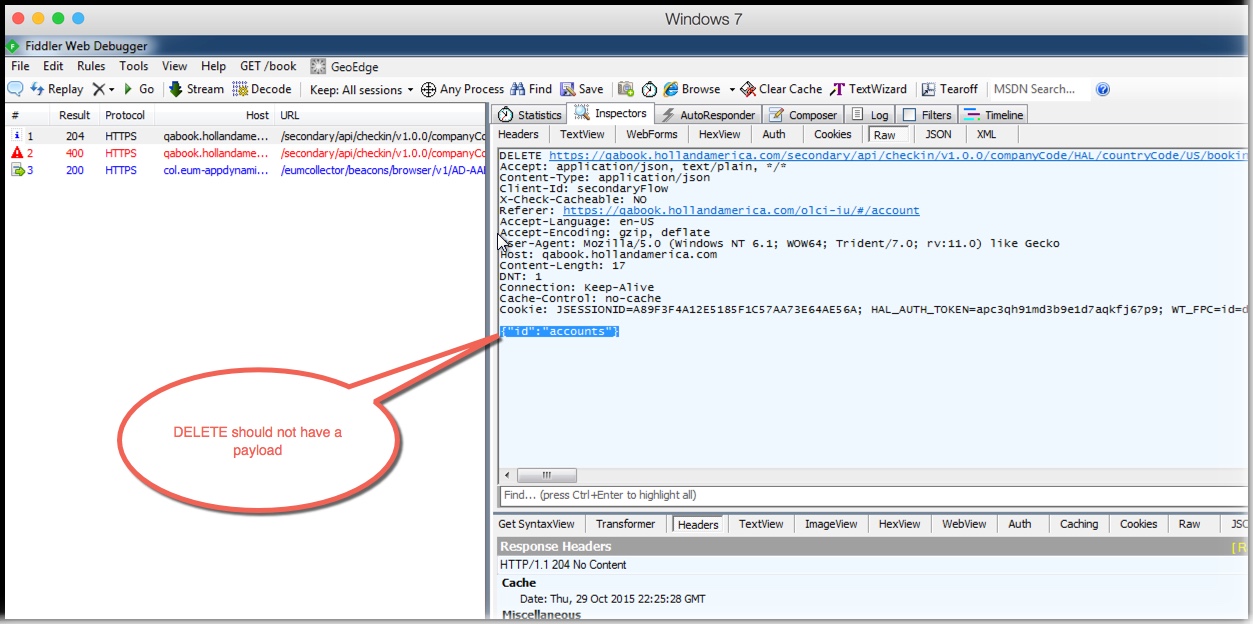
DEL-No-Payload-2015-10-29_15-38-48

Problem with Outlook on Mac Mail

Could not delete an email message.  I was actually already deleted but it kept showing up on mail and could not be deleted.  Solution was to rebuild the email.

"mailbox, rebuild" fixed the problem.

Delete File on Reboot

SysInternals has a utility to delete files upon reboot just in case the files are locked. See the notes below:

There are several applications, such as service packs and hotfixes, that must replace a file that's in use and is unable to. Windows therefore provides the MoveFileEx API to rename or delete a file and allows the caller to specify that they want the operation to take place the next time the system boots, before the files are referenced. Session Manager performs this task by reading the registered rename and delete commands from the HKLM\System\CurrentControlSet\Control\Session Manager\PendingFileRenameOperations value.

This applet dumps the contents of the pending rename/delete value and also reports an error when the source file is not accessible. Here is example output that shows a temporary installation file is schedule for deletion at the next reboot:

C:\>pendmovesPendMove v1.02
Copyright (C) 2004 Mark Russinovich
Sysinternals - wwww.sysinternals.com

Source: C:\Config.Msi\3ec7bbbf.rbf
Target: DELETE

The included MoveFile utililty allows you to schedule move and delete commands for the next reboot:

usage: movefile [source] [dest]Specifying an empty
destination ("") deletes the source at boot.

An example that deletes test.exe is:

movefile test.exe ""