
For Ubuntu 20.04, download the Ubuntu_20.04_Printer_Setup.zip file and follow the instructions.
For Ubuntu 18.04 18.04 setup it was necessary to go through the browser base setup instead of the GUI based setup:
Important - Security is messed up and a fix is required:
Refer: https://bugs.launchpad.net/ubuntu/+source/cups/+bug/1769893
$ sudo usermod -aG lpadmin YourUserName
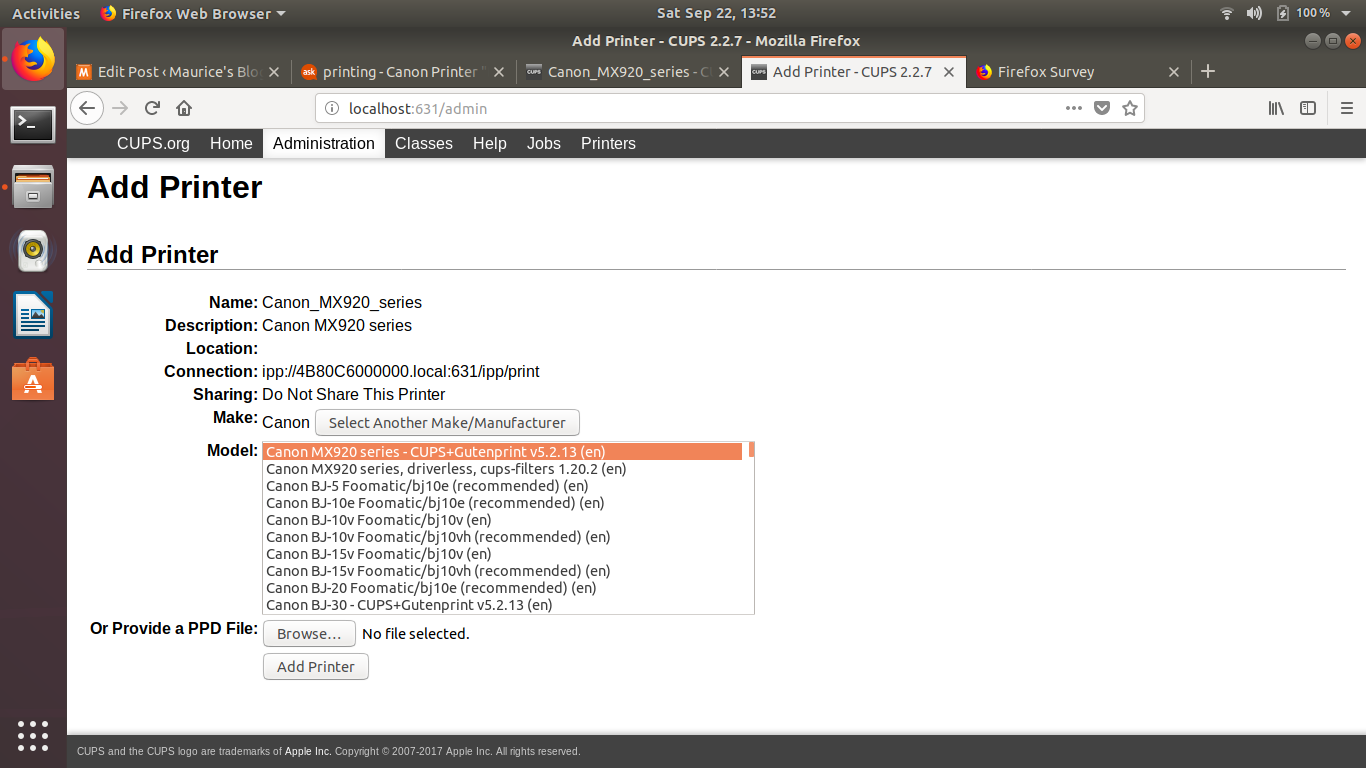
As you go through the settings choose the CUPS option for MX900 and NOT the driverless version. It should look something like:
Canon MX920 series - CUPS+Gutenprint v5.2.13 (color, 2-sided printing)
Older Items from Research - DO NOT USE - Does NOT Work
Go here, to copy off the drivers, you will have to be sudo and copy them and change permissions
/etc/cups/ppd for files ending in ".ppd"
Trying to troubleshot MX922 Cannon printer, seemed to stop working after 18.04.1 upgrade.
Refer: https://askubuntu.com/questions/1052928/canon-printer-does-not-accept-jobs-on-ubuntu-18-04