Refer: https://unix.stackexchange.com/questions/85663/poweroff-or-reboot-as-normal-user
$ sudo gedit /etc/sudoers
Add the following line:
mruckman ALL=NOPASSWD: /sbin/halt, /sbin/reboot, /sbin/poweroff
Technical notes, and other ideas.
Refer: https://unix.stackexchange.com/questions/85663/poweroff-or-reboot-as-normal-user
$ sudo gedit /etc/sudoers
Add the following line:
mruckman ALL=NOPASSWD: /sbin/halt, /sbin/reboot, /sbin/poweroffSymptoms
The virtual machine processor was reset by the operating system. error message is shown when working with a Windows virtual machine:
Resolution
While Parallels Engineering Team is working on the permanent fix for this issue by disabling hybrid hibernation it's possible to temporary resolve the issue:
Refer: https://kb.parallels.com/en/123831
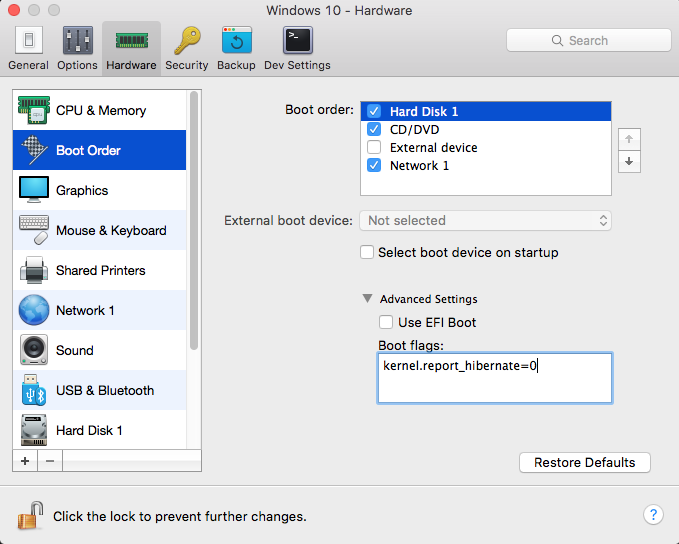
Other possible solutions, did not work but when using the above switch, the options completely disappeared as an option. The trick was to delete the fast boot option.
Refer: https://winaero.com/blog/how-to-disable-or-enable-fast-startup-in-windows-10/
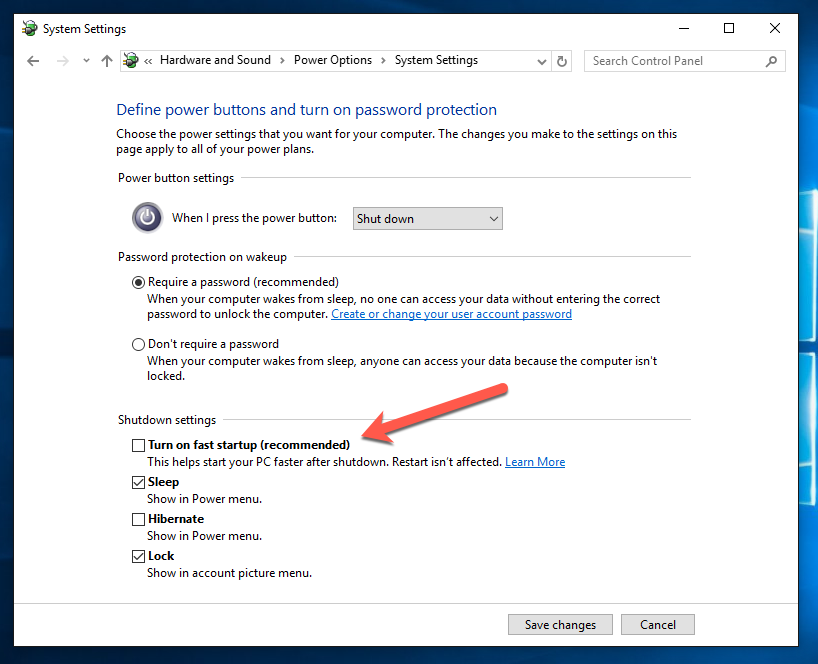
To disable Fast Startup in Windows 10, follow these simple instructions:
That's it. Now the Fast Startup feature is disabled.
sudo reboot
SysInternals has a utility to delete files upon reboot just in case the files are locked. See the notes below:
There are several applications, such as service packs and hotfixes, that must replace a file that's in use and is unable to. Windows therefore provides the MoveFileEx API to rename or delete a file and allows the caller to specify that they want the operation to take place the next time the system boots, before the files are referenced. Session Manager performs this task by reading the registered rename and delete commands from the HKLM\System\CurrentControlSet\Control\Session Manager\PendingFileRenameOperations value.
This applet dumps the contents of the pending rename/delete value and also reports an error when the source file is not accessible. Here is example output that shows a temporary installation file is schedule for deletion at the next reboot:
C:\>pendmovesPendMove v1.02
Copyright (C) 2004 Mark Russinovich
Sysinternals - wwww.sysinternals.com
Source: C:\Config.Msi\3ec7bbbf.rbf
Target: DELETE
The included MoveFile utililty allows you to schedule move and delete commands for the next reboot:
usage: movefile [source] [dest]Specifying an empty
destination ("") deletes the source at boot.
An example that deletes test.exe is:
movefile test.exe ""
Workstation:
net statistics workstation | more
Server:
net statistics server | more