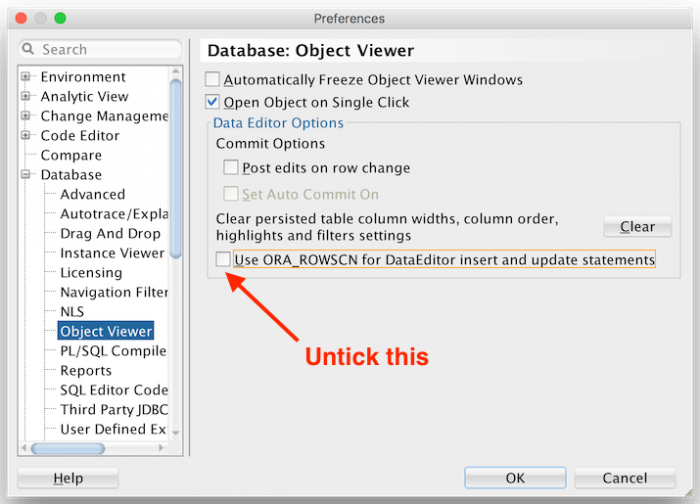
Fix the ORA-00904: ORA_ROWSCN

Fix the ORA-00904: ORA_ROWSCN: invalid identifier error in SQLDeveloper with a few easy steps

Refer: https://www.igorkromin.net/index.php/2017/08/06/fix-the-ora-00904-ora_rowscn-invalid-identifier-error-in-sqldeveloper-with-a-few-easy-steps/

Fix

Turns out fixing this problem is easy. Open up the SQL Developer Preferences, then navigate to Database > Object Viewer. Untick the box that says Use ORA_ROWSCN for DataEditor insert and update statements.

Install SQL Developer on Ubuntu 18.04 with OpenJDK 8

## Install Java 8 SDK

```Bash
sudo add-apt-repository ppa:openjdk-r/ppa
sudo apt-get -y update
sudo apt-get -y install openjdk-8-jdk
```

## Install Oracle SQL Developer

Before you can use SQL Developer with OpenJDK 8, you need to install JFX. Please note, that Oracle does not officially support OpenJDK, but it does work; however, you need to use JFX version 8. You will have to download the "Other Platform" where the JRE is NOT included with the installation.

Refer: <https://www.oracle.com/technetwork/developer-tools/sql-developer/downloads/index.html>

## Install JFX

Refer: <https://stackoverflow.com/questions/52484814/oracle-sql-developer-problem-initializing-welcome-page>

```Bash
sudo apt install -y libopenjfx-java=8u161-b12-1ubuntu2 --allow-downgrades
sudo apt install -y libopenjfx-jni=8u161-b12-1ubuntu2 --allow-downgrades
sudo apt install -y openjfx=8u161-b12-1ubuntu2 --allow-downgrades
```

Verify you have OpenJFX 8 installed:

```Bash
dpkg -l | grep openjfx
```

Location of Java, required for Oracle SQL Developer:

```Text
/usr/lib/jvm/java-8-openjdk-amd64
```

Install SQL Developer in Ubuntu 14 in VirtualBox

When launching the SQL Developer bash script it asked for the Java location, could not find it.

If you’ve installed Java 7, and you launch SQL Developer, use this as the path, or the equivalent:
/usr/lib/jvm/java-7-oracle

You can set your java_home but this does not help the above:
sudo nano /etc/environment
JAVA_HOME=/usr/lib/jvm/java-7-oracle

SQL Developer that works with Java 7:
http://www.oracle.com/technetwork/developer-tools/sql-developer/downloads/sqldev-downloads-403-2529784.html
sqldeveloper-4.0.3.16.84-no-jre.zip

Bonus:

Use Filter: WEB% for HAL

Oracle SQLDeveloper Problem

Editor not working, enter key / backspace / delete button not working – quick fix

To resolve the problem you have to go to:
Tools -> Preferences -> Accelerators -> Load Preset -> Default -> OK