
Symptoms
The virtual machine processor was reset by the operating system. error message is shown when working with a Windows virtual machine:
Resolution
While Parallels Engineering Team is working on the permanent fix for this issue by disabling hybrid hibernation it's possible to temporary resolve the issue:
- Shut down the Windows virtual machine and open its configuration.
- Switch to the Hardware tab and choose Boot Order from the list.
- Expand Advanced Settings dropdown menu and insert the following boot flag in the Boot flags section:
kernel.report_hibernate=0
Refer: https://kb.parallels.com/en/123831
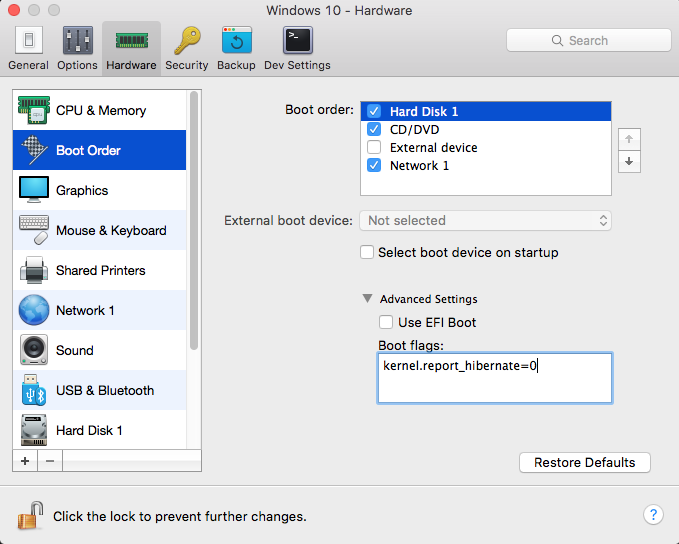
Other possible solutions, did not work but when using the above switch, the options completely disappeared as an option. The trick was to delete the fast boot option.
Refer: https://winaero.com/blog/how-to-disable-or-enable-fast-startup-in-windows-10/
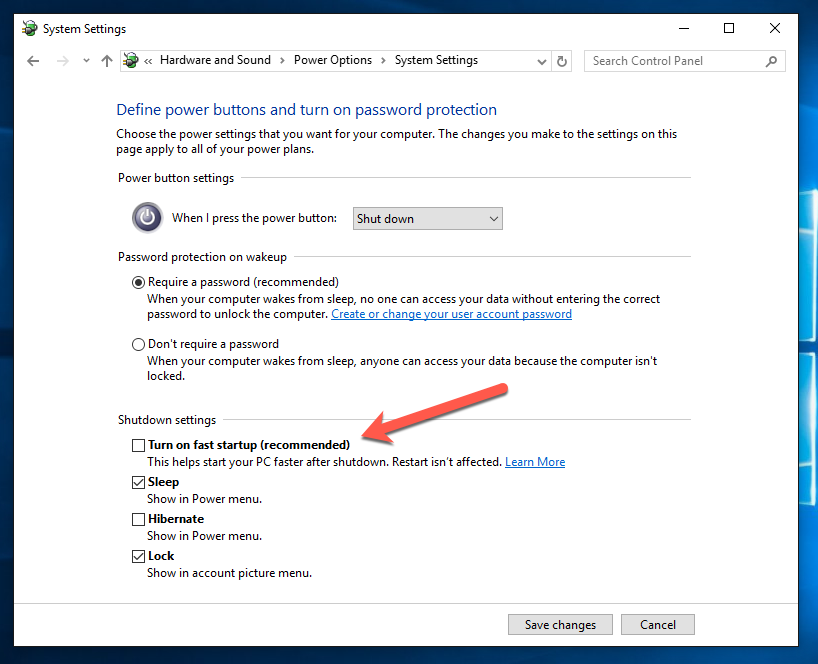
To disable Fast Startup in Windows 10, follow these simple instructions:
- Right click the Start button or you can press Win + X shortcut keys together to open the Power Users menu / Win + X menu.
- In the Win+X menu, click the Control Panel item. Windows 10 win+x menu control panel
- Go to the following applet:
- Control Panel\System and Security\Power Options
Windows 10 Control panel Power options - Click the link "Change what the power button does" on the left.
- The following window will appear on the screen: Windows 10 change what power button does
- Click on the 'Change settings that are currently unavailable' link to make the Shutdown options available.
- Untick the Turn on fast startup (recommended) option: Windows 10 disable fast startup
That's it. Now the Fast Startup feature is disabled.