Refer: https://askubuntu.com/questions/1184774/some-applications-on-ubuntu-19-10-very-slow-to-start
sudo apt-get install appmenu-gtk2-module
reboot

Technical notes, and other ideas.
Refer: https://askubuntu.com/questions/1184774/some-applications-on-ubuntu-19-10-very-slow-to-start
sudo apt-get install appmenu-gtk2-module
reboot
Refer: https://hackaday.com/2017/03/29/swan-better-linux-on-windows/
Install WSL on Window: https://docs.microsoft.com/en-us/windows/wsl/install-win10
Open and Run the Following PowerShell Command as Administrator:
Enable-WindowsOptionalFeature -Online -FeatureName Microsoft-Windows-Subsystem-LinuxDownload your Distribution of Choice and then you need to initialize it from the start menu.
Background of Swan, I'm using MobXterm.
If you are a Linux user that has to use Windows — or even a Windows user that needs some Linux support — Cygwin has long been a great tool for getting things done. It provides a nearly complete Linux toolset. It also provides almost the entire Linux API, so that anything it doesn’t supply can probably be built from source. You can even write code on Windows, compile and test it and (usually) port it over to Linux painlessly.
However, Cygwin’s package management is a little clunky and setting up the GUI environment has always been tricky, especially for new users. A project called Swan aims to make a full-featured X11 Linux environment easy to install on Windows.
The project uses Cygwin along with Xfce for its desktop. Cygwin provides pretty good Windows integration, but Swan also includes extra features. For example, you can make your default browser the Windows browser with a single click. It also includes spm — a package manager for Cygwin that is somewhat easier to use, although it still launches the default package manager to do the work (this isn’t a new idea, by the way).
Use the following example to list all of the folders that contain a pom.xml file
Refer: https://www.computerhope.com/unix/tree.htm
tree --prune -P "pom\.xml"Reading package lists... Done
E: Repository 'https://download.docker.com/linux/ubuntu bionic InRelease' changed its 'Label' value from 'Docker EE' to 'Docker CE'
N: This must be accepted explicitly before updates for this repository can be applied. See apt-secure(8) manpage for details.
Refer: https://forums.docker.com/t/apt-repo-label-changed-from-ce-to-ee/82488/5
$ sudo apt-get --allow-releaseinfo-change update
Refer: https://superuser.com/questions/570984/virtualbox-guest-ubuntu-loses-dns-when-host-connects-to-vpn
$ sudo gedit /etc/NetworkManager/NetworkManager.conf
Comment out, the plugins line below (shown before commenting)
[main]
plugins=ifupdown,keyfile,ofono
# dns=dnsmasq
Notes: had a very similar situation with Lubuntu 16.04 (should be identical in other Ubuntus) but this fix did not improve the situation. At least with 16.04, the problem appears to be that NetworkManager uses a local DNS proxy (dnsmasq), and this doesn't play nice with VPN connections, at least in the default configuration.
Commenting/deleting dns=dnsmasq in /etc/NetworkManager/NetworkManager.conf
Note: This fixed was applied too on the Windows host, but it did not seem to make a difference, go ahead and do both.
"C:\Program Files\Oracle\VirtualBox\VBoxManage.exe" modifyvm Ubuntu-1804-Convert --natdnshostresolver1 onRefer: https://github.com/brave/brave-browser/issues/4097
curl -s https://brave-browser-apt-release.s3.brave.com/brave-core.asc | sudo apt-key --keyring /etc/apt/trusted.gpg.d/brave-browser-release.gpg add -
Refer: https://www.asbru-cm.net/
Ubuntu 20.04
Refer: https://docs.asbru-cm.net/General/Installation/#ubuntu
sudo apt-add-repository multiverse
sudo apt install curl
curl -s https://packagecloud.io/install/repositories/asbru-cm/asbru-cm/script.deb.sh | sudo bash
sudo apt install asbru-cm
Debian
curl -s https://packagecloud.io/install/repositories/asbru-cm/asbru-cm/script.deb.sh | sudo bash
sudo apt install asbru-cm
Fedora
curl -s https://packagecloud.io/install/repositories/asbru-cm/asbru-cm/script.rpm.sh | sudo bash
sudo dnf install asbru-cm
Getting GoDaddy to Work
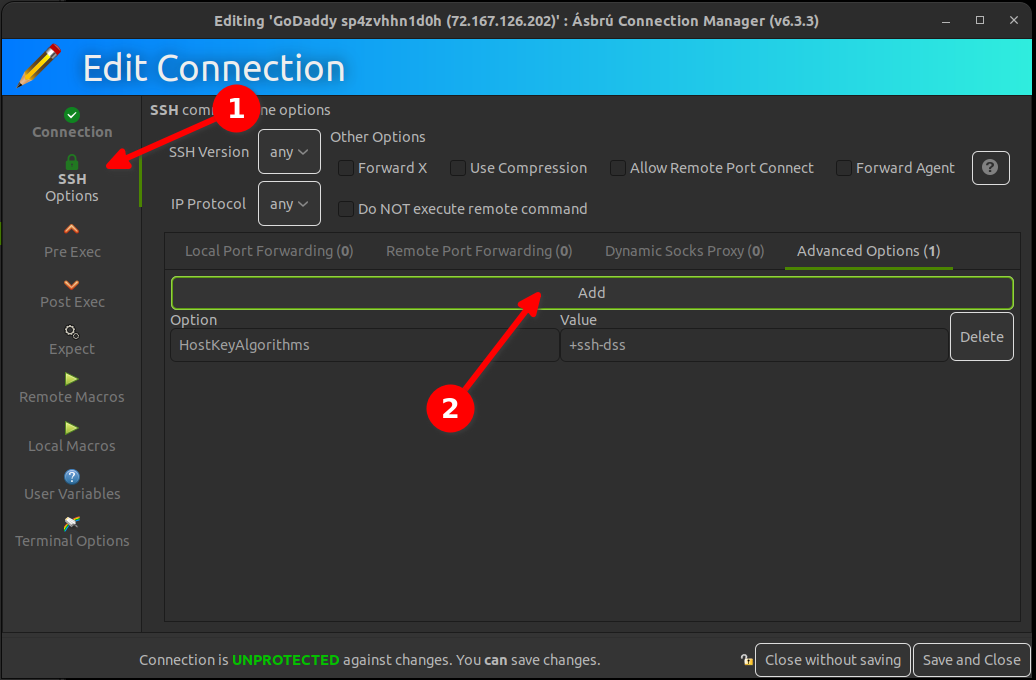
Easier solution is to just set the terminal font to monospace
Refer: https://github.com/microsoft/vscode/issues/35901

Refer: https://github.com/microsoft/vscode/issues/35901
The underscore or underline character is missing in Visual Studio Code terminal. I changed the fonts to match Sublime and the font was too small.
{
    "terminal.integrated.fontFamily": "Monospace",
    "terminal.integrated.fontSize": 15,
    "python.pythonPath": "/usr/bin/python",
    "python.linting.pylintEnabled": true,
    "python.linting.enabled": true
}Refer: https://askubuntu.com/questions/822262/how-do-i-get-menu-accelerator-keyboard-shortcuts-to-work-in-terminal
Apparently Gnome Terminal is different from "normal" apps and has accelerators turned off by default? (Why is this?)
Anyway, the solution was to go to Edit menu -> Preferences -> General and enable the "Enable mnemonics" checkbox.

## Install Java 8 SDK
```Bash
sudo add-apt-repository ppa:openjdk-r/ppa
sudo apt-get -y update
sudo apt-get -y install openjdk-8-jdk
```
## Install Oracle SQL Developer
Before you can use SQL Developer with OpenJDK 8, you need to install JFX. Please note, that Oracle does not officially support OpenJDK, but it does work; however, you need to use JFX version 8. You will have to download the "Other Platform" where the JRE is NOT included with the installation.
Refer: <https://www.oracle.com/technetwork/developer-tools/sql-developer/downloads/index.html>
## Install JFX
Refer: <https://stackoverflow.com/questions/52484814/oracle-sql-developer-problem-initializing-welcome-page>
```Bash
sudo apt install -y libopenjfx-java=8u161-b12-1ubuntu2 --allow-downgrades
sudo apt install -y libopenjfx-jni=8u161-b12-1ubuntu2 --allow-downgrades
sudo apt install -y openjfx=8u161-b12-1ubuntu2 --allow-downgrades
```
Verify you have OpenJFX 8 installed:
```Bash
dpkg -l | grep openjfx
```
Location of Java, required for Oracle SQL Developer:
```Text
/usr/lib/jvm/java-8-openjdk-amd64
```