Windows Keyboard
[Shift] + [Windows] + [Alt] + [V]
Mac Keyboard
[Shift] + [Alt] + [Command] + [V]

Technical notes, and other ideas.
Windows Keyboard
[Shift] + [Windows] + [Alt] + [V]
Mac Keyboard
[Shift] + [Alt] + [Command] + [V]
Ubuntu
Open Files, and under Network "Connect to Server"
smb://isilonpool01.hq.halw.com
You'll then be prompted to enter your domain and credentials, after that you should be connected.
Mac OS X
With ForkLift, Go, Connect
Your will need the following information:
Protocol:SMB
Server: isilonpool01.hq.halw.com
Username:
Password:
Refer: http://stackoverflow.com/questions/21184567/make-mac-into-a-personal-wifi-hotspot-for-the-local-mamp-based-server
I'll post my partial answer here - it will hopefully benefit somebody in the future.
In the end it was pretty easy:
Its unfortunately partial because it works only with Apple's Mac/iOS devices - other devices (have tried it with Android) will simply not see the personal network you've created (I assume details are being transmitted via Apple's Bonjour anyway so thats why). But better something than nothing. But its still pretty cool - I can now connect my iPhone and iPad to the MAMP running on my Mac even without being connected to the Internet or having a DHCP-enabled AP taking care of the networking details.
On Feb 14, 2015, at 1:26 AM, BinaryNights Support
Hi,
Yes, there is a known issue with 'Group by Date added’ listing on Yosemite that makes ForkLift not responding. We will fix it in the upcoming update.
Please restore your ForkLift favorites first:
1) Look up ForkLift's preference file on your backup at ~/Library/Preferences/com.binarynights.ForkLift2.plist
2) Since Mavericks, the OS caches the preferences so you need to force-kill 'cfprefsd' process in Activity Monitor before pasting the plist file.
3) Copy com.binarynights.ForkLift2.plist from backup to ~/Library/Preferences/
Then close it and paste the following command into Terminal (Applications > Utilities > Terminal.app):
defaults delete com.binarynights.ForkLift2 ViewSettings
kind regards,
Bam
Refer: https://interfacelift.com
Used thunderbolt adapters to drive two external monitors. One of them was rotated so there was another tweak necessary to get this to pickup.
Settings, Monitors
Choose: Gather Windows
Multiple windows appear, choose the window/panel with the monitor to rotate, and it should have a rotation option.
Please see attached example.
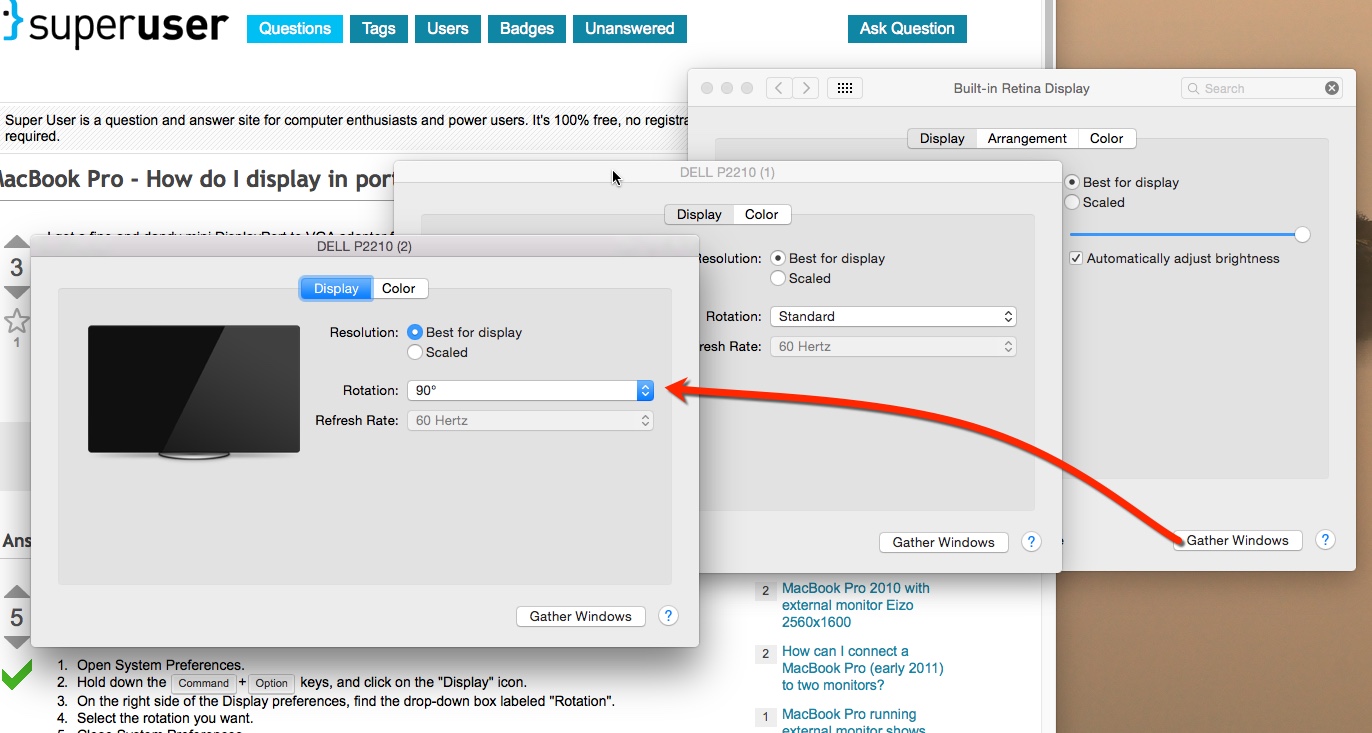
Looks like John D, got hit by this item, fairly good article for removal.
http://virusremovalguideline.blogspot.jp/2014/05/offers4u-popup-how-do-i-stop-ads-by.html
John was looking around his MacBook pro to see if any Malware was installed. These are notes from terminal history of where to look.
465 ls -ltr
466 cd /Library
467 ls -ltr
468 cd LaunchAgents/
469 ls -ltr
470 cd ..
471 cd LaunchDaemons/
472 ls -ltr
Installed sound flower and then it did not seem like audio went through the monitors speakers anymore. Hold [Option}+[Sound Icon] at top of Macbook Panel to select the monitor's speakers again.
Installing on M1 Silicone
Install Home Brew
/bin/bash -c "$(curl -fsSL https://raw.githubusercontent.com/Homebrew/install/HEAD/install.sh)"After installation, ensure Homebrew is in your PATH by adding the following to your ~/.zshrc (for Zsh, the default shell on macOS). Instead of the following, please follow the prompts from the terminal int includes instructions too.
echo 'eval "$(/opt/homebrew/bin/brew shellenv)"' >> ~/.zshrc
source ~/.zshrc
Install Midnight Commander itself
brew install mcVerify Installation
mc --versionLaunch Midnight Commander
mcPress F10 to exit or [Ctrl]+[o] to toggle back and forth and then enter exit from terminal to close it.
Older Notes
The missing package manager for OS X
http://brew.sh/
From your Mac
$ brew help
If you just want the package names for all formulas:
$ brew search
The following command will list the info snippets for all existing Homebrew formulae:
$ brew info --all
You can also start a server to browse the formulae locally at http://localhost:4567:
$ brew server
Or browse the local Git repository—thanks to Mk12 for that:
$ ls $(brew --prefix)/Library/Formula
Online - Other than that, you can just browse the following website:
https://github.com/mxcl/homebrew/tree/master/Library/Formula
Recommended Homebrew Items
download intellij
download java
download java from oracle
download sublime
download source tree
buy forklift
download brew
midnight commander