Quicktime and Soundflower Recording

Using Soundflower on your Macbook Pro, to record sounds from your computer

0. Install Soundflower and reboot your laptop

You will not be able to monitor your session on your laptop, if you wish to follow the audio, you will need another device

1. Open sound, and change the output to Soundflower (ch2)
2. On the Quicktime choose from the dropdown Soundflower (ch2)
3. Start your recording
4. When done, save the recording
5. Switch your sound output back to the device of your choice
6. Enjoy your video
Uninstall AKA Delete Apps from Macbook Pro

AppDelete Tool - If an application is protected you have to display the information for it, and change its permissions to read / write in order to delete it.

NOTE: Running applications are protected, you need to stop them first, in addition to changing their permissions.  Parallels Access is an example of a running program.

http://freemacsoft.net/appcleaner/

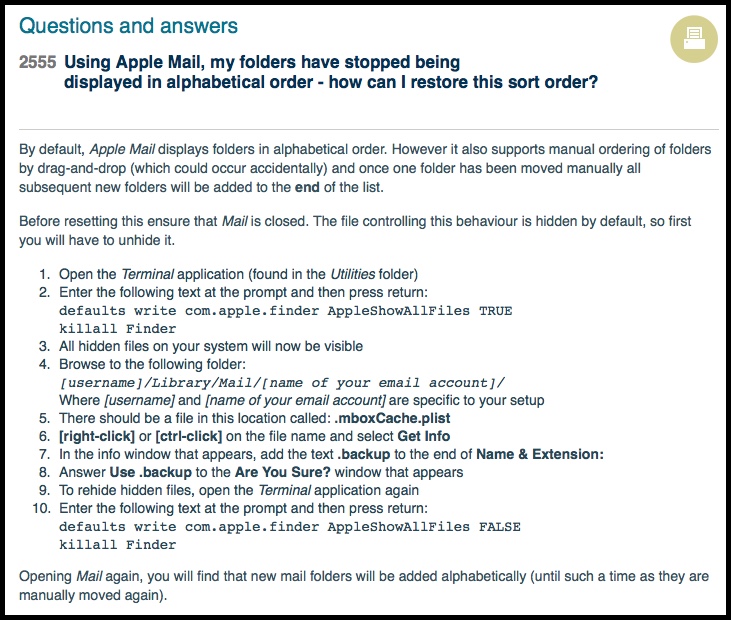
Reset / Re-order Folders on Macbook Email

http://www.sussex.ac.uk/its/help/faq?faqid=2555

You can use the following steps to re-import your email on the Macbook

Open the Terminal application (found in the Utilities folder)

Enter the following text at the prompt and then press return:

defaults write com.apple.finder AppleShowAllFiles TRUE
killall Finder

All hidden files on your system will now be visible

Browse to the following folder in Finder:
[username]/Library/Mail/[name of your email account]/

Where [username] and [name of your email account] are specific to your setup

There should be a file in this location called: .mboxCache.plist

[right-click] or [ctrl-click] on the file name and select Get Info

In the info window that appears, add the text .backup to the end of Name & Extension:

Answer Use .backup to the Are You Sure? window that appears

To rehide hidden files, open the Terminal application again

Enter the following text at the prompt and then press return:
defaults write com.apple.finder AppleShowAllFiles FALSE
killall Finder

Email-Sort-2016-02-25_08-30-45

Export Quicktime MOV for Snagit Recorded Session

The issue with recoding Snagit sessions, is it puts the audio on two tracks and when uploading it to YouTube, the audio disappears.  Use VLC to see how the audio would play.  Using QuickTime to convert the video.  iMove does the same thing too, but it takes lots of resources as it imports media into it's library.

Steps to Process with QuickTime 7

  • Open Movie with Quicktime, and you are going to export the MP4 movies as a Quicktime MOV file instead.  Other formats seem to lose quite  a bit of quality
  • Audio Channels: Mono
  • Compression Typ: H.264 with Best quality (Multi-pass)

2015-12-20_10-55-17_1

2015-12-20_10-55-17_4

2015-12-20_10-55-17_2

2015-12-20_10-55-17_3

Steps to Process with iMovie

  • Combine and export audio traces of MP4 Snagit Movie with Audacity
  • Open media for both movie and audio, edit movie clip and drop audio
  • Add audio track and export the entire movie
  • Delete all off the media files and empty trash

Flush DNS Without Rebooting

Mac El Capitan 10.11.1
$ sudo killall –HUP mDNSResponder;say flushed

Mac Yosemite 10.10.4+
$ sudo dscacheutil -flushcache;sudo killall -HUP mDNSResponder;say cache flushed

Mac Yosemite 10.10.3-
$ sudo discoveryutil mdnsflushcache;sudo discoveryutil udnsflushcaches;say flushed

Ubuntu:
Note: Ubuntu doesn't cache DNS by default unless you install a DNS cache service manually.
$ sudo /etc/init.d/dns-clean restart

Windows:
Right-click Command Prompt and select Run as Administrator.
Run the following command: ipconfig /flushdns

Important:
Don't forget to change your host file's IP to 10.57.225.54 for halprdgit01.hq.halw.com if you use a Mac or Linux machine and hard-coded the IP into the host file.

Work VPN Proxy for Google Hangouts

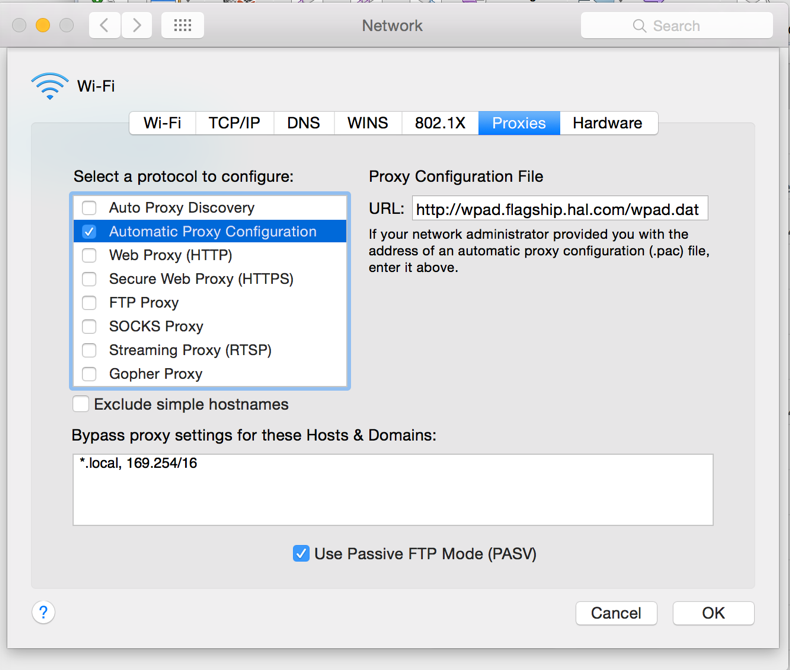
In Network Preferences, do the following. After Apply, I quit Chrome, then logged out of VPN then logged back in. When I started Chrome, it asked me to log in to halproxy01, like Firefox does, and everything worked.

A0942570-3D1B-4E56-8FC8-6705318619A7

Proxy Configuration File
http://wpad.flagship.hal.com/wpad.dat

Bypass proxy settings:
*.local, 169.254/16

Mac What’s Locking File

Refer: http://apple.stackexchange.com/questions/22259/how-to-check-whats-locking-a-file

$ sudo lsof | grep -i looking-for

You will still need to kill the process and you can try the rm command too.