Linking Domains to your GoDaddy Account

When GoDaddy upgraded and change my server package, we move my domains from one plan to another; however, the sites never went live on the new servers. This was because GoDaddy's automated process did not update my DNS settings properly. Do this manually.

Get the IP address of the new server, and you need to go through each domain that you own and update the A records for the DNS.

Delete a file starting with a dash/hypen on Linux on the command line

So you have a file that starts with a dash/hyphen/- and need to delete it. But when you try to do so, the "rm" command complains that you have passed an "invalid option –". This post looks at the simple solution to deleting a file that starts with a dash/hyphen.

As an example, doing a directory listing gives you something like this:

$ ls -l
total 678586
-rw-r--r-- 1 root root        54 Apr 29 15:39 -.log
-rw-r--r-- 1 root root     26819 Apr 30 13:17 210.5.53.35.log
-rw-r--r-- 1 root root     18114 Apr 30 01:37 210.5.53.36.log
-rw-r--r-- 1 root root     18410 Apr 30 01:37 210.5.53.37.log

You try to delete the -.log file like this:

rm -.log

and rm complains like this:

rm: invalid option -- .
Try rm ./-.log' to remove the file -.log'.
Try `rm --help' for more information.

The answer is actually supplied in the error message, which is fairly unusual for a Linux/Unix command. Instead of doing rm -.log you simply add ./ to the start and run this instead:

rm ./-.log

This will also work for other command line utilities you need to run against a file starting with a hypen/dash.

Fix the ORA-00904: ORA_ROWSCN

Fix the ORA-00904: ORA_ROWSCN: invalid identifier error in SQLDeveloper with a few easy steps

Refer: https://www.igorkromin.net/index.php/2017/08/06/fix-the-ora-00904-ora_rowscn-invalid-identifier-error-in-sqldeveloper-with-a-few-easy-steps/

Fix

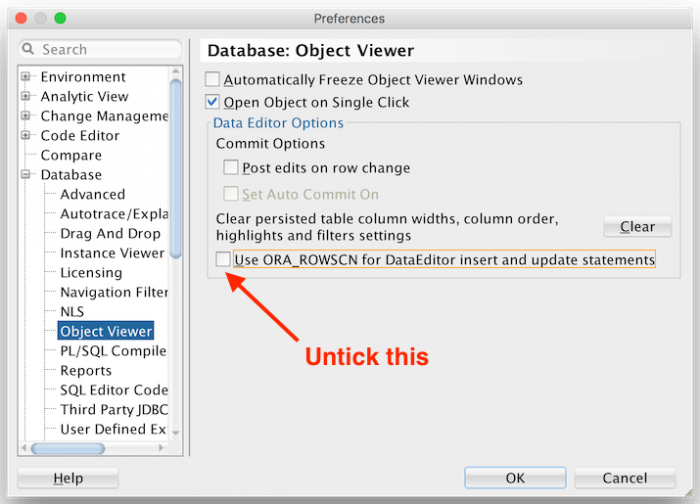
Turns out fixing this problem is easy. Open up the SQL Developer Preferences, then navigate to Database > Object Viewer. Untick the box that says Use ORA_ROWSCN for DataEditor insert and update statements.

How to Share a Folder via SMB/CIFS in Ubuntu 20.04

Refer: https://ubuntuhandbook.org/index.php/2020/07/share-folder-smb-ubuntu-20-04/

Install Samba

sudo apt install samba

Right click the file via our folder browser and choose share options

If you want a remote PC to have access with a uersname and password, run the following command,

Note: The USERNAME must be an existing user on your Linux machine.

sudo smbpasswd -a USERNAME

Before getting access from the remote PC, you may need the IP address of hostname

ip -4 address
hostname

Access the share folder from remote computer

smb://ip-address/
\\ip-address\ or \\hostname\

Ubuntu Startup Messages and NOT Splash Screen

Refer: https://askubuntu.com/questions/1030867/how-to-diagnose-fix-very-slow-boot-on-ubuntu-18-04

To update GRUB so that it passes this option to the kernel automatically on boot:

Edit the file /etc/default/grub file so that the string noresume is included in the GRUB_CMDLINE_LINUX_DEFAULT line, for example:

sudo gedit /etc/default/grub
### GRUB_CMDLINE_LINUX_DEFAULT="quiet splash"
GRUB_CMDLINE_LINUX_DEFAULT=""

or if you want to ignore the SWAP file

GRUB_CMDLINE_LINUX_DEFAULT="noresume"
sudo update-grub

Mute Everything (ALL)

# MUTE EVERYTHING ON UBUNTU
# REFER: https://askubuntu.com/questions/12100/command-to-mute-and-unmute-a-microphone

pacmd list-sources | \
    grep -oP 'index: \d?\d' | \
    awk '{ print $2 }' | \
    xargs -I{} pactl set-source-mute {} toggle

Backup / Restore Firefox Settings

Refer: https://support.mozilla.org/en-US/kb/back-and-restore-information-firefox-profiles

Source Computer

In Firefox click the pancake setting and go to Help, "More troubleshooting information"

Look for path to your "Profile Directory", such as:
/home/mruckman/.mozilla/firefox/6kzldk99.default-release

Close Firefox

Zip/Tar the entire folder

Target Computer

Same procedure as above, locate the folder of your profile. Erase everything in the folder and replace it with the source folder information, the contents remain the same, the only change is the folder name.

Make sure to CLOSE Firefox before deleting and copying the files

Tar Zip Files

Extract just a Tar file

tar -xvf yourfile.tar

Compress Files

tar -czvf name-of-archive.tar.gz /path/to/directory-or-file

Extract Files Current Folder

tar -xzvf name-of-archive.tar.gz

Extract Files to Specific Location

Target Location Must Exist

mkdir /tmp/Documents
tar -xzvf name-of-archive.tar.gz -C /tmp/Documents

Split Files Into Pieces

Refer: https://askubuntu.com/questions/54579/how-to-split-larger-files-into-smaller-parts

mkdir output
split --bytes=10M aem-6.4-authoring.tar.gz output/prefixeS

Combine the Pieces

cat prefixeS* > aem-6.4-authoring.tar.gz

Sharing Ubuntu Image

split --bytes=1000M Ubuntu1804-AEM-64GB.ova output/prefixeS
cat prefixeS* > Ubuntu1804-AEM-64GB.ova

Remove Z to NOT do compression, this includes FULL path in tar file

tar -cvf firefox-profile.tar.gz /home/mruckman/.mozilla/firefox/7sqqgk5s.default-release-1/