Some of the SNAP installations of Robo3T throw errors:
This application failed to start because it could not find or load the Qt platform plugin "wayland-egl"
This version of the Snap worked as of August 4, 2022

Technical notes, and other ideas.
Some of the SNAP installations of Robo3T throw errors:
This application failed to start because it could not find or load the Qt platform plugin "wayland-egl"
This version of the Snap worked as of August 4, 2022
Refer: https://linuxconfig.org/how-to-disable-ipv6-address-on-ubuntu-20-04-lts-focal-fossa
sudo sysctl -w net.ipv6.conf.all.disable_ipv6=1
sudo sysctl -w net.ipv6.conf.default.disable_ipv6=1
The above commands will temporarily disable IPv6, meaning that the settings will not persist after reboot. To re-enable IPv6 reboot your system or execute the above commands again however reverse the logic and change 1 to 0
In case you need more permanent solution to disable IPv6 even after system reboot follow the steps below:
As an administrative user open up the /etc/default/grub file using your favourite text editor and make to following changes:
FROM:
GRUB_CMDLINE_LINUX_DEFAULT=""
TO:
GRUB_CMDLINE_LINUX_DEFAULT="ipv6.disable=1"
Once ready update Grub menu:
sudo update-grubIn case you need to re-enable the IPv6 network addresses simply remove the ipv6.disable=1 from the /etc/default/grub file and run the update-grub command.
Refer: https://stackoverflow.com/questions/746458/how-to-show-lines-in-common-reverse-diff" href="https://stackoverflow.com/questions/746458/how-to-show-lines-in-common-reverse-diff">https://stackoverflow.com/questions/746458/how-to-show-lines-in-common-reverse-diff
comm -1 -2 file1.sorted file2.sorted
where file1 and file2 are sorted and piped into *.sorted
Here's the full usage of comm:
comm [-1] [-2] [-3 ] file1 file2
-1 Suppress the output column of lines unique to file1
-2 Suppress the output column of lines unique to file2
-3 Suppress the output column of lines duplicated in file1 and file2
The comm command (short for "common") may be useful comm - compare two sorted files line by line
find lines only in file1
comm -23 file1 file2find lines only in file2
comm -13 file1 file2find lines common to both files
comm -12 file1 file2The man file is actually quite readable for this.
comm -23 OLCI_K229.csv OLCI_EDOCS.csvRefer: https://askubuntu.com/questions/1264779/how-to-split-an-mp3-file-by-detecting-silent-parts
Use ffmpeg to convert m4b to mp3
Refer: Refer: https://superuser.com/questions/173571/how-to-convert-m4b-files-to-mp3
ffmpeg -i "file.m4b" -acodec libmp3lame -ar 22050 "file.mp3"Install Software
sudo apt install -y mp3spltSample Usage:
mp3splt -s your.mp3If it creates TOO MANY TRACKS
Mp3splt will try to automatically detect splitpoints with silence detection and will split all tracks found with default parameters.
mp3splt -s -p th=-50,nt=100 your.mp3passing desired parameters, splitting 100 tracks (or less if too much) with the most probable silence points at a threshold of -50 dB.
In this example we are setting the minimum silence to 4.9 seconds and still
mp3splt -s -p th=-40,min=4.9,nt=100 'The Catcher in the Rye By Salinger.mp3'Update: Worked great but it had problems with larger markdown files and was truncating them. Ghostwriter seems to work better on Ubuntu 22.04 now.
ReText is a simple but powerful editor for Markdown and reStructuredText markup languages. One can also add support for custom markups using Python modules.
Refer: https://github.com/retext-project/retext
This is available in the Sofware Center
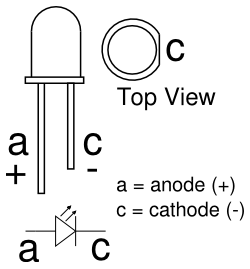
On the physical LED, the longer lead (or leg) of the LED is the anode. The cathode is marked on the rim of the LED body with a flat area shown in the diagram. Another way to tell which lead is the anode and which is the cathode is to look at the two plates at the end of the leads inside the body of the LED.
The more pins that have interrupts the better.
Refer: https://www.pjrc.com/teensy/td_libs_Encoder.html
Here's a Rotary_Encoder_Library.pdf of the above page.
Refer: https://www.thewindowsclub.com/ethernet-keeps-disconnecting-in-windows-10
Trying to disable power saver features on the network card by unchecking "Allow the computer to turn off this device to save power."

Create a .markdownlint.json file and place it in the root folder of your project.
{
    "default": true,
    "MD034": false
}