Pylint Tweaks Print Statement Error

Refer: https://stackoverflow.com/questions/48626676/vs-code-shows-an-error-message-at-print-statement-in-python-2-7
Refer: https://code.visualstudio.com/docs/python/linting

Create yourself a default file:

pylint --generate-rcfile > .pylintrc

Update the following section and add this entry

[MESSAGES CONTROL]
disable=print-statement

Visual Source Code

Edit /home/mruckman/.config/Code/User/settings.json and update this section for pylint:

    "python.linting.pylintArgs": [
        "--max-line-length=120",
        "--rcfile=/home/mruckman/Documents/Scripts/Python/pylintrc"
    ],

Download: pylintrc.txt

Imperva WAF Upgrade at DCC

From: "Brunelle, James (PCL)

Subject: Imperva WAF Upgrade at DCC (CHG0091517)

Date: June 20, 2018 at 6:53:45 PM PDT

Yesterday, we began work in implementing CHG0091517, to upgrade the physical Imperva gateway appliances at DCC from version 11.5 to version 13. We began by pulling one of the gateways out of datapath and performed the upgrade, which we believed to be successful. After placing the upgraded appliance back in datapath, we performed some basic testing to make sure the appliance was passing traffic. At the time, I was able to access multiple sites which were in-line with the web application firewall. While some misconfiguration for several of the HAL sites on the WAF prevented me from running our full battery of tests we usually run at PCL, I had seen enough data to suggest to me that the upgraded gateway was functioning correctly. It became quickly apparent the next morning that there were connectivity issues to these sites. As soon as it was clear that the issue was most likely the upgrade that was causing this issue, we pulled the upgraded gateway back out of datapath and connectivity was restored.

I spent most of today digging into this problem, and we believe we've identified what happened. The Imperva gateways at DCC are placed in-line with web traffic via the Gigamon appliances. The Gigamon adds a 2nd VLAN tag to the packets it sends through the in-line security tools (such as Imperva), pushing the maximum packet size above 1500 bytes. We identified this issue years ago when this was first set up, and we had to set the Imperva gateways network interfaces to accept Jumbo Frames (frames larger than the standard 1500 bytes). This change involved modifying network configuration scripts for each interface on the gateway. We checked to make sure the scripts were set to accept these larger packets after performing the upgrade. However, the setting does not appear to be taking effect on the latest version of Imperva, as the interfaces were set to only accept packets up to the standard 1500 bytes despite the larger value being specified in the configuration files. The result was that a lot of packets were being dropped, and caused the connectivity issues we experienced overnight into this morning.

I have opened a case with Imperva technical support regarding this issue and have been working with them this afternoon and this evening in troubleshooting the problem. I do not have a timeline on when this issue may be resolved or if there is a workaround for this. Obviously, we will not be moving forward with upgrading the other gateway which is currently in datapath until this issue has been resolved. We may want to keep the upgraded gateway out of datapath for the time being in order to perform troubleshooting on this issue, rather than reverting to v11.5 and putting it back in datapath. I will discuss this with our security operations folks tomorrow morning. For now, it remains out of datapath.

As for CHG0091517, I have marked this as "Completed, Unsuccessful". I have marked the P1 incident that was opened (INC0298214) as resolved, as the connectivity issues we experienced went away this morning once the failed gateway was pulled out of datapath. We will not attempt to put that gateway back in datapath without first contacting Anila Augustine first, making sure we have Anila's team standing by to perform their testing once the gateway is placed back in-line. This would also require a separate change be opened at this point since we are outside of our change window for CHG0091517.

Accessing Oracle with Python

Ubuntu 14.04
$ sudo apt-get install python-dev
$ sudo pip install --upgrade pip
$ sudo -H pip install JayDeBeApi
Refer: https://pypi.org/project/JayDeBeApi/
Another option, untried: http://cx-oracle.readthedocs.io/en/latest/installation.html#quick-start-cx-oracle-installation

Ubuntu Upgrade 15.10 to 16.04

Refer: https://askubuntu.com/questions/848085/upgrade-from-15-10-to-16-04-no-new-release-found

You can change your software sources from wily to xenial, then update, upgrade and dist-upgrade.

1. 'sudo nano /etc/apt/sources.list'
2. Check every rows to find the word wily and change those to xenial 2. Ctrl-X to save, Y to yes, Press Enter key
3. Update, upgrade, dist-upgrade. – Arijit Chatterjee

Akamai Book2 Required Fix

From: Girish Keshav <gkeshav@akamai.com>
Date: Wednesday, March 21, 2018 at 1:23 AM
To: "Van, Johnna (HA Group)" <JVan@HollandAmericaGroup.com>
Subject: Re: eCommerce issue

Book2.hollandamerica.com  origin does not likes/honors requests from www.hollandamerica.com but likes from book2.hollandamerica.com and beta.hollandamerica.com

So all I did was to forward the request to book2.hollandameirca.com and modify the host from www.hollandamerica.com to book2.holland America.com

So in short

Instead of receiving https://www.hollandamerica.com/cruise-ecommerce/brand/HAL/v1/cruise/O873/price/payment

It receives

https://book2.hollandamerica.com/cruise-ecommerce/brand/HAL/v1/cruise/O873/price/payment

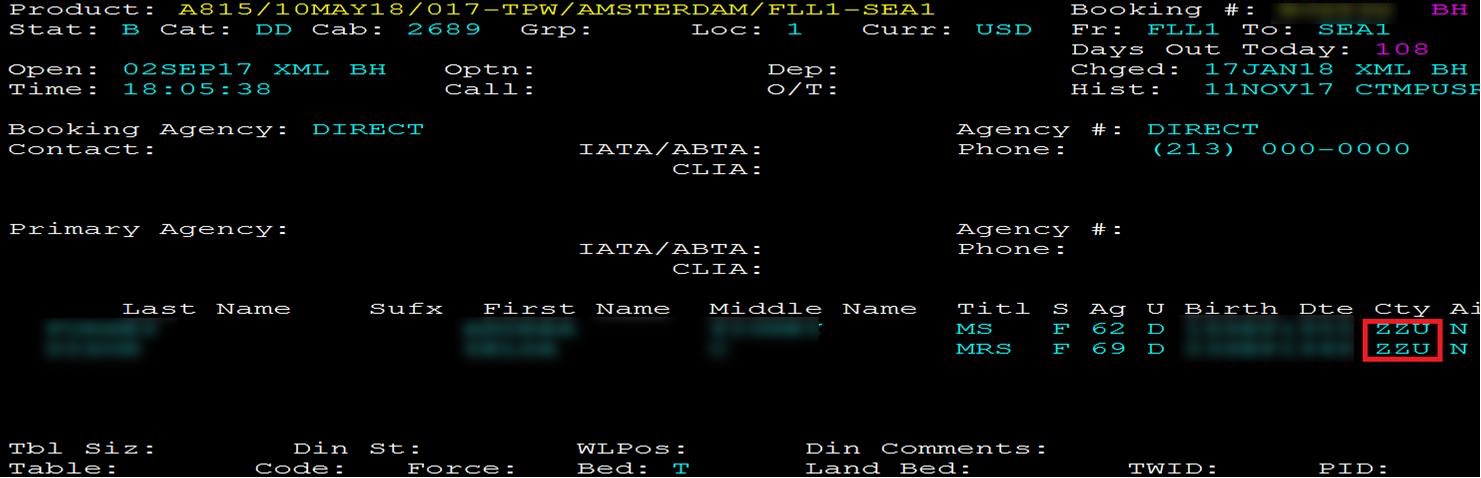
ZZU City Codes in POLAR

From: "Harris, Tyrone (HA Group)"
Subject: Gateway codes
Date: January 22, 2018 at 3:15:47 PM PST

ZZU is still a valid code for Polar. It is a code that was made up by the business to reflect US booking online without conflicting with any regional promotions. Canada is ZZC

DAIR is the Polar command to see the air codes built in Polar.

Akamai Whitelist IP Address

Refer: https://youtu.be/tkBuT7d_TF4

Sample White Listed IPs

Steps to Reach IP Lists:

  1. Configure, Network List Management
  2. "Search Network Lists" with "holland"

Currently as of 01/22/2018 3 Lists :

  • Holland IP Bypass List - Contains VPN for example, these IPs will bypass the WAF
  • Reputation Whitelist (Holland) - Currently Empty, will white list IPs that have a bad reputation
  • Holland Partner IP List (Bot Manager) - Majority of IPs here, and these will automatically put this into “monitor mode” and NOT block them

Docker Oracle Client

$ docker pull store/oracle/database-instantclient:12.2.0.1

Refer: https://store.docker.com/profiles/mruckman/content/sub-e067a44b-9ead-41c7-b597-de06ee2ef454

About this Docker Image

This Docker image contains the Oracle Instant Client 'Basic', 'SDK' and 'SQL*Plus' packages. It can be extended to run OCI, OCCI, and JDBC applications. It can also be extended to build and run scripting language drivers that use OCI such as Python's cx_Oracle, Node.js's node-oracledb, PHP's OCI8, and Ruby's ruby-oci8.

The SQL*Plus command-line query tool is also included, allowing quick ad-hoc SQL and PL/SQL execution.

About Oracle Instant Client

Oracle Instant Client is a repackaging of Oracle Database libraries, tools and header files usable to create and run applications that connect to a remote (or local) Oracle Database.

Usage

You can run a container interactively to execute ad-hoc SQL and PL/SQL statements in SQL*Plus:

docker run -ti --rm store/oracle/database-instantclient:12.2.0.1 sqlplus hr/welcome@example.com/pdborcl

Adding Oracle Database Drivers

To extend the image with optional Oracle Database drivers, follow your desired driver installation steps. The Instant Client libraries are in /usr/lib/oracle/12.2/client64/lib and the Instant Client headers are in /usr/include/oracle/12.2/client64/.

The Instant Client libraries are in the default library search path.