Lubuntu 20.04 Writer Spell Checker NOT Working

Refer: https://askubuntu.com/questions/1150144/spell-checker-not-working-in-libre-office-6-0

File: dict-en-20200601.7z

This worked for me. Even hunspell or myspell, as suggested by resplin, didn't work.

However adding this extension to Libre Office worked like charm: https://extensions.libreoffice.org/extensions/english-dictionaries/

You'll need to go to Tools > Extension Manager > Add > {upload extension file}. Restart.

Add sound for Windows Hyper-V Ubuntu 18.03

Refer: https://c-nergy.be/blog/?p=13655

Open you software center and enable source code, and third party Conocial Partners

# Step 1 - Install Some PreReqs


sudo apt-get install git libpulse-dev autoconf m4 intltool build-essential dpkg-dev -y
sudo apt build-dep pulseaudio -y

# Download pulseaudio source in /tmp directory - Do not forget to enable source repositories


cd /tmp
sudo apt source pulseaudio

# Compile


pulsever=$(pulseaudio --version | awk '{print $2}')
cd /tmp/pulseaudio-$pulsever
sudo ./configure

# Create xrdp sound modules


sudo git clone https://github.com/neutrinolabs/pulseaudio-module-xrdp.git
cd pulseaudio-module-xrdp
sudo ./bootstrap 
sudo ./configure PULSE_DIR="/tmp/pulseaudio-$pulsever"
sudo make

# copy files to correct location (as defined in /etc/xrdp/pulse/default.pa)


cd /tmp/pulseaudio-$pulsever/pulseaudio-module-xrdp/src/.libs
sudo install -t "/var/lib/xrdp-pulseaudio-installer" -D -m 644 *.so

reboot

Install IntelliJ on Ubuntu

Refer: https://www.jetbrains.com/help/idea/installation-guide.html#

Install the Toolbox App or use Snap instead

Download the tarball .tar.gz from the Toolbox App web page.

Refer: https://www.jetbrains.com/toolbox/app/

Extract the tarball to a directory that supports file execution.

For example, to extract it to the recommended /opt directory, run the following command:

$ sudo tar -xzf jetbrains-toolbox-1.13.4801.tar.gz -C /opt

Execute the jetbrains-toolbox binary from the extracted directory to run the Toolbox App and select which product and version you want to install. After you run the Toolbox App for the first time, it will automatically add the Toolbox App icon to the main menu.

$ sudo snap install intellij-idea-ultimate --classic
$ sudo snap install intellij-idea-community --classic

Refer: https://www.jetbrains.com/help/idea/uninstall.html#

$ sudo snap remove intellij-idea-ultimate
$ sudo snap remove intellij-idea-community

Docker with VPN

Did NOT work with Ubuntu 20.04 installation

There's a setting with Cisco AnyConnect to "Allow local (LAN) access when using VPN (if configured)

Refer: https://www.lullabot.com/articles/fixing-docker-and-vpn-ip-address-conflicts (pdf)

By default Cisco AnyConnect was interfering with Docker running on localhost.  The fix was to have Docker use a different range of IP addresses.

$ sudo nano /etc/docker/daemon.json

daemon.json

And the restart your computer.

Canon MX920 Ubuntu Printer for Home

For Ubuntu 20.04, download the Ubuntu_20.04_Printer_Setup.zip file and follow the instructions.

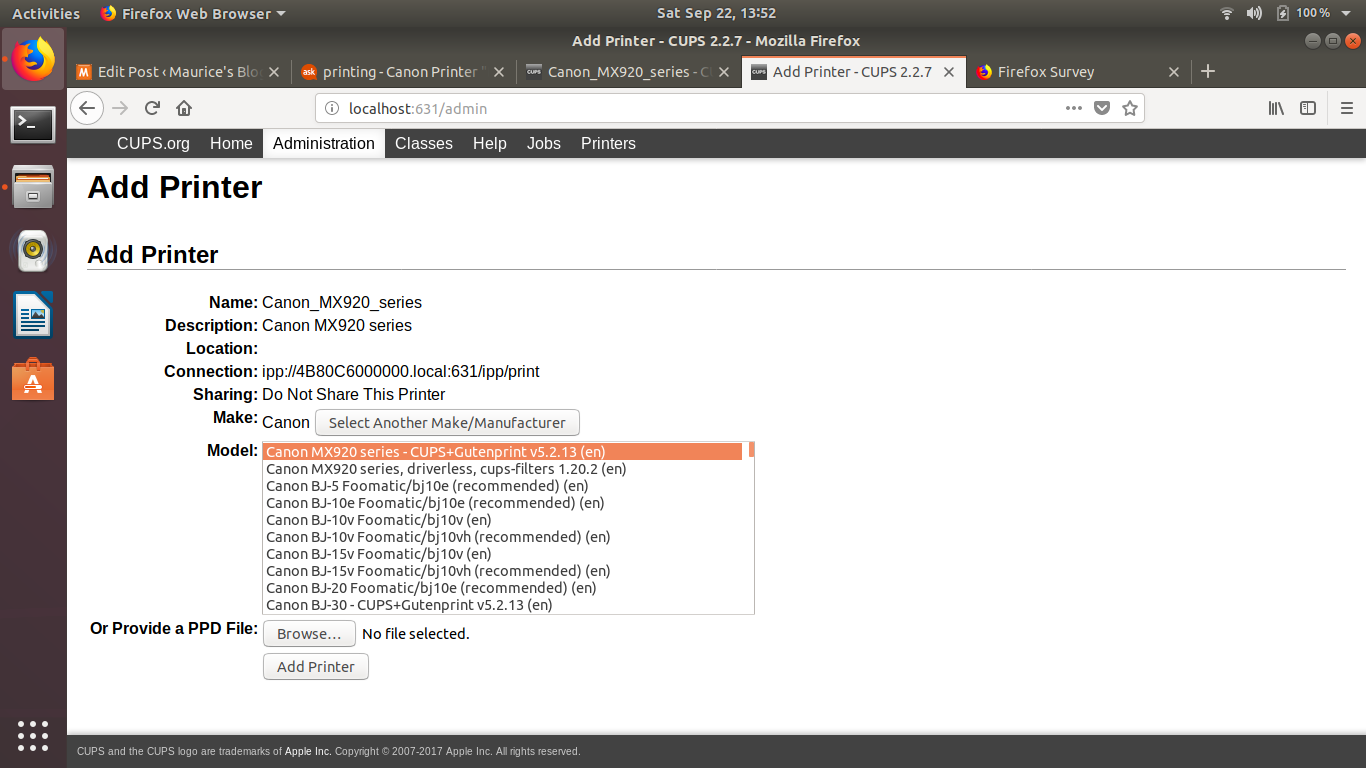
For Ubuntu 18.04 18.04 setup it was necessary to go through the browser base setup instead of the GUI based setup:

Important - Security is messed up and a fix is required:
Refer: https://bugs.launchpad.net/ubuntu/+source/cups/+bug/1769893
$ sudo usermod -aG lpadmin YourUserName

http://localhost:631/admin

As you go through the settings choose the CUPS option for MX900 and NOT the driverless version.  It should look something like:

Canon MX920 series - CUPS+Gutenprint v5.2.13 (color, 2-sided printing)

Older Items from Research - DO NOT USE - Does NOT Work

Go here, to copy off the drivers, you will have to be sudo and copy them and change permissions
/etc/cups/ppd for files ending in ".ppd"

Trying to troubleshot MX922 Cannon printer, seemed to stop working after 18.04.1 upgrade.

Refer: https://askubuntu.com/questions/1052928/canon-printer-does-not-accept-jobs-on-ubuntu-18-04

Cook Pasta in Microwave

Refer: https://www.leaf.tv/articles/how-to-fix-kraft-mac-cheese-in-the-microwave/

Ingredient Ratios for Normal Box

  • 145g Pasta
  • 385g Water AKA 1 2/3 Cup (Weight of Pasta x 2.65 for Weight of Water)
  • 30g of Cheese Powder ~3.5 tbsp

Need to figure out a way to mix the butter, half-n-half and cheese packet better, maybe ahead of time?

Use a medium glass bowl with a little oil on top of the water

The pasta provided in Kraft Macaroni & Cheese packages cooks in about 12 minutes in the microwave on high, stirring every 5 minutes. Use a 2-quart bowl or casserole dish to hold the noodles and the water, and leave it uncovered while it cooks. To save the step of draining the noodles after they've cooked, the manufacturer suggests using 1 3/4 cups water for the standard-size package. If you're using family style or another larger Kraft Macaroni & Cheese product, check package instructions so that you add just enough water to be absorbed by the macaroni.

Improve Ubuntu 20.04 Battery by installing TLP for Linux

Laptop fan started running continuously, removed the application.

Refer: https://fossbytes.com/things-to-do-after-installing-ubuntu/

TLP is a great command-line tool for improving the battery performance for your laptop after installing Ubuntu 20.04 LTS. This advanced power management tool comes with automated background tasks that can help you get the most out of your battery.

To install TLP in Ubuntu 20.04 Focal Fossa,

sudo add-apt-repository ppa:linrunner/tlp
sudo apt-get update
sudo apt-get install tlp tlp-rdw
sudo tlp start