
Refer: https://medium.freecodecamp.org/nginx-rate-limiting-in-a-nutshell-128fe9e0126c
Nginx Mechanic
https://github.com/punkave/mechanic
Command-line tool to manage nginx-powered proxies for node apps. Static file delivery, load balancing, HTTPS, all that jazz with a clean interface.
Load Balance in nginx
Example setting load balancing between 2 servers
$ sudo gedit /etc/nginx/sites-available/default
upstream talproxy {
server 10.7.19.75:12940 weight=2;
server 10.7.19.3:12940 weight=1;
}
server {
... REMOVED TO SAVE SPACE ...
### BEGIN PATCH ###
location /talproxy {
proxy_pass http://talproxy/;
}
Using nginx Rewrite Rules
Refer: https://www.nginx.com/blog/creating-nginx-rewrite-rules/
Setup SSL for nginx for Ubuntu 14.04
Install nginx
sudo apt-get update
sudo apt-get install nginx
Setup SSL Self-signed Cert, Good for 10 Years
sudo mkdir /etc/nginx/ssl
sudo openssl req -x509 -nodes -days 3650 -newkey rsa:2048 -keyout /etc/nginx/ssl/nginx.key -out /etc/nginx/ssl/nginx.crt
Here's an example for local.hollandamerica.com, it creates files in folder the same place your run it.
openssl req -x509 -newkey rsa:2048 -nodes -keyout cert.key -out cert.crt -days 3650 -subj "/C=US/ST=State/L=Locality/O=Organization/CN=local.hollandamerica.com"Sample Values
Country Name (2 letter code) [AU]:US
State or Province Name (full name) [Some-State]:New York
Locality Name (eg, city) []:New York City
Organization Name (eg, company) [Internet Widgits Pty Ltd]:Bouncy Castles, Inc.
Organizational Unit Name (eg, section) []:Ministry of Water Slides
Common Name (e.g. server FQDN or YOUR name) []:your_domain.com
Email Address []:admin@your_domain.com
Sample Server Code, Magic Sauce is the following 4 lines:
listen 443 ssl;
server_name localhost;
ssl_certificate /etc/nginx/ssl/nginx.crt;
ssl_certificate_key /etc/nginx/ssl/nginx.key;
server {
listen 80 default_server;
listen [::]:80 default_server ipv6only=on;
listen 443 ssl;
root /usr/share/nginx/html;
index index.html index.htm;
server_name your_domain.com;
ssl_certificate /etc/nginx/ssl/nginx.crt;
ssl_certificate_key /etc/nginx/ssl/nginx.key;
location / {
try_files $uri $uri/ =404;
}
}
Using nginx as a reverse proxy, installing in Ubuntu 14.04
Sample nginx configuration changes:
nginx.conf
default
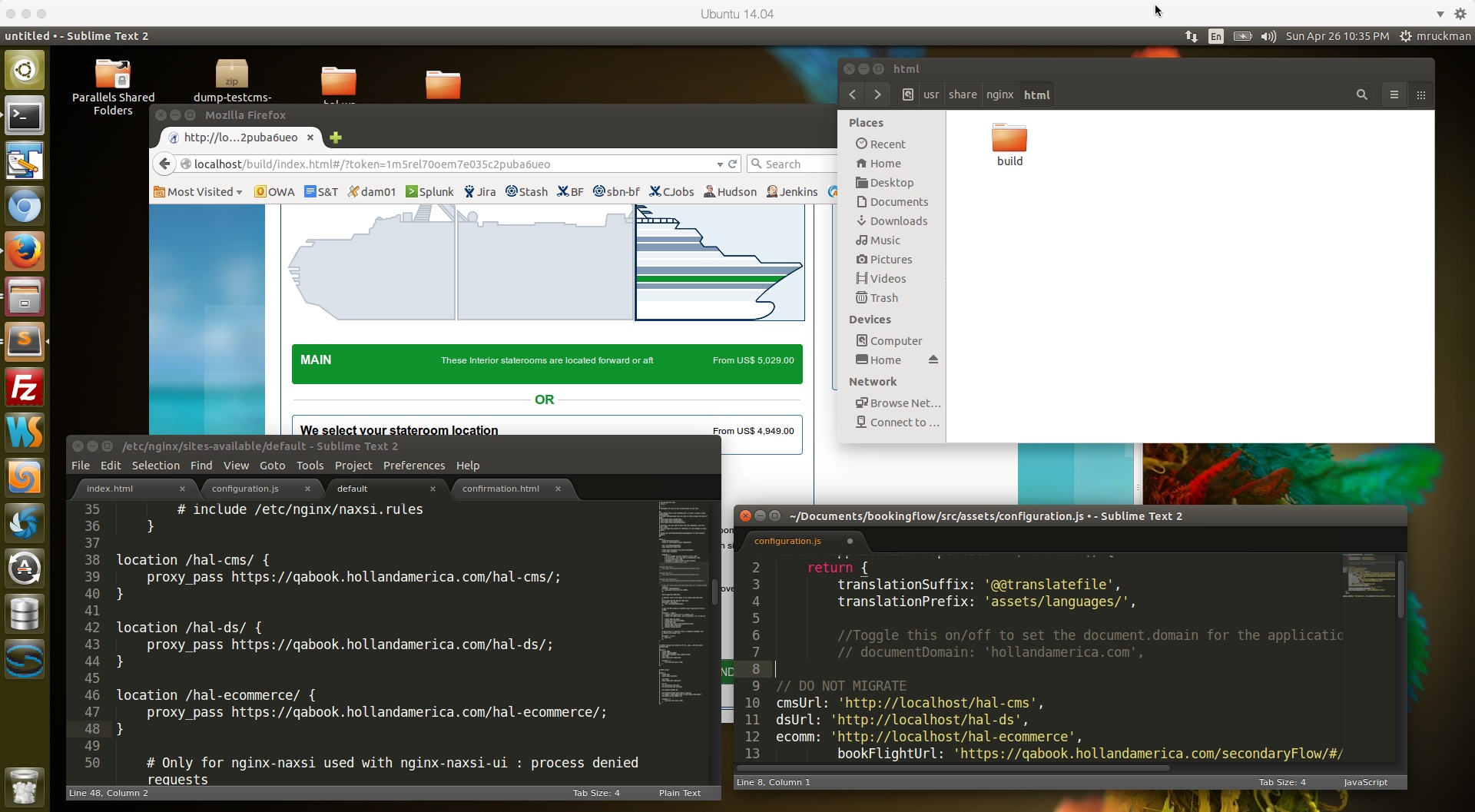
Install nginx in Ubuntu 14.04
Refer: https://www.digitalocean.com/community/tutorials/how-to-install-nginx-on-ubuntu-14-04-lts
$ sudo apt-get update
$ sudo apt-get install nginx
It runs under localhost by default.
Manage the Nginx Process
$ sudo service nginx stop
$ sudo service nginx start
$ sudo service nginx restart
Location of default HTML files for nginx:
/usr/share/nginx/html
Change permissions to allow easy access to files:
$ sudo chown -R $USERID:$USERID /usr/share/nginx/html
$ sudo chmod -R 755 /usr/share/nginx/html
You can copy the "build" folder there now for testing, make sure to restart nginx
http://localhost/build/index.html#/?token=1m5rel70oem7e035c2puba6ueo
Additional Setup for Reverse Proxy
Refer: https://www.digitalocean.com/community/tutorials/how-to-set-up-nginx-server-blocks-virtual-hosts-on-ubuntu-14-04-lts
Uncomment One Line
$ sudo gedit /etc/nginx/nginx.conf
### BEGIN SNIPPET 1 OF 2 ###
server_names_hash_bucket_size 64;
### END SNIPPET 1 OF 2 ###
You can edit the default nginx property file here, with 3 reverse proxy examples, and ucomment one line, and restart:
$ sudo gedit /etc/nginx/sites-available/default
### BEGIN SNIPPET 2 of 2 ###
location /hal-cms/ {
proxy_pass https://qabook.hollandamerica.com/hal-cms/;
}
location /hal-ds/ {
proxy_pass https://qabook.hollandamerica.com/hal-ds/;
}
location /hal-dsbooking-server/ {
proxy_pass https://qabook.hollandamerica.com/hal-dsbooking-server/;
}
location /hal-ecommerce/ {
proxy_pass https://qabook.hollandamerica.com/hal-ecommerce/;
}
# Only for nginx-naxsi used with nginx-naxsi-ui : process denied requests
#location /RequestDenied {
# proxy_pass http://127.0.0.1:8080;
#}
### END SNIPPET 2 0f 2 ###
Verify your nginx configuration
$ sudo nginx -c /etc/nginx/nginx.conf -t
UI Code Monkey Patch Example:
// DO NOT MIGRATE
cmsUrl: 'http://localhost/hal-cms',
dsUrl: 'http://localhost/hal-ds',
ecomm: 'http://localhost/hal-ecommerce',
NOTE: Make sure to restart Nginx after all of your configuration changes
$ sudo service nginx restart
“Engine X” nginx
Nginx (pronounced "engine x") is an open source reverse proxy server for HTTP, HTTPS, SMTP, POP3, and IMAP protocols, as well as a load balancer, HTTP cache, and a web server (origin server). The nginx project started with a strong focus on high concurrency, high performance and low memory usage. It is licensed under the 2-clause BSD-like license and it runs on Linux, BSD variants, Mac OS X, Solaris, AIX, HP-UX, as well as on other *nix flavors. It also has a proof of concept port for Microsoft Windows.[6]