$ less /etc/mtab
Refer: http://unix.stackexchange.com/questions/24182/how-to-get-the-complete-and-exact-list-of-mounted-filesystems-in-linux

Technical notes, and other ideas.
$ less /etc/mtab
Refer: http://unix.stackexchange.com/questions/24182/how-to-get-the-complete-and-exact-list-of-mounted-filesystems-in-linux
In Network Preferences, do the following. After Apply, I quit Chrome, then logged out of VPN then logged back in. When I started Chrome, it asked me to log in to halproxy01, like Firefox does, and everything worked.
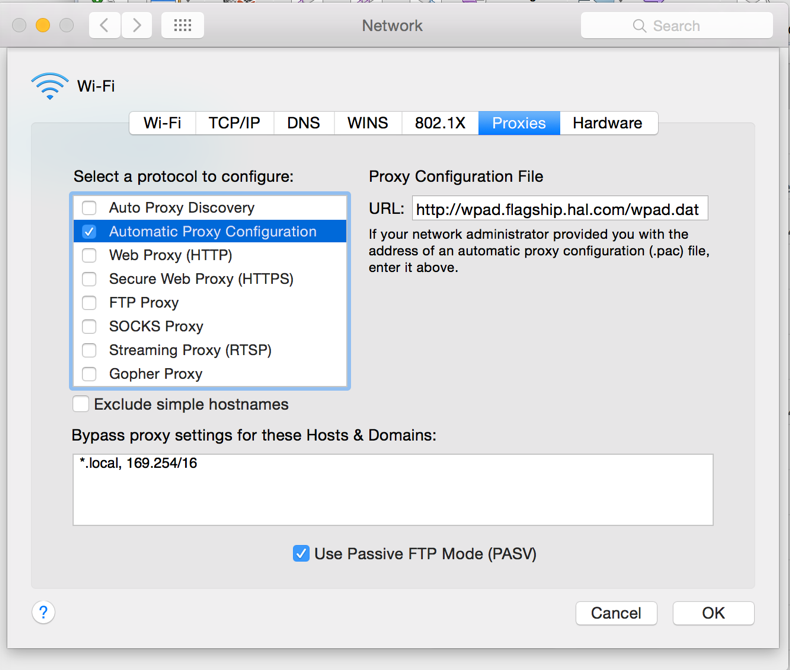
Proxy Configuration File
http://wpad.flagship.hal.com/wpad.dat
Bypass proxy settings:
*.local, 169.254/16
From the console:
angular.version.full
Go into drop-down menu top-right corner, and click "Settings", "Show Advanced"
And uncheck "Use hardware acceleration when available."
netstat -a |grep ESTABLIS | wc -l
Had an issue where MongoDB had its maximum connections exceeded which was 1019
Don Tripp mentioned we use the DNS appliance Infoblox.
Refer: https://www.infoblox.com/products
ORA-00904: "ORA_ROWSCN": invalid identifier
Refer: https://community.oracle.com/thread/1019844?tstart=0
Fix is to uncheck "Use ORA_ROWSCN for DataEditor insert and update statements"

Use Ctrl+[o] to toggle between terminal and mc program
Refer: http://gaming.stackexchange.com/questions/133658/how-do-you-make-a-local-lan-server-in-minecraft
Five steps for Direct Connect - No Server Needed
Running a Minecraft Server
Using Parallels with a Windows 7 appliance. It was necessary to download a minecraft_server.exe or the jar equivalent from the minecraft.net site. Once launched, you could connect to it via localhost on the appliance, since the game was running on the same place and then other machines could connect to it. It was also necessary to have the appliance bridge the network adapter too.